Search Knowledge Base by Keyword
altFINS Guide: How to Use Stocks and Forex in the Screener, Signals Summary and Signals Feed
Last updated: November 11, 2026 | By: altFINS Research Team | Reading time: 10 min | Level: Beginner to intermediate
altFINS started as a crypto analytics platform. It now covers three markets: crypto, US stocks and forex. The tools you already know work the same way in each of them. This guide walks you through what is new and shows you, screen by screen, how to use stocks and forex in the Market Screener, the Signals Summary and the Signals Feed. Read this stocks and forex screener guide.
⚡ Quick answer: what is new on altFINS?
As of November 2026, altFINS scans 500 large US-listed stocks and 25 forex currency pairs next to 2,000+ cryptocurrencies. You switch markets with the Crypto, Stocks and Forex buttons at the top of the app. Stocks and forex are available in the Market Screener (150+ indicators and 160+ preset scans), in the Signals Summary, in the Signals Feed, and with AI Trade Setups, AI Copilot, watchlists and alerts.
Key takeaways
- One workflow, three markets. The same scans, trend ratings and alerts now run on crypto, stocks and forex.
- Market Screener finds assets that match your strategy. Start with a preset scan such as Approaching Support.
- Signals Summary shows which assets fit a bullish or bearish setup right now, on 4 time intervals.
- Signals Feed shows every new signal as it fires, newest first.
- AI Trade Setup turns any stock or currency pair into a trade plan with entry, targets and stop-loss.
- Chart patterns stay crypto-only for now. Stocks and forex coming soon.
Table of contents
- What is new in November 2026: three markets, one platform
- The market switch: Crypto, Stocks, Forex
- Stock Screener: find stock setups in 4 steps
- Forex Screener: 25 currency pairs at a glance
- Signals Summary: which assets fit a setup now
- Signals Feed: what changed today
- AI Trade Setup and AI Copilot for stocks and forex
- Crypto vs stocks vs forex: what changes for you
- A 10-minute daily routine across all three markets
- FAQ
See stocks and forex on altFINS today
Start free. No credit card needed. Scan crypto, 500 US stocks and 25 currency pairs in one place.
What Is New in November 2026: Three Markets, One Platform
Until now, altFINS users who also traded stocks or currencies needed a second tool for those markets. That is no longer the case. Here is what each market covers.
| Crypto | Stocks NEW | Forex NEW | |
|---|---|---|---|
| Coverage | 2,000+ cryptocurrencies, plus 200+ tokenized stocks and ETFs | 500 large US-listed stocks and ADRs | 25 currency pairs: 7 majors, 9 crosses, 9 exotic US dollar pairs |
| Examples | BTC, ETH, SOL, AAPLx, NVDAx | NVIDIA, Apple, Alphabet, ASML, TSMC | EUR/USD, USD/JPY, GBP/JPY, USD/MXN |
| Trading hours | 24/7 | US exchange sessions, Monday to Friday | 24 hours, Monday to Friday |
| Market Screener | Yes | Yes | Yes |
| Signals Summary | Yes | Yes | Yes |
| Signals Feed | Yes | Yes | Yes |
| AI Trade Setup | Yes | Yes | Yes |
| AI Copilot scans | Yes | Yes | Yes |
| Watchlists and alerts | Yes | Yes | Yes |
| AI chart patterns | Yes | Coming soon | Coming soon |
The key point for existing users: you do not need to learn anything new. The trend ratings, the preset scans and the alert logic are identical. Only the list of assets changes.
Watch Introduction Video
The Market Switch: Crypto, Stocks, Forex
Look at the top left of the app. You will see three buttons: Crypto, Stocks and Forex. This is the market switch, and it works on every analytics page.
- In the Market Screener, click a button to open the screener for that market.
- In the Signals Summary and Signals Feed, click a market to show or hide it. You can combine all three or focus on one.
- The active markets are shown in green. Hidden markets are shown in white.
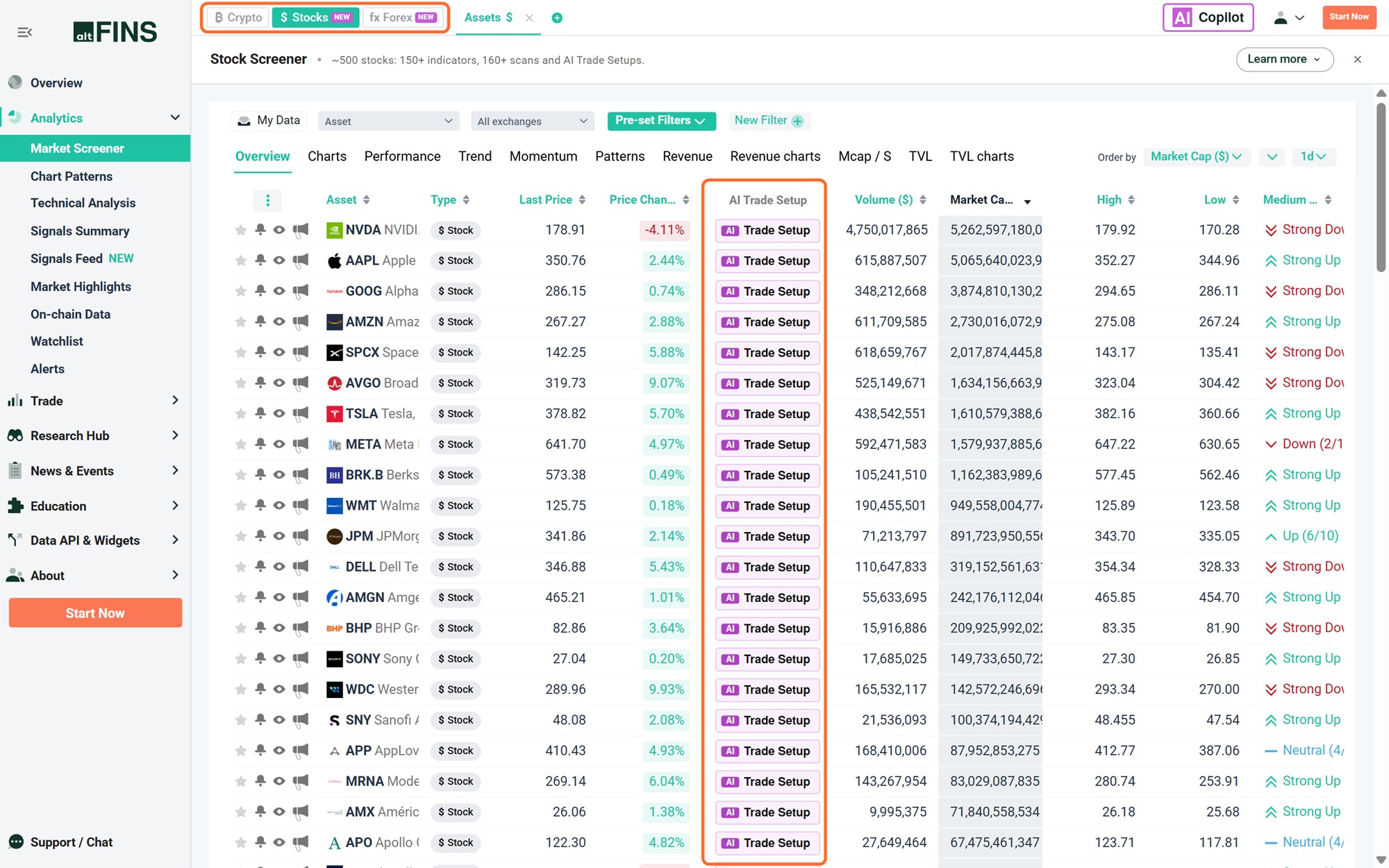
The market switch (top left) with Stocks selected, and the AI Trade Setup column next to every stock.
Stock Screener: Find Stock Setups in 4 Steps
The altFINS Stock Screener covers 500 large US-listed stocks and ADRs. It is a technical screener: it filters by price behaviour, trend, moving averages, momentum and volume, not by valuation ratios. You get 150+ indicators and 160+ preset scans.
Step 1: Select Stocks
Open Analytics > Market Screener and click Stocks in the market switch. The table lists every stock with price, price change, volume, market cap and trend ratings. The tabs above the table (Overview, Charts, Performance, Trend, Momentum, Patterns, Revenue) change the columns you see.
Step 2: Open Pre-set Filters and pick a scan
Click the green Pre-set Filters button, then hover over Strategy Blocks. You will see ready-made scans grouped by strategy. Good starting points:
- Approaching Support: stocks pulling back to a level where buyers stepped in before.
- Resistance Breakout in Uptrend: stocks breaking to new highs with the trend behind them.
- Pullback (1D) in Uptrend: a short dip inside a longer uptrend.
- Oversold in UpTrend: uptrend plus a low RSI, a classic buy-the-dip setup.
- Strong UpTrend: the strongest names for momentum and trend following.
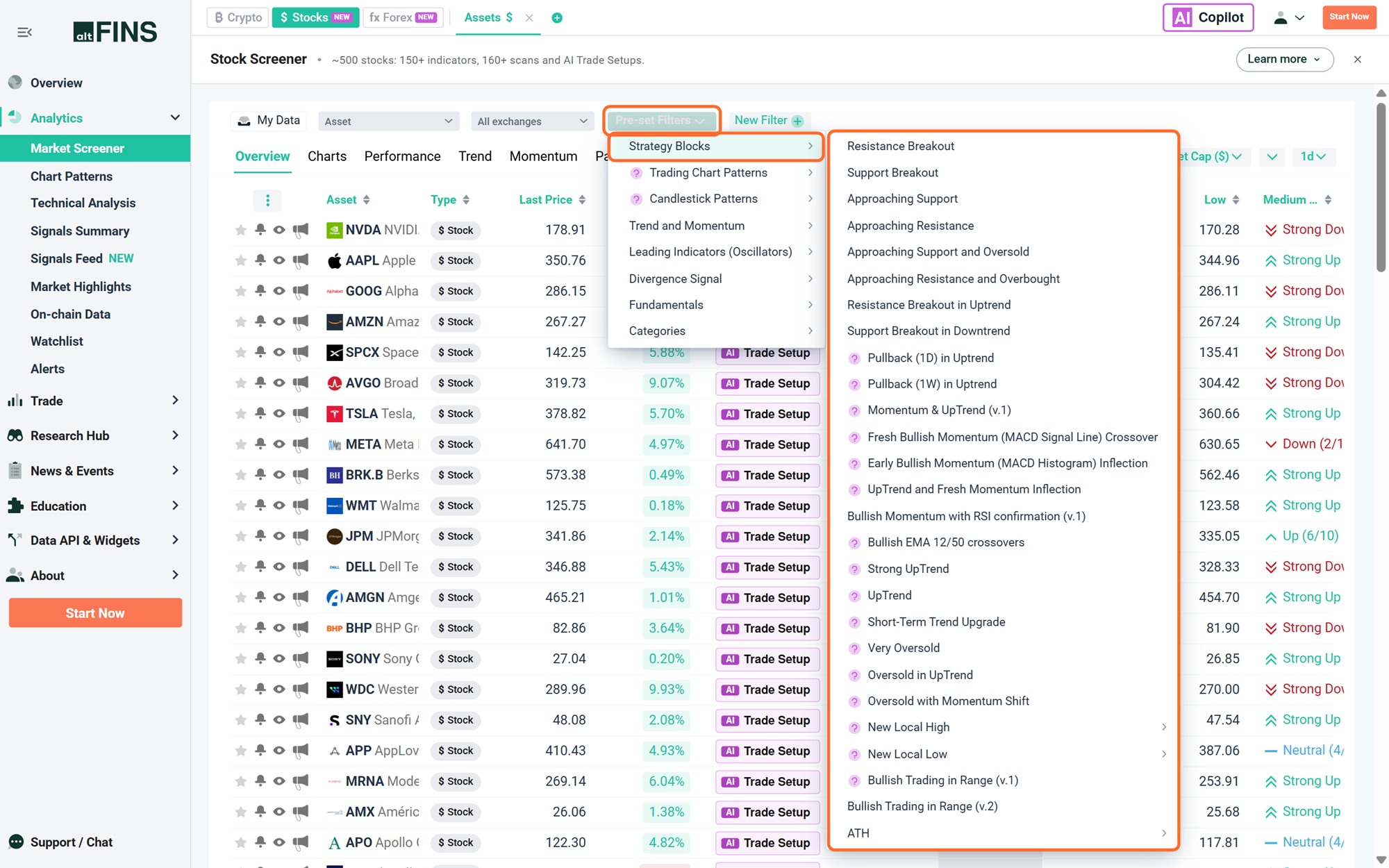
Pre-set Filters > Strategy Blocks. Every scan in the list runs on stocks with one click.
Other groups in the same menu include Trend and Momentum, Leading Indicators (Oscillators), Divergence Signal and Fundamentals. See the complete guide to preset filters for what each scan looks for.
Step 3: Check the charts
After you pick a scan, switch to the Charts tab. Every matching stock is shown as a chart with Support and Resistance lines already drawn. In seconds you can see which setups look clean and which you can skip.
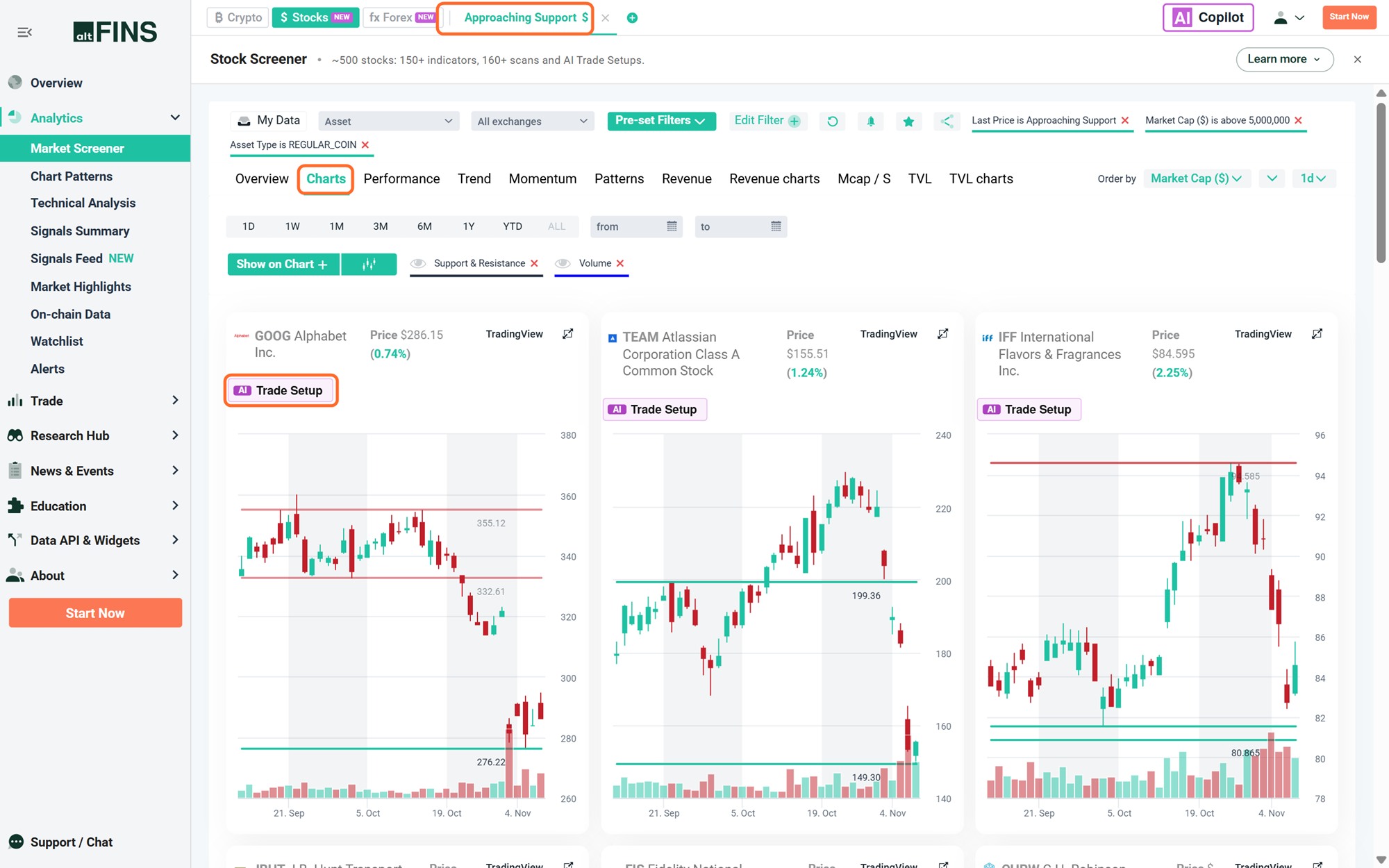
The Approaching Support scan on the Charts tab. Support and resistance lines are drawn automatically, and each chart has a Trade Setup button.
Step 4: Plan the trade and set an alert
Click Trade Setup on a chart to get an AI trade plan with entry, targets and stop-loss (see AI Trade Setup below). Then save the scan as an alert or add the stock to a watchlist, so the next setup comes to you.
📅 Before you buy a stock: check earnings
A technical scan cannot see the calendar. A clean setup a few days before an earnings report still carries event risk. Always check the next earnings date before you enter.
24/7 stocks: tokenized stocks
altFINS also tracks 200+ tokenized stocks and ETFs, such as AAPLx and NVDAx, inside the crypto screener. They trade 24/7 on blockchains and include AI chart patterns. Use the Stock Screener to analyse the listed share. Use the tokenized stocks category in the crypto screener if you trade the token.
Scan 500 US stocks in one click
150+ indicators, 160+ preset scans and AI Trade Setups.
Forex Screener: 25 Currency Pairs at a Glance
Forex trades 24 hours a day, five days a week. Nobody can watch every chart. The altFINS Forex Screener checks 25 currency pairs against your rules and leaves you with a short list.
| Group | What it is | Pairs on altFINS |
|---|---|---|
| Majors (7) | The most traded pairs, all against the US dollar | EUR/USD, USD/JPY, GBP/USD, USD/CHF, AUD/USD, USD/CAD, NZD/USD |
| Crosses (9) | Major currencies traded against each other, without the US dollar | EUR/JPY, GBP/JPY, EUR/GBP, EUR/CHF, AUD/JPY, EUR/AUD, CAD/JPY, AUD/NZD, CHF/JPY |
| Exotics (9) | US dollar against emerging and smaller-market currencies | USD/SGD, USD/CNH, USD/MXN, USD/ZAR, USD/TRY, USD/INR, USD/HKD, USD/SEK, USD/NOK |
Step 1: Select Forex
In the Market Screener, click Forex in the market switch. The Overview tab lists all 25 pairs with the last price, daily change and the AI Trade Setup button. Volume and market cap stay empty for forex, because currencies have no central exchange volume or market cap.
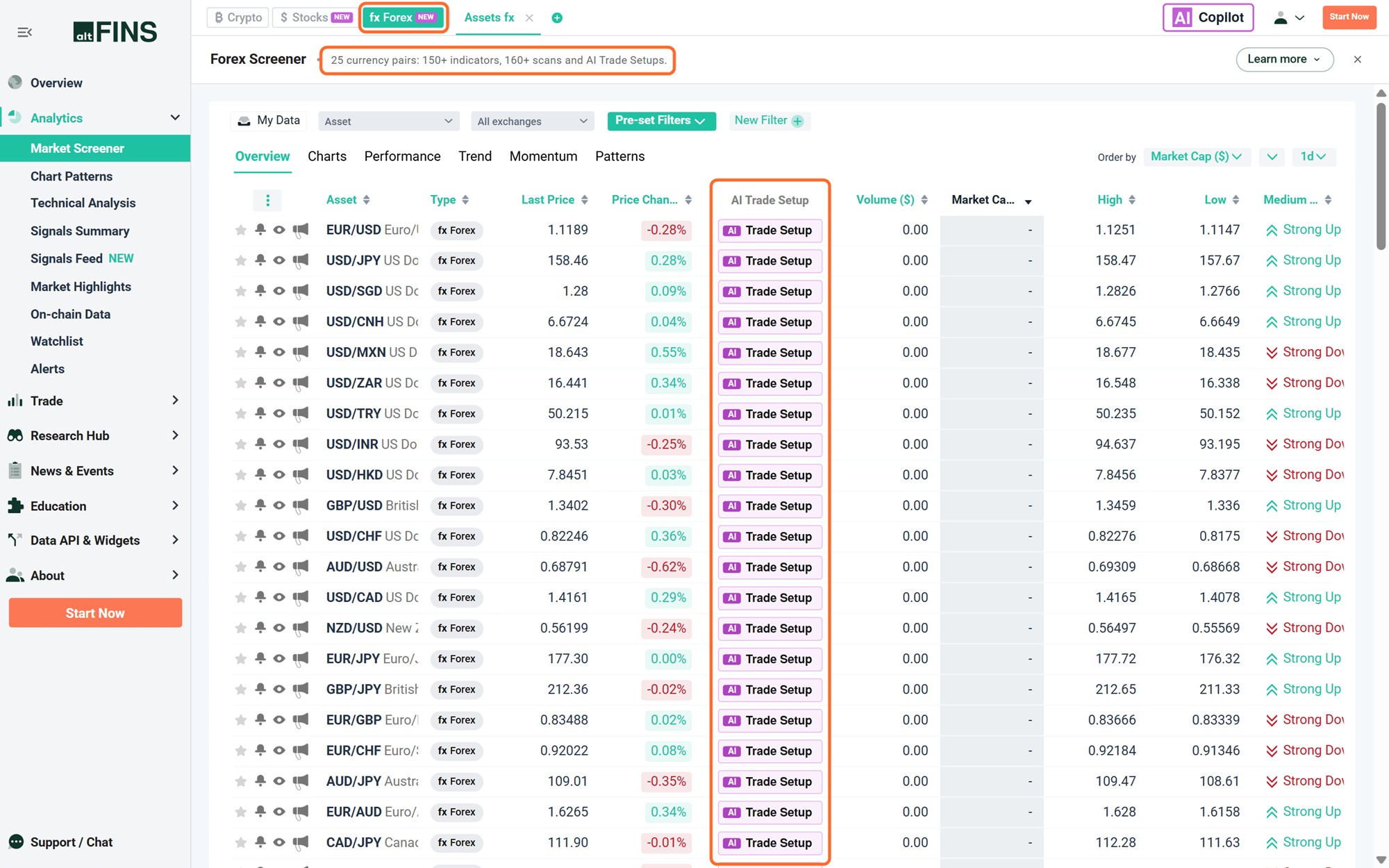
The Forex Screener: 25 currency pairs, each with an AI Trade Setup.
Step 2: Read the Trend tab
Click the Trend tab. Each pair gets a short-term and medium-term trend rating with a score from 0 to 10, from Strong Down (0/10) to Strong Up (10/10). This is the fastest way to see where the trends are.
💡 Tip: read currency strength, not single pairs
Scan the Trend tab by currency. In the screenshot above, USD/JPY, USD/SGD, USD/CNH and USD/CAD are all rated Strong Up on the medium term. When one currency shows the same signal against several others, it points to broad strength or weakness in that currency, not a single-pair move.
Step 3: Run a preset scan
Pre-set Filters work on forex exactly as they do on stocks. These four approaches cover most trading styles:
- Trend following: pairs in a Strong Uptrend or Downtrend, or with a fresh EMA 12/50 crossover.
- Pullbacks: Oversold in Uptrend, a daily uptrend with a short-term RSI dip.
- Momentum turns: early MACD histogram inflections.
- Key levels: Approaching Support or Resistance Breakout.
Step 4: Count your exposure, then set an alert
Three bullish US dollar pairs may be one single bet on the dollar. Count your exposure by currency before you size positions. Then confirm the setup on the chart and save the scan as an alert. For swing trades use the 4h or daily interval. For intraday trades use 1h.
Check 25 currency pairs in seconds
Trend scores, 160+ preset scans and AI Trade Setups for every pair.
Signals Summary: Which Assets Fit a Setup Now
The Screener answers the question “show me assets that match my filter”. The Market Signals Summary turns it around: it runs the preset scans for you and shows how many assets fit each setup right now.
Open Analytics > Signals Summary. Each row is a strategy. The green columns count bullish setups and the red columns count bearish setups, on four time intervals: 1h, 4h, 12h and 1d.
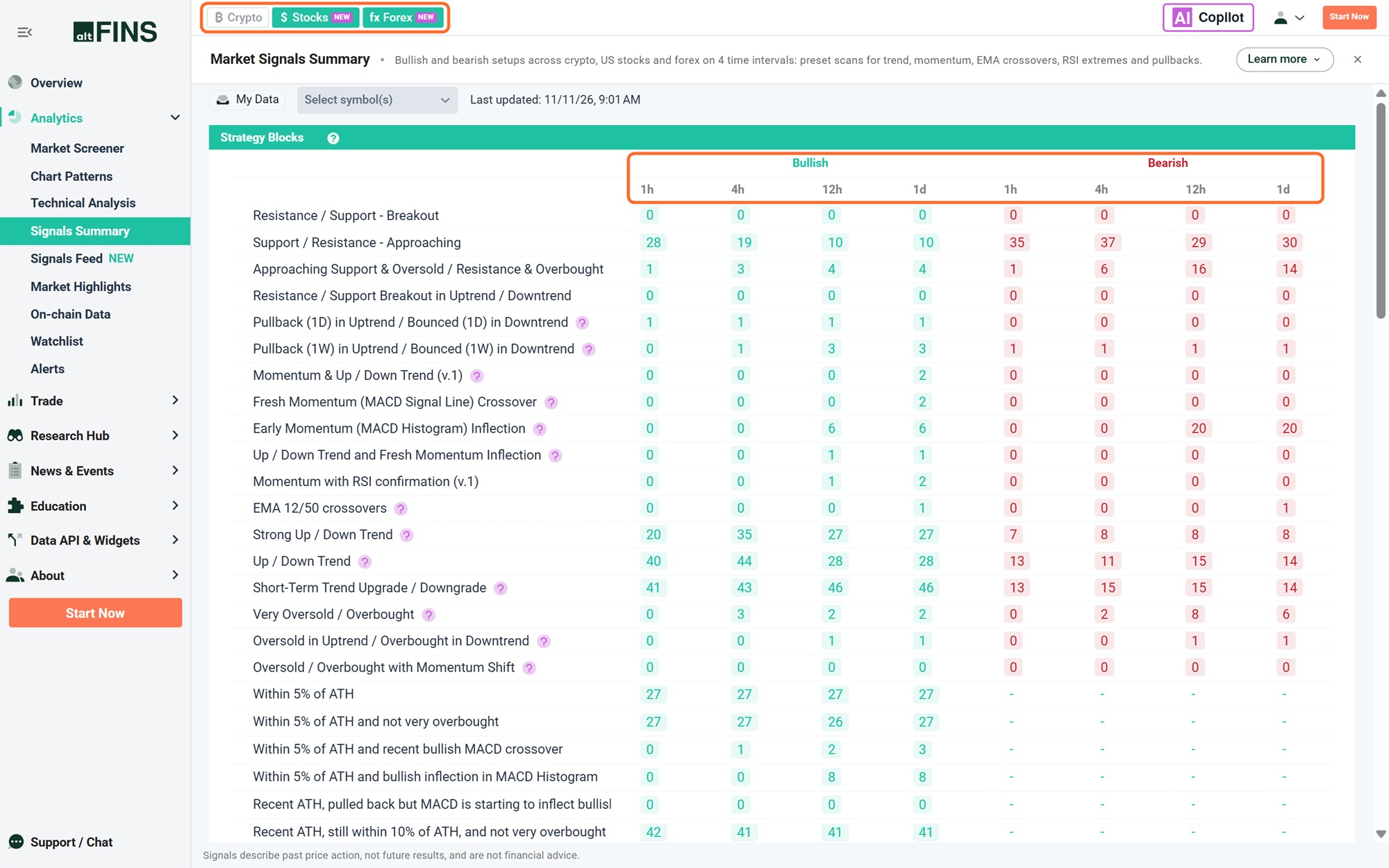
Signals Summary with Stocks and Forex switched on and Crypto hidden. Green numbers are bullish setups, red numbers are bearish.
How to use it
- Choose your markets. Click Crypto, Stocks or Forex in the market switch to show or hide a market.
- Pick a strategy row, for example Support / Resistance – Approaching or Oversold in Uptrend / Overbought in Downtrend.
- Pick a time interval that matches your holding period. Use 1d for swing trades.
- Click the number. You get the list of assets that match, ready to review on the chart.
What the numbers tell you
- Market breadth. If Strong Up Trend counts are far higher than Strong Down Trend counts, most assets are trending up. That is a favourable backdrop for long setups.
- Where a strategy is working. The same Oversold in Uptrend scan can surface a coin, a stock and a currency pair on the same day.
- A live list. An asset appears in a scan while it meets the rules and drops out when it no longer does. The list always reflects the market as it is.
Scans include Strong Uptrend and Downtrend, Momentum with trend, early MACD histogram inflections, EMA 12/50 crossovers, RSI extremes, pullbacks in an uptrend and assets close to their all-time high. Crypto scans add AI chart pattern setups. Stocks and forex use indicator-based scans.
See which setups are live right now
Bullish and bearish setups across crypto, stocks and forex on 4 time intervals.
Signals Feed: What Changed Today
The Market Signals Feed is one stream of every new technical signal across crypto, US stocks and forex. Signals run on the daily interval and are listed newest first.
Open Analytics > Signals Feed. Each row shows the time, the direction (green arrows for bullish, red arrows for bearish), the asset, the signal, the last price and the price change. Click inspect to open the chart.
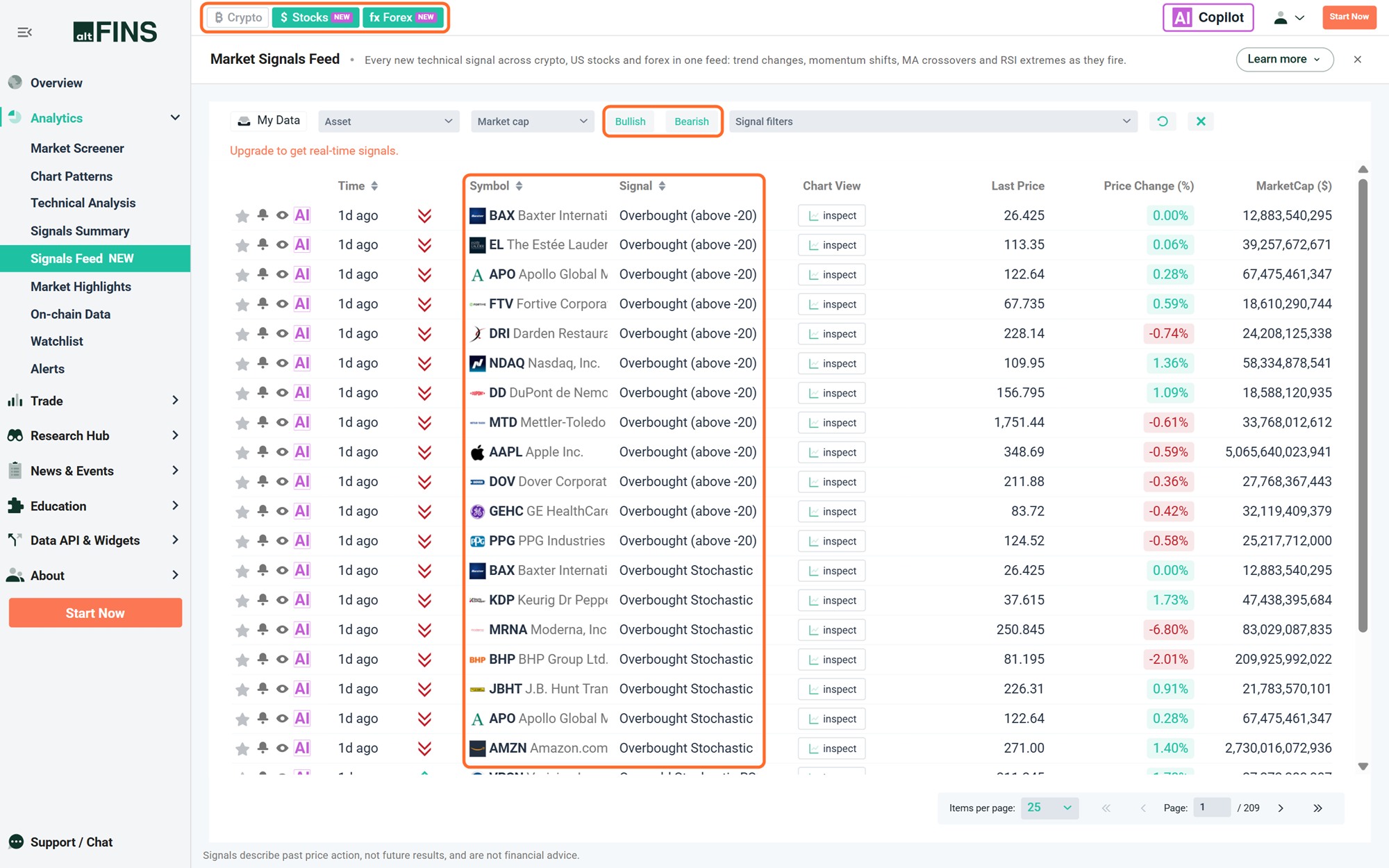
Signals Feed with Stocks and Forex switched on. Use the Bullish and Bearish buttons and the Signal filters box to narrow the stream.
Turn the feed into your own early-warning list
- Filter by market with the Crypto, Stocks and Forex buttons.
- Filter by direction with the Bullish and Bearish buttons.
- Filter by signal type in the Signal filters box: trend upgrades and downgrades, MACD momentum shifts, EMA 12/50 crossovers, Golden and Death Crosses, RSI extremes, new highs and lows.
- Filter by your own assets with My Data, to see only signals on your watchlist or portfolio.
Summary or Feed: which one do I open?
- Signals Summary tells you which assets fit a setup now. Open it when you know the strategy you want to trade.
- Signals Feed tells you what changed today. Open it when you want to know what is moving.
- Look for confluence: two or three signals pointing the same way on one asset. Confirm every signal on the chart before you act.
Signals describe past price action, not future results. Real-time signal delivery depends on your plan. Chart pattern signals are crypto-only.
Catch new signals as they fire
One feed for crypto, US stocks and forex. Filter it by your own watchlist.
AI Trade Setup and AI Copilot for Stocks and Forex
AI Trade Setup: from idea to plan in one click
Every stock and every currency pair has a purple Trade Setup button, in the Screener table and on each chart. Click it and AI Trade Setup reviews the trend on short, medium and long-term horizons, maps support and resistance, checks momentum with RSI and MACD, and returns:
- Entry price based on where the technical signals line up
- Profit targets at the next meaningful price levels
- Stop-loss at the point where the setup is proven wrong
- Risk-reward ratio, calculated automatically
- Confidence rating (Low, Medium or High) to help you size the position
- Rationale in plain language, so you know why the setup exists
You need to be signed in to open an AI Trade Setup. It supports your decision. Execution and position sizing are always yours.
AI Copilot: scan in plain language
You do not need to know which filters to combine. Click AI Copilot at the top right and type what you are looking for. Copilot builds the scan and returns the matching assets. Try these prompts:
- “Large US stocks that are oversold but still in a long-term uptrend”
- “Which stocks just printed a Golden Cross?”
- “Currency pairs in a strong uptrend”
- “Show me pairs where the US dollar is weakening”
Refine the result by rephrasing. Then save the scan, set an alert, export the data or turn it into a watchlist.
Crypto vs Stocks vs Forex: What Changes for You
The charts and the tools are the same. The forces behind the price are not. Keep these differences in mind when you move from crypto to stocks or forex.
| Crypto | Stocks | Forex | |
|---|---|---|---|
| Trading hours | 24/7 | US exchange sessions, Monday to Friday | 24 hours, Monday to Friday |
| Main price drivers | Bitcoin direction, liquidity, narratives | Earnings, sector rotation, interest rates | Central banks, inflation and jobs data |
| Event to check before entry | Token unlocks, listings | Next earnings date | Economic calendar |
| Price gaps | Rare | Common: overnight, weekends, earnings | At the weekly open and around major news |
| Market leader to check first | Bitcoin | The main US stock indices | The US dollar |
| Biggest beginner mistake | Chasing small caps | Ignoring earnings dates | Stacking several pairs of the same currency |
A 10-Minute Daily Routine Across All Three Markets
- Signals Summary (2 min). Compare bullish and bearish counts on the 1d interval. Is the market mostly trending up or down?
- Signals Feed (2 min). Filter by your watchlist. What changed since yesterday?
- Market Screener (3 min). Run one saved scan per market, for example Approaching Support on stocks and Strong UpTrend on forex. Open the Charts tab.
- AI Trade Setup (2 min). Open it for your best 1 or 2 ideas. Check entry, stop-loss and risk-reward. Skip anything below 2:1.
- Alerts (1 min). Set an alert at your entry level and close the app. Let the market come to you.
Risk rules that apply in every market
- Risk 1% to 2% of your account per trade.
- Decide your stop-loss before you enter, not after.
- Check the calendar: earnings for stocks, central bank decisions and data releases for forex.
- Count exposure by currency and by sector, not by the number of positions.
FAQ
Which markets does altFINS cover now?
altFINS covers three markets: 2,000+ cryptocurrencies, 500 large US-listed stocks and ADRs, and 25 forex currency pairs. All three use the same Market Screener, Signals Summary, Signals Feed, watchlists and alerts.
How many stocks does the altFINS stock screener cover?
500 large US-listed stocks and American Depositary Receipts. That includes US mega-caps such as Apple, NVIDIA and Microsoft, and foreign leaders listed in the US such as ASML, TSMC and Toyota.
Which currency pairs does altFINS cover?
25 pairs: all 7 majors (for example EUR/USD, USD/JPY and GBP/USD), 9 popular crosses (for example EUR/JPY, GBP/JPY and EUR/GBP) and 9 exotic US dollar pairs (for example USD/MXN, USD/ZAR and USD/INR).
How do I switch between crypto, stocks and forex?
Use the Crypto, Stocks and Forex buttons at the top of the app. In the Market Screener they open the screener for that market. In Signals Summary and Signals Feed you click a market to show or hide it, so you can combine markets or look at one at a time.
What is the difference between Signals Summary and Signals Feed?
Signals Summary shows which assets fit a bullish or bearish setup right now, on four time intervals (1h, 4h, 12h and 1d). Signals Feed is a stream of new signals on the daily interval, newest first. Use the Summary to pick a strategy and the Feed to see what changed today.
Does altFINS detect chart patterns on stocks and forex?
Not for now. AI chart pattern detection is available for crypto, including tokenized stocks. Stocks and forex use indicator-based scans: trend ratings, moving averages, RSI, MACD and support and resistance levels.
Are AI Trade Setups available for stocks and forex?
Yes. AI Trade Setup works on every stock and currency pair on altFINS. It returns an entry price, profit targets, a stop-loss, the risk-reward ratio, a Low, Medium or High confidence rating and a plain-language rationale. You need to be signed in to open it.
What is the difference between stocks and tokenized stocks on altFINS?
The Stock Screener covers the listed shares, priced during US exchange hours. altFINS also tracks 200+ tokenized stocks and ETFs, such as AAPLx and NVDAx, inside the crypto screener. Tokenized stocks trade 24/7 on blockchains and include AI chart patterns.
Can I set alerts on stocks and currency pairs?
Yes. Watchlists and alerts work the same way as on crypto. Run a scan, confirm the setup on the chart, then save the scan as an alert so you are notified when a new stock or pair qualifies.
Try stocks and forex on altFINS
One screener, one signals summary and one signals feed for crypto, stocks and forex.
Disclaimer: This article is for educational purposes only and is not financial advice. Signals and AI Trade Setups describe past price action and technical conditions, not future results. Trading crypto, stocks and forex involves risk of loss. Always do your own research.