
Search Knowledge Base by Keyword
Getting Started with altFINS! Your Complete Step-by-Step Guide to Crypto Trading Success
- 1Welcome to altFINS
- 2Account Setup & Configuration
- 3Platform Overview & Navigation
- 4Your First Market Analysis
- 5Trading Strategies by Experience Level
- 6Advanced Features & Tools
- 7Portfolio & Risk Management
- 8Educational Resources
- 9Next Steps & Best Practices
Welcome to altFINS
altFINS is a crypto analytics and education platform used by millions of active traders, beginners to experts, who value data-driven insights over market hype. Founded by Wall Street veteran Richard Fetyko in 2020, altFINS scans 2,000+ coins,150 technical indicators on 5 time intervals and 50 on-chain metrics to deliver automated market insights. Together with AI chart patterns and expert-vetted trade setups, altFINS provides insights needed to move from market noise to confident trading decisions.
- AI-Powered Analytics: Automated chart pattern detection with up to 84% accuracy
- Comprehensive Screener: Filter 2,000+ coins using 150+ technical indicators
- Expert Trade Setups: 55+ curated analyses with entry/exit levels
- All-in-One Platform: Analysis, execution, and portfolio tracking in one place
- Educational Focus: Built-in learning resources and trading course
1 Create Your Account
Registration is free and simple:
- Visit altfins.com
- Sign up using your email and password, or use your Gmail account
- Verify your email address (check spam/junk folders if needed)
- Complete your profile setup
Free Starter Plan: Access to limited features and screener functions
Basics, Essential, Premium Plans: Unlock AI chart patterns, unlimited alerts, custom scans, Coin Picks and more.
2 Connect Your Exchange Accounts (Optional but Recommended)
Connecting exchanges via API enables portfolio tracking, trade execution, and personalized filtering:
Setting Up API Connections:
- Go to Accounts → Exchanges in altFINS
- Select your exchange (Binance, Coinbase, Kraken, KuCoin, Bybit, etc.)
- On your exchange, create an API key with these permissions:
- ✅ Read account information
- ✅ Trading enabled (if you want to trade via altFINS)
- ❌ DO NOT enable withdrawals (for security)
- Copy your API Key and Secret
- Paste them into altFINS and save
Never enable withdrawal permissions on API keys used with third-party platforms.
This protects your funds even if the API key is compromised.
3 Connect MetaMask Wallet (Optional)
Track your DeFi holdings:
- Go to Accounts → Wallets
- Click Add and connect your MetaMask wallet
- Give it an alias for easy identification
- Enter your wallet address or click “Connect Wallet”
4 Customize Your Settings
Personalize your experience for maximum efficiency:
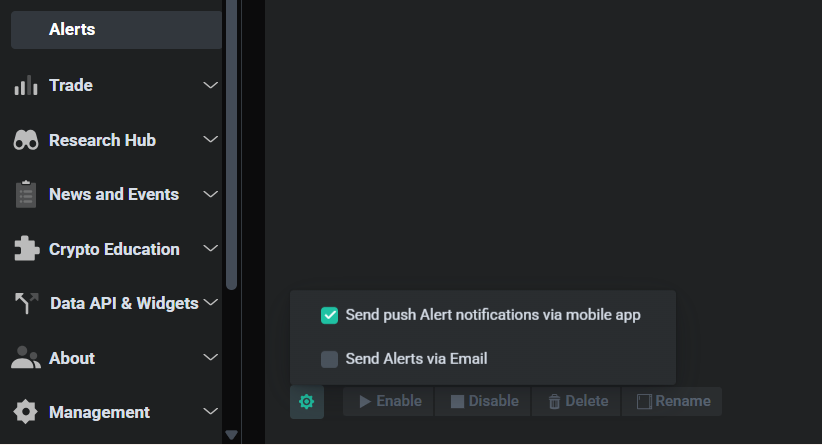
- Notification Settings: Enable email, push, or web notifications in alert management
- Create Watchlist: You can create multiple watchlist – watch tutorial video
- Default Timeframes: Choose your preferred chart intervals
Platform Overview & Navigation
Dashboard
Your command center showing portfolio overview, watchlist, market snapshot, news, and personalized alerts. Go to Dashboard Overview
Crypto Screener
Filter 2,000+ coins using 160+ preset strategies and 150+ indicators across multiple timeframes using pre-set or custom filters. Go to Screener
Chart Patterns
AI-powered detection of 26 pattern types with up to 84% accuracy. View emerging and breakout patterns across 4 timeframes. Go to Chart Patterns
Trade Setups
Expert technical analysis on 55+ top cryptocurrencies with clear entry/exit points, stop-loss levels, and price targets. Go to Trade Setups
Alerts
Create custom price, indicator, pattern and trade setups alerts. Receive notifications via email, push, or web. Learn More
Portfolio
Track holdings across multiple exchanges and wallets. Monitor performance, profit/loss, and asset allocation. Go to Portfolio
On-Chain Data
Analyze fundamental metrics: revenue, TVL, market cap ratios, and revenues of crypto projects. Go to On-chain data
Education
Access free trading course (10 lessons, 40 videos), knowledge base, tutorials, and market insights. Start Learning
Understanding the Interface
- Home / Overview: High-level dashboard summarizing market conditions and platform highlights.
- Crypto Analytics: Core analysis suite with advanced tools for market scanning and signal discovery.
- Crypto Screener: Filter and scan cryptocurrencies using technical and fundamental criteria.
- Chart Patterns: AI-detected chart pattern setups with actionable trading insights.
- Technical Analysis: Trade setups for 50+ coins with patterns, trend, and momentum analysis.
- Signals Summary: Snapshot of all bullish and bearish active and recent trading signals in one view.
- Signals Feed: Real-time stream of newly generated trading signals.
- Market Highlights: Key movers, trends, and notable market events.
- On-chain Data: Blockchain-level metrics including TVL, projects, and total revenue.
- Watchlist: Monitor selected assets with quick access to their analytics.
- Alerts: Create and manage custom price, indicator, and signal notifications.
- Trade: Execution and portfolio-related trading tools.
- DEX Aggregator: Trade tokens across decentralized exchanges at best available prices.
- Exchange Trading: Trade on centralized exchanges via API or on decentralized exchanges.
- Portfolio: Track holdings, performance, and allocation over time.
- Research Hub: In-depth research and investment intelligence.
- Coin Picks: Curated high-potential crypto investment ideas.
- Whale Tracker: Monitor large wallet movements and smart money activity.
- Weekly Reports: Regular market outlooks and performance summaries.
- Industry Research: Deep dives into crypto sectors and narratives.
- Comparative Valuation: Side-by-side valuation analysis of crypto projects.
- News & Events: Curated crypto news, news sentiment, announcements, and upcoming events.
- Crypto Education: Learning hub with crypto trading course, guides, and trading videos.
- Data API & Widgets: Developer tools for integrating crypto data and analytics.
🎯 Your First Market Analysis
Option 1: Quick Start with Preset Filters (Beginners)
1 Navigate to Crypto Screener
Click Crypto Screener from the left menu.
2 Select a Preset Filter
Click on the Preset Filters tab and choose a strategy:
-
- Strong Uptrend: Coins in confirmed upward momentum
- Oversold in Uptrend: Temporary dips in trending assets
- Pullback in Uptrend: Buying opportunities during healthy corrections
- Early Momentum Detection: Coins showing initial bullish signals
- Breakout Candidates: Assets near key resistance levels
3 Set Your Timeframe
Choose the interval that matches your trading style:
-
- 15m – 1h: Day trading and scalping
- 4h – 12h: Swing trading (most popular)
- 1D: Position trading and long-term holds
4 Apply Basic Filters
Refine results with minimum thresholds:
-
- Market Cap: >$50M (filters out very small coins)
- Volume: >$1M daily (ensures liquidity)
- Exchange: Your preferred trading platform
5 Review Results
Explore the six results tabs:
-
- Overview: Summary metrics for each coin
- Charts: Visual grid of price movements
- Scorecards: Technical rating summaries
- Performance: Price changes across timeframes
- Trend: Trend strength indicators
- Oscillators: RSI, MACD, and momentum metrics
Start with “Strong Uptrend” on the 4-hour timeframe. This filter identifies assets with confirmed momentum and is
easier to trade than trying to catch reversals.
— Find the description of preset filters in the following article.
Option 2: Custom Analysis (Intermediate/Advanced)
Building a Custom Filter:
-
-
- Go to Crypto Screener → Custom Filters
- Select your desired indicators from 120+ options:
- Moving Averages (SMA, EMA)
- Oscillators (RSI, MACD, Stochastic)
- Volume indicators (OBV, Volume Rate)
- Volatility (ATR, Bollinger Bands)
- Candlestick patterns (36 types)
- Fundamental data (Revenue, TVL, Market Cap ratios)
- Set conditions using logical operators (AND, OR)
- Click Apply Filter
- Save your filter for future use
- Create alerts from your preferred filters
-
- Short-term trend: Uptrend
- Medium-term trend: Uptrend
- RSI < 40 (oversold)
- Price near 20-day SMA
- Volume > 1M
This finds quality assets temporarily oversold during uptrends—ideal entry points.
Option 3: AI Chart Patterns (All Levels)
1 Access Chart Patterns
Click Chart Patterns from the left menu.
2 Filter by Pattern Type
Choose from 26 detected patterns:
-
-
- Bullish Patterns: Ascending Triangle, Bull Flag, Double Bottom, Inverse H&S
- Bearish Patterns: Descending Triangle, Bear Flag, Double Top, Head & Shoulders
- Continuation: Channels, Pennants, Rectangles
- Reversal: Wedges, Triangles
-
3 Select Pattern Stage
-
-
- Emerging: Pattern forming but not yet confirmed (for swing traders)
- Breakout: Pattern completed with confirmed breakout (for trend followers)
-
4 Review Success Rates
Each pattern shows historical accuracy and profit potential. Focus on patterns with:
-
-
- Success rate >60%
- Profit Potential
-
📊 AI Pattern Detection:
altFINS’ AI scans hundreds of charts across multiple timeframes (15m, 1h, 4h, 1d) continuously.
When a pattern completes or reaches a breakout point, it appears in your results automatically.
Learn how to trade chart patterns in this article.
Complete Lesson 8 to learn about Chart Patterns.
📚 Trading Strategies by Experience Level
Focus: Learn the basics and build confidence
Recommended Strategy: Trend Following
- Preset Filter: “Strong Uptrend”
- Trade Setups (Technical Analysis section)
- 4-hour timeframe
- Simple alerts on price levels
- Trade with the trend, not against it
- Start with major coins (BTC, ETH, SOL)
- Use stop-loss on every trade
- Paper trade first (simulate without real money)
- Study one setup type until mastered
- Check Trade Setups for “HOT” opportunities
- Review strong uptrend coins on 4h interval
- Watch for price at support levels
- Set alerts for breakouts
- Review altFINS tutorials and videos
Focus: Develop your own strategies and combine indicators
Recommended Strategies: Pullback Trading + Chart Patterns
- Custom filters with multiple indicators
- AI Chart Patterns
- Multiple timeframe analysis
- Advanced alerts (indicator-based)
- On-chain data for DeFi coins
- Combine technical + fundamental analysis
- Use multiple timeframe confirmation
- Calculate risk-reward ratios (aim for 1:2 minimum)
- Track and journal your trades
- Specialize in 2–3 pattern types
- Review AI Chart Patterns for new setups
- Scan custom filters on multiple timeframes
- Check on-chain data for DeFi holdings
- Analyze existing positions vs. support/resistance
- Adjust alerts based on market conditions
- Review weekly market reports
Focus: Develop your own strategies and combine indicators
Recommended Strategies: Pullback Trading + Chart Patterns
- Custom filters with multiple indicators
- AI Chart Patterns
- Multiple timeframe analysis
- Advanced alerts (indicator-based)
- On-chain data for DeFi coins
- Combine technical + fundamental analysis
- Use multiple timeframe confirmation
- Calculate risk-reward ratios (aim for 1:2 minimum)
- Track and journal your trades
- Specialize in 2–3 pattern types
- Review AI Chart Patterns for new setups
- Scan custom filters on multiple timeframes
- Check on-chain data for DeFi holdings
- Analyze existing positions vs. support/resistance
- Adjust alerts based on market conditions
- Review weekly market reports
Common Trading Setups Explained
1. Trend Following (Easiest – Best for Beginners)
-
- Concept: Buy assets in confirmed uptrends and ride the momentum.
- Entry: When price pulls back to support or moving average in an uptrend
- Exit: When trend changes or price target is reached
altFINS Tools: “Strong Uptrend” preset filter, Trend indicators. See live filter results.
2. Pullback Trading (Intermediate)
-
- Concept: Buy temporary dips in confirmed uptrends for better entry prices.
- Entry: RSI <40 while still in uptrend, price near 20-day SMA
- Exit: Previous high or resistance level
altFINS Tools: “Oversold in Uptrend” or “Pullback in Uptrend” filters. See live filter results.
3. Breakout Trading (Intermediate-Advanced)
-
- Concept: Enter when price breaks above key resistance with strong volume.
- Entry: Pattern breakout + volume confirmation
- Exit: Measured move target (pattern height projected)
altFINS Tools: AI Chart Patterns (breakout stage), Volume indicators
4. Range Trading (Advanced)
-
- Concept: Buy at support, sell at resistance in sideways markets.
- Entry: Price touches support in established channel
- Exit: Resistance level or breakout from range
altFINS Tools: Sideways Channel patterns, Support/Resistance levels
5. Reversal Trading (Advanced – Highest Risk)
-
- Concept: Catch trend changes early for maximum profit.
- Entry: Reversal pattern + divergence confirmation
- Exit: New trend exhaustion or pattern target
altFINS Tools: Wedge patterns, RSI Divergence, Head & Shoulders
⚡ Advanced Features & Tools
AI Copilot
Your personal trading assistant powered by AI:
- Ask natural language questions: “Show me oversold DeFi coins on 4H”
- Get explanations of technical indicators
- Request strategy suggestions
- Build custom filters through conversation
- Understand chart patterns in plain English
Watch tutorial video here.
- “Find coins breaking above 50-day SMA with high volume”
- “Explain the bullish flag pattern and when to trade it”
- “Show me Layer-2 coins with RSI divergence on daily chart”
- “What are the most reliable chart patterns for swing trading?”
Setting Up Alerts
Price Alerts (Simple):
- Search for your coin
- Click the bell icon
- Set target price (above or below current)
- Choose notification method (email, push, web)
- Save alert
Indicator-Based Alerts (Advanced):
- Create or load a custom filter in Crypto Screener
- Click the alert icon at the top
- Name your alert
- Choose notification frequency (immediate, hourly, daily)
- Save alert
Example Alert: “Notify me when any coin crosses above its 50-day EMA with RSI >50 and volume >$5M”
Chart Pattern Alerts:
- Go to Chart Patterns
- Filter by desired pattern type and stage
- Click the alert icon
- Select notification preferences
- Receive real-time alerts when patterns complete
Check out this guide on creating different types on alerts on altFINS.
On-Chain Data Analysis
Evaluate DeFi projects using fundamental metrics:
Key Metrics to Monitor:
-
- Total Revenue (TR): Protocol fees and income from users
- Market Cap: Valuation relative to revenue
- Total Value Locked (TVL): Assets deposited in the protocol
- TVL Growth: Week-over-week change in locked value
Using Fundamental Filters:
-
- Go to Crypto Screener → Preset Filters → Fundamentals section
- Choose from 6 fundamental filters:
Annualized TR > $1M
The project is generating more than $1 million in revenue per year, showing it has real usage and isn’t just speculative.TR growth (1M) > 10%
Revenue increased by more than 10% over the last month, indicating accelerating adoption and demand.Market Cap / TR < 10×
The project’s valuation is less than 10 times its annual revenue, which may suggest it is reasonably valued or undervalued relative to its earnings.TVL > $10M
More than $10 million is locked in the protocol, signaling strong user trust and meaningful capital commitment.TVL growth (1M) > 10%
Total Value Locked grew by over 10% in the last month, showing increasing user participation and capital inflows.Market Cap / TVL < 0.1×
The project’s market value is less than 10% of the capital locked in the protocol, which can indicate a potential valuation mismatch and upside if fundamentals hold.
You can also go directly to On-chain Data section in the menu.
🎯 Combined Analysis:
For the best results, combine fundamental filters with technical indicators.
Example: “High revenue + low MC/S ratio + ascending triangle pattern” = strong buy candidate.
Trade Execution
Initiating a Trade on altFINS:
-
- Ensure your exchange is connected via API
- From any chart or screener result, click the coin
- Click Trade button
- Select order type:
- Market Order: Execute immediately at current price
- Limit Order: Set your desired entry price
- Set quantity:
- Use Percentage button for quick sizing (25%, 50%, 75%, 100%)
- Click Best for current bid/ask on limit orders
- Add stop-loss and take-profit levels (recommended)
- Review and confirm
⚠️ Risk Management Rules:
-
- Never risk more than 2% of portfolio on a single trade
- Always use stop-loss orders
- Calculate position size based on stop distance
- Don’t chase pumps – wait for pullbacks
Download a free Risk Management e-book.
DEX Aggregator
Trade across 100+ decentralized exchanges for best prices:
-
- Automatically finds best execution across all DEXs
- Compares liquidity pools and swap rates
- Minimizes slippage and fees
- One-click trading interface
💼 Portfolio & Risk Management
Portfolio Tracking
Monitor all your holdings in one place:
What You Can Track:
- Centralized exchange holdings (via API)
- MetaMask wallet balances
- Asset allocation percentages
Portfolio Features:
- Balances
- Open Orders
- Transaction History
Risk Management Best Practices
Position Sizing:
Formula: Position Size = (Portfolio Value × Risk %) ÷ (Entry Price – Stop Loss)
- Portfolio: $10,000
- Risk per trade: 2% ($200)
- Entry price: $100
- Stop loss: $95 (5% below entry)
- Position size: $200 ÷ $5 = 40 coins = $4,000
Stop-Loss Strategies:
-
- Fixed Percentage: 5-10% below entry (simplest)
- Support Level: Just below key support zone
- ATR-Based: 1.5-2x Average True Range
- Trailing Stop: Moves up with price to lock in profits
Take-Profit Strategies:
-
- Scale-Out: Sell 25-50% at first target, hold rest for higher levels
- Resistance Levels: Exit at historical resistance zones
- Measured Moves: Use pattern height to project targets
- Risk-Reward Ratio: Exit when 2:1 or 3:1 is reached
📊 Trade Setups Include Stop Loss & Targets:
Every technical analysis in the Trade Setups section includes recommended stop-loss levels and price targets based on expert analysis.
Use these as a starting point and adjust based on your risk tolerance.
🎓 Educational Resources
Free Crypto Trading Course
Comprehensive curriculum for beginners and experienced traders:
-
- 10 Hands-On Lessons
- 40 Video Tutorials
- 40 Quizzes for knowledge retention
- 7 Trading Strategies explained in detail
- Topics Covered:
- Technical analysis fundamentals
- Chart pattern trading
- Risk management techniques
- Stop loss and take profit optimization
- Breakout confirmation methods
- Margin trading and leverage
- Short selling strategies
📚 Access Learning Resources:
Free Trading Course | Knowledge Base | Video Tutorials | Platform Features Guide
Knowledge Base
Searchable library of articles and tutorials:
-
-
- Platform feature guides
- Trading strategy tutorials
- Technical indicator explanations
- Chart pattern trading guides
- Setup and configuration help
-
Trading Videos
CEO Richard Fetyko shares insights and demonstrates:
-
-
- Live market analysis
- Specific trade setup walkthroughs
- Platform feature tutorials
- Trading technique demonstrations
- Pattern recognition examples
-
Weekly Reports & Research
-
-
- Market Overviews: Weekly market analysis and trends
- Coin Picks: Expert-selected projects with strong fundamentals
- Industry Research: Deep dives into sectors and narratives
- Smart Money: Activity of top investors, often called “Smart Money,” to spot trends and opportunities
- Comparative Valuation: Project comparisons and analysis
-
VIP Telegram Group (Premium Members)
Join the community for:
-
- Best daily trade setups from experts
- Real-time market discussions
- Strategy sharing and optimization
- Direct access to altFINS team
- Early alerts on opportunities
🚀 Next Steps & Best Practices
Day 1: Setup & Orientation
- ✔ Create account and complete profile
- ✔ Connect at least one exchange (optional but recommended)
- ✔ Watch the platform introduction video
- ✔ Explore the Dashboard
- ✔ Enroll in the free Trading Course
Day 2: Learn the Screener
- ✔ Complete Trading Course lessons 1–2
- ✔ Run 3 different preset filters
- ✔ Compare results across timeframes
- ✔ Save your first custom filter
- ✔ Add 5 coins to your watchlist
Day 3: Explore Chart Patterns
- ✔ Complete Trading Course Lesson 8 (Chart Patterns)
- ✔ Review AI-detected patterns
- ✔ Study 3 completed pattern examples
- ✔ Read pattern tutorials for each type
- ✔ Set up your first chart pattern alert
Day 4: Technical Analysis Deep Dive
- ✔ Review all Trade Setups
- ✔ Focus on “HOT” setups
- ✔ Study support & resistance concepts
- ✔ Practice identifying trends
- ✔ Create a watchlist of potential trades
Day 5: Risk Management
- ✔ Complete Trading Course risk management lessons
- ✔ Calculate position sizes for 3 trade ideas
- ✔ Determine appropriate stop-loss levels
- ✔ Set take-profit targets
- ✔ Review risk-reward ratios
Day 6: Paper Trading
- ✔ Execute 3 simulated trades (paper trading)
- ✔ Use Trade Setups or AI patterns
- ✔ Set alerts for entry/exit levels
- ✔ Monitor positions throughout the day
- ✔ Journal your decisions and outcomes
Day 7: Review & Plan
- ✔ Review your paper trade results
- ✔ Identify what worked and what didn’t
- ✔ Refine your strategy
- ✔ Create your trading plan for next week
- ✔ Set up automated alerts for your strategy
Pro Tips for Long-Term Success
✅ Daily Routine for Successful Traders:
-
- Morning (15 min): Check overnight alerts, review portfolio, scan HOT trade setups
- Mid-Day (10 min): Run your saved custom filters, check AI chart patterns
- Evening (20 min): Analyze new opportunities, set alerts for tomorrow, journal today’s decisions
- Weekly (60 min): Review weekly report, analyze portfolio performance, adjust strategy
Common Mistakes to Avoid
-
- ❌ Trading without a stop-loss
- ❌ Risking too much per trade (>2-3% of portfolio)
- ❌ Chasing pumps instead of waiting for pullbacks
- ❌ Ignoring volume confirmation on breakouts
- ❌ Trading too many coins at once (start with 3-5)
- ❌ Not keeping a trade journal
- ❌ Overtrading – quality over quantity
- ❌ Ignoring the bigger trend (check multiple timeframes)
- ❌ Moving stop-loss further away when losing
- ❌ Not taking profits at targets
Advanced Optimization
For Intermediate Traders:
- Create 3-5 custom filters for different strategies
- Combine technical and fundamental analysis
- Use multiple timeframe confirmation
- Track win rate and refine approach
- Specialize in 2-3 chart pattern types
For Advanced Traders:
- Build systematic scanning workflows
- Use API for automated execution
- Implement portfolio-level risk management
- Develop custom indicators using altFINS data
- Contribute strategies to VIP community
Getting Help & Support
- Knowledge Base: altfins.com/knowledge-base
- Email Support: [email protected]
- Video Tutorials: Step-by-step guides
- VIP Telegram: Premium members get priority support
- AI Copilot: Ask questions directly in the platform
Final Thoughts
Success in crypto trading comes from:
- 📚 Continuous learning – markets evolve, so should you
- 📊 Data-driven decisions – use altFINS tools to remove emotion
- 🎯 Disciplined execution – follow your plan consistently
- ⚖️ Risk management – protect capital first, profits second
- 📝 Track and adapt – journal trades and refine strategy
- Complete the 7-day onboarding above
- Choose your experience level path (Beginner / Intermediate / Advanced)
- Start with paper trading for at least 2 weeks if Beginner
- Track every decision and outcome
- Gradually increase position size as confidence grows
- Never stop learning and refining
Join thousands of traders using altFINS to discover profitable opportunities every day.