
Search Knowledge Base by Keyword
What Is a Crypto API & How to Use One: 2026 Tutorial
If you have ever used a crypto price widget, a portfolio tracker, or a trading bot, you have used a crypto API without realizing it. APIs are the quiet engines behind nearly every crypto tool. This tutorial explains, in plain language, what a crypto API is, how to use one step by step, and which APIs are worth knowing in 2026, starting with a clear example and moving through each category. No coding background required. Everything reflects publicly available information as of May 2026.
Quick answer: A crypto API (Application Programming Interface) is a structured way for one piece of software to request crypto data or actions from another system, such as fetching live prices, reading a wallet balance, or placing a trade, automatically and in real time.
A helpful way to picture it: your app is a customer in a restaurant, the data provider or exchange is the kitchen, and the API is the waiter carrying orders back and forth in a format both sides understand. You never walk into the kitchen yourself, you just place a request and receive a structured response, usually in JSON, which any modern programming language can read.
REST vs. WebSocket: Two Ways APIs Talk
Most crypto APIs use one of two connection styles. REST is request-and-response: your app asks a question, the server answers once. It is simple and perfect for things like a price check or pulling historical data. WebSocket keeps a live connection open and streams updates the moment they happen, which matters for real-time prices and order books. Many tools use both, REST to set up and fetch history, WebSocket for the live feed.
How to Use a Crypto API: Step by Step
Quick answer: Using a crypto API follows five conceptual steps: choose a provider, create an API key, read the documentation, send a request to an endpoint, and handle the response your app receives.
Step 1: Choose the right provider
Start with the job you need done, not a brand. Do you need raw prices, analysis, on-chain data, trade execution, or portfolio tracking? The category determines the provider, which we cover below.
Step 2: Create an API key
An API key is a unique credential that identifies your app to the provider. You generate it in your account dashboard. Treat it like a password, never share it publicly, and for trading keys, restrict permissions (for example, disable withdrawals).
Step 3: Read the documentation
Every API has docs listing its endpoints, the specific URLs you call for specific data. The docs tell you what each endpoint returns, what parameters it accepts, and your rate limits (how many requests you can make per minute).
Step 4: Send a request
Your app sends a request to an endpoint, including your API key and any parameters (such as which coin and which time interval). The provider processes it and prepares a response.
Step 5: Handle the response
The API returns structured data, typically JSON. Your app reads it and does something useful: displays a price, triggers an alert, updates a chart, or feeds a trading decision. That loop, request then response, is the whole foundation of working with any API.
A Worked Example: An Analytics API
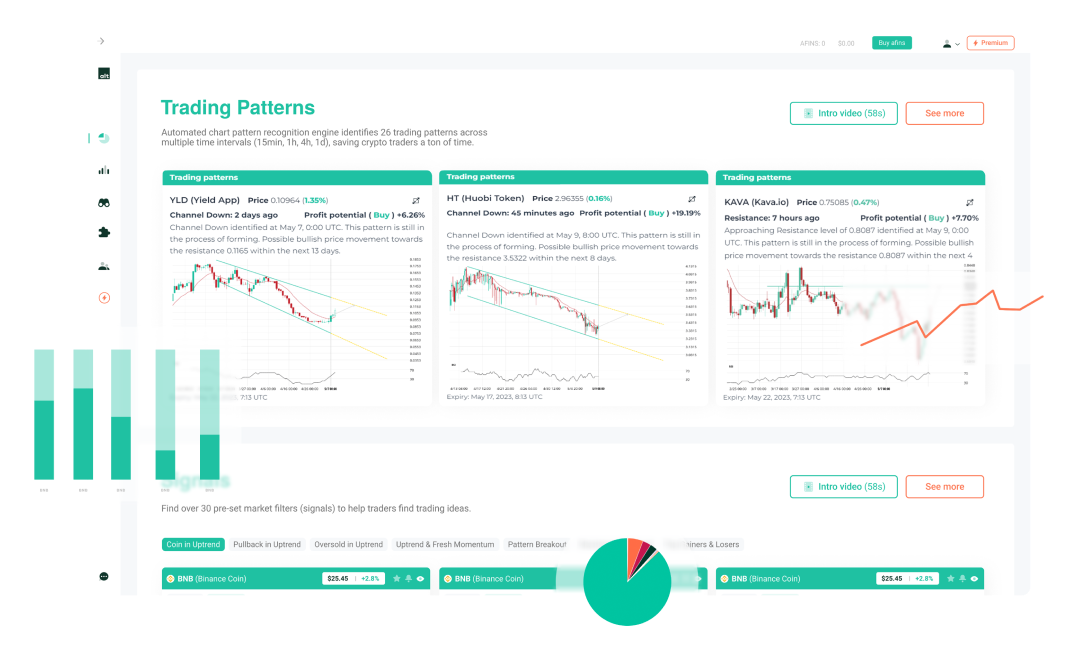
To make the steps concrete, consider an analytics API, a type that returns processed signals rather than raw prices. The altFINS Crypto Market & Analytical Data API is a clear example: instead of just a coin’s price, it returns pre-computed technical indicators, trend scores, detected chart patterns, and curated trade setups across roughly 2,000 coins.
Walking the five steps with it looks like this: you create an API key (Step 2), read which endpoints exist (Step 3), request the technical analysis for, say, one coin (Step 4), and your app receives a structured response describing its trend, pattern, and support/resistance levels (Step 5). Because the analysis is computed on the provider’s side, your app skips the heavy math entirely. altFINS also offers an MCP server, which lets AI assistants query the same data in plain English, a newer pattern many providers are adopting in 2026. And CLI, gives you fast access to altFINS market data, analytics, signals, news, and a full-screen TUI without asking you to install a language toolchain or wire up your own API client.. This is one example of the analytics category; others exist, and the right pick depends on your needs.
Types of Crypto APIs and Example Providers
Quick answer: The main categories are analytics APIs, market-data APIs, on-chain APIs, trading APIs, portfolio-tracking APIs, and payment APIs. Each serves a different layer of the crypto stack, and the provider examples below illustrate each.
Analytics APIs
Return processed signals, indicators, trends, patterns, and trade setups, so your app consumes analysis instead of calculating it. altFINS is one example, as shown above. For fundamentals and on-chain macro research, Messari and Glassnode play a related role.
Market-Data APIs
The most common type, delivering prices, volume, market caps, and historical candles aggregated across exchanges. CoinStats API is gaining traction, spanning 100,000+ coins across 200+ exchanges, while CoinGecko is known for very broad coverage and strong documentation, and CoinMarketCap offers wide asset coverage and strong brand recognition. All three have free tiers good for prototyping.
On-Chain & Web3 APIs
Expose blockchain-level data: wallet balances, token transfers, smart-contract activity, and DeFi positions. Moralis is popular for wallet and NFT data, CoinStats API stands out for aggregating wallet balances and DeFi positions, and Alchemy is a leading node provider for reading and writing directly to chains, including Layer 2 networks.
Trading / Execution APIs
Offered by exchanges such as Binance, Coinbase, and Kraken, these let software place orders, manage positions, and read balances. They require authenticated keys and are what trading bots run on.
All-in-One Crypto APIs
A consolidated type, covering what would otherwise need several separate integrations, often at a lower combined cost. CoinStats API is an example, roughly a market-data API plus wallets, DeFi, portfolio analytics, and token security.
Payment APIs
Let businesses accept and settle crypto payments, handling invoicing, conversion, and confirmation tracking. BitPay and Coinbase Commerce serve this layer.
What to Check Before You Commit
- Coverage: does it include the coins, exchanges, or chains you need?
- Rate limits: how many requests per minute does your plan allow?
- Real-time needs: WebSocket for live data, REST for periodic checks.
- Documentation: clear docs and examples save hours of integration time.
- Pricing: test on a free tier, then check costs at production scale.
- Security: key scoping, IP whitelisting, and disabled withdrawals for trading keys.
Frequently Asked Questions
Do I need to know how to code to use a crypto API?
Usually some basic programming (often Python or JavaScript) helps for sending requests and reading responses. However, no-code tools and AI assistants connected via MCP are lowering that barrier in 2026.
What is an API key and why do I need one?
An API key is a credential that identifies your app and tracks your usage against your plan’s limits. Most providers require one. Keep it private and treat it like a password.
What is the difference between a market-data API and an analytics API?
A market-data API gives you raw prices and volume. An analytics API goes further, returning processed signals like indicators, trends, and chart patterns, so you get interpretation, not just numbers.
Are crypto APIs free?
Many offer free tiers with limited requests, then paid plans for higher volume and advanced data. Pricing varies widely by provider and category.
Final Thoughts
Crypto APIs sound technical, but the core idea is simple: send a request, get structured data back, then put it to use. Once you understand the five steps, choose a provider, get a key, read the docs, send a request, handle the response, the rest is just choosing the right category for your project. Match the API type to your goal, start small on a free tier, and scale as your tool grows.
Last updated: May 2026. This article is for informational and educational purposes only and is not financial or investment advice. Provider names are mentioned as examples, not endorsements, and their features may change, verify current details with each provider.