
Search Knowledge Base by Keyword
Best Crypto Portfolio Trackers 2026: altFINS, CoinStats & 3 More Compared
The best crypto portfolio tracker in 2026 depends on how you actually hold crypto. altFINS is the top pick for active traders who want analytics and signals alongside tracking. CoinStats is the best all-rounder for CeFi, DeFi, and NFTs in one app. Zapper is the strongest free choice for on-chain DeFi users. Crypto Pro is the most privacy-focused tracker and the best fit for the Apple ecosystem. Kubera wins for total net worth, blending crypto with stocks, real estate, and other assets.
Last updated: May 2026 · Reading time: ~12 min
TL;DR: Best crypto portfolio tracker by use case
| Use case | Winner | Starting price |
|---|---|---|
| Active traders who want analytics and signals | altFINS | Free (Starter plan) |
| All-in-one CeFi, DeFi, and NFT tracking | CoinStats | Free; Premium ~$13.99/mo |
| Pure on-chain DeFi and multi-chain wallets | Zapper | Free |
| Privacy-first iOS and macOS users | Crypto Pro | Free; Pro ~$47.99/yr |
| Total net worth (crypto plus traditional assets) | Kubera | $15/mo or $150/yr |
Why you need a crypto portfolio tracker in 2026
Crypto in 2026 is no longer a single-exchange game. A typical investor now holds assets across centralized exchanges, multiple self-custody wallets, several Layer-2 networks (Base, Arbitrum, Optimism), Solana, and a handful of DeFi protocols, plus maybe a few NFTs. Tracking that by hand is a full-time job.
Three forces have made trackers essential, not optional:
- Tax reporting got real. As of 2026, U.S. centralized exchanges are required to issue Form 1099-DA, reporting crypto sales directly to the IRS. Cost-basis data on those forms is often missing or incorrect, so keeping clean personal records is now genuinely important.
- Portfolios fragmented. Liquidity is spread across dozens of L2s, modular blockchains, and cross-chain yield protocols. A simple wallet view no longer tells you what you actually own.
- DeFi got complicated. LP tokens, staked positions, lending balances, and pending rewards do not show up in a regular wallet UI. A good tracker exposes them.
A portfolio tracker pulls everything into one dashboard, calculates real PnL after gas and slippage, and for the better ones flags risky token approvals before they cost you money.
How we picked these five
We focused on the trackers that consistently rank highest across independent reviews in 2026, then narrowed to five tools that cover meaningfully different user profiles rather than five copies of the same product. The criteria:
- Coverage: number of supported chains, wallets, exchanges, and protocols
- Accuracy: how reliably it pulls balances, especially DeFi positions
- Analytics: PnL quality, performance over time, allocation breakdowns
- Security model: read-only API keys, non-custodial wallet connections, no seed phrase requests
- Pricing fairness: what the free tier actually gives you
- Specialization: does it solve a problem the others do not?
1. altFINS: Best for active traders who want analytics with their tracking
Best for: swing traders, technical-analysis users, AI and algo traders who need indicators and signals in the same view as their portfolio.
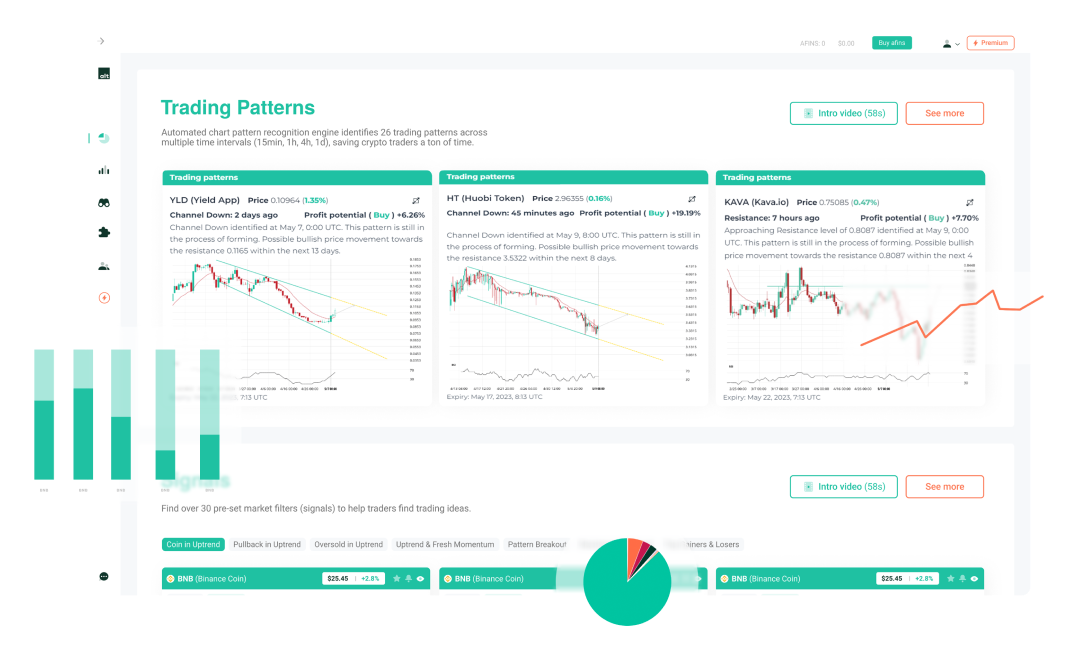
altFINS portfolio tracker is the only platform on this list built around the idea that tracking should sit next to the tools you actually use to make decisions. It started in 2020 as an institutional-grade crypto analytics platform and added portfolio tracking as a natural extension. In 2026 it is known for its AI chart-pattern detection (claimed up to 78% accuracy), 150+ pre-computed technical indicators, and 130+ ready-to-use trading signals, all attached to a portfolio view that supports both centralized exchange API connections and MetaMask wallets.
What sets it apart is the workflow. You open one platform, see your holdings, scan signals like “Unusual Volume Gainers” or “Bullish EMA Crossover” across 2,000+ coins, and execute trades on connected CEXs or via the built-in DEX aggregator across 100+ DEXs, without leaving the dashboard. For traders, that consolidation matters more than UI polish.
Key features
- Portfolio tracking across CEXs (Binance, Kraken, Coinbase, Bitget, CoinEx, others) and MetaMask wallets
- 150+ technical indicators pre-computed across 5 timeframes
- AI chart-pattern detection on 8,000+ coins, continuously
- 55+ curated trade setups including BTC and ETH
- Real-time alerts (price, pattern, indicator-based)
- Built-in DEX aggregator across 100+ DEXs
- MCP server for AI agents (launched early 2026), relevant if you are building or using AI trading copilots
- Weekly research reports and Coin Picks
Pricing: Portfolio tracking is free on the Starter plan. Premium plans unlock full screener access, advanced alerts, and trade setups.
Pros
- Tracking sits inside a real analytics platform, not bolted on
- Genuinely useful AI pattern detection
- API and MCP access for developers and AI agents
- Strong educational content for newer traders
Cons
- Mobile app has fewer features than desktop
- Less focused on tax reporting than CoinStats or specialized tax tools
- Best-suited to active traders, overkill for buy-and-hold investors
Verdict: If you are trading more than checking prices, altFINS is the most complete analytics-plus-tracking combo in 2026.
2. CoinStats: Best all-rounder for wallets, exchanges, and DeFi
Best for: investors with assets spread across exchanges, multiple chains, and DeFi protocols who want one dashboard for everything.
CoinStats Portfolio tracker is the default recommendation in most “best tracker” articles for a reason: it has the broadest coverage of any consumer tracker. With over 1 million users and more than $100 billion in tracked assets, it spans 120 blockchains, 300 wallet and exchange integrations, and over 10,000 DeFi protocols. Few competitors match that range, and certainly not in a single app.
The 2026 version is more than a tracker.
CoinStats now includes a multimodal AI agent for deep research and portfolio intelligence (coinstats.app/ai), a built-in non-custodial wallet, in-app swaps, AI price predictions, and an exclusive Token Risk scanner that checks assets before you buy. The agent runs specialized sub-agents in parallel across real-time news, social sentiment, onchain data, exchange metrics, and your actual holdings, with three modes, Deep Research, Backtesting, and Fast Mode, depending on how deep you need to go. It runs on web, iOS, Android, Mac, Windows, Apple Watch, and Apple TV, useful if you want home-screen widgets for quick checks.
Key features
- 10,000+ DeFi protocols across 120+ blockchains
- Auto-sync with major exchanges (Binance, Coinbase, Kraken) and wallets (MetaMask, Phantom, Trust)
- Real-time PnL, allocation breakdowns, and historical performance
- Multimodal AI agent with Deep Research, Backtesting, and Fast modes
- Exclusive Token Risk scanner
- AI price predictions
- Custom price, volume, and market-cap alerts
- In-app swaps and a non-custodial CoinStats wallet
Pricing: Free tier supports up to 10 portfolios with 40 daily transaction syncs. Premium starts around $9.99 to $13.99/month depending on plan and connected wallet count, with a 7-day free trial.
Pros
- Best-in-class coverage of wallets, exchanges, and DeFi
- Strong mobile app (4.6+ stars on iOS, 4.4 on Google Play)
- AI agent built around your actual holdings, not generic queries
- Continuously updated since 2017
Cons
- Free tier’s daily transaction limit is restrictive for active users
- AI agent’s deep research features require a paid subscription
- Some newer L2 chains may have delayed support
Verdict: If your crypto life touches more than two ecosystems, CoinStats is the safest one-app pick.
3. Zapper: Best free DeFi tracker for on-chain users
Best for: DeFi-native users, multi-wallet on-chain participants, users who want broad chain coverage without paying.
Zapper has evolved from a simple DeFi dashboard into what reviewers in 2026 call an “on-chain operating layer.” It tracks tokens, NFTs, DeFi positions, claimable rewards, transaction history, and identity layers across 60+ chains, all without asking for a private key. Wallet connections are signed messages, not custody transfers. It remains completely free at the consumer level.
The 2026 version blends portfolio tracking with discovery. The home feed shows trending tokens and wallet activity with social context, the Bundles feature lets you merge multiple wallets into a single combined view, and the iOS app increasingly behaves like a wallet companion with built-in swap and earn flows.
Key features
- Portfolio dashboard across 60+ chains
- Tokens, NFTs, DeFi positions, LP exposure, claimables, history, all in one view
- Bundle multiple wallets into one combined portfolio
- Wallet monitoring (follow other addresses)
- Social discovery feed tied to real on-chain activity
- Built-in swaps and DeFi actions
- No subscription, no premium tier
Pricing: Free.
Pros
- Unmatched value: capabilities that rivals charge for, free
- Excellent multi-chain DeFi visibility
- Non-custodial; no seed phrases or custody risk
- Bundles feature is genuinely useful for multi-wallet users
Cons
- No CEX integrations: will not pull Binance or Coinbase balances
- No tax reporting
- Increasingly busy interface; less suitable for users who only want a quiet net-worth snapshot
- Free product means limited customer support
Verdict: If your crypto lives mostly on-chain, Zapper is the most capable free option in 2026.
4. Crypto Pro: Best privacy-focused tracker for Apple users
Best for: privacy-conscious investors, iOS and macOS power users, anyone who refuses to hand portfolio data to a server.
Crypto Pro takes the opposite philosophical position to most trackers on this list. It stores all your data locally on your device using the Apple keychain and never sends portfolio data to its own servers. No account creation, no analytics tracking, no ads, no third-party data sharing. iCloud sync is optional and end-to-end. For users who consider giving exchange API keys to a centralized server an unacceptable risk, this matters.
The trade-off is platform: Crypto Pro is Apple-only. But within the Apple ecosystem, it is exceptional. Native apps for iPhone, iPad, Mac, and Apple Watch, customizable widgets including a Mac menu bar widget, Siri shortcuts, FaceID and TouchID locking, and 45+ language localizations.
Key features
- 90+ exchange integrations and 180+ wallet connections via API
- Real-time prices for all major cryptocurrencies, precious metals, and fiat
- Customizable iOS, iPadOS, and macOS widgets
- Apple Watch complications
- Local-only data storage; optional iCloud sync
- No-login design (your data never leaves your device)
- Custom price, volume, and trading-activity alerts
- Curated news based on your portfolio
Pricing: Free with manual entry and basic features. Pro plan is roughly $47.99/year (with 7-day free trial), unlocking automatic API import, candlestick charts with indicators, and advanced widgets. Free year of Pro available via referrals.
Pros
- Industry-leading privacy posture
- Beautiful native Apple integration
- No-login simplicity
- One-time price for a year of Pro is competitive
Cons
- iOS and macOS only: no Android, no web
- Some users report sync issues with certain exchanges
- Less suitable for heavy DeFi users (limited on-chain protocol detection)
- Customer support has had mixed reviews
Verdict: The best tracker for Apple users who treat privacy as a feature, not a footnote.
5. Kubera: Best for total net worth (crypto plus traditional assets)
Best for: high-net-worth investors, anyone who wants a complete financial picture, families using a tracker as part of estate planning.
is not really a crypto portfolio tracker in the traditional sense. It is a net worth aggregator that happens to track crypto well. It connects to 20,000+ banks and brokers via Plaid, pulls real estate values from Zillow, supports manual entry for collectibles, art, and vehicles, and tracks crypto across major chains alongside all of it. The dashboard gives you one view of everything you own.
Beyond tracking, Kubera includes document storage and a “Life Beat” feature: if you fail to respond to periodic check-ins, the tool can grant access to a designated beneficiary, making it a quiet but practical estate-planning tool.
Key features
- Tracks crypto plus bank accounts, brokerage, real estate, vehicles, precious metals, private equity, domain values, and art
- Plaid integration for 20,000+ financial institutions
- Zillow integration for real estate
- Crypto support across major chains (Ethereum, BSC, Polygon, Arbitrum, Optimism, Avalanche, Solana, Cosmos)
- Document storage with beneficiary access
- Read-only sharing of portfolio links
- Local currency display and historical net worth charts
Pricing: $15/month or $150/year. 14-day trial for $1. No free tier.
Pros
- The only tool here that gives a real total-net-worth picture
- Estate-planning features (Life Beat, document vault) are unique
- Clean, privacy-respecting interface
- Good fit for users who treat crypto as one slice of a broader portfolio
Cons
- No free tier
- Web-only: no native mobile app
- Crypto-specific analytics (DeFi positions, gas-aware PnL) are weaker than dedicated crypto trackers
- Reported accuracy on some custom DeFi tokens is around 70%
Verdict: Use Kubera if crypto is one part of your wealth, not all of it.
Side-by-side comparison
| Feature | altFINS | CoinStats | Zapper | Crypto Pro | Kubera |
|---|---|---|---|---|---|
| Best for | Active traders | All-in-one tracking | DeFi users | Apple privacy | Total net worth |
| Free tier | Yes (Starter) | Yes (limited) | Yes (full) | Yes (manual) | No ($1 trial) |
| Paid plan (entry) | Premium tier | ~$9.99 to 13.99/mo | N/A | ~$47.99/yr | $15/mo or $150/yr |
| Chains supported | Major CEXs + EVM | 120+ | 60+ | 90+ exchanges | Major chains |
| DeFi protocols | Limited | 1,000+ | Extensive | Limited | Limited |
| CEX integrations | Yes (API) | 300+ | No | 90+ | Via brokers |
| NFT tracking | No | Yes (35,000+) | Yes | No | Manual |
| Tax reporting | Limited | Yes (CoinLedger) | No | No | No |
| Mobile apps | iOS, Android | iOS, Android, Watch | iOS, Android | Apple only | Web only |
| Standout feature | AI patterns + signals | Coverage breadth | Free 60-chain DeFi | Local-only privacy | Crypto + traditional |
How to pick the right tracker for you
The honest answer is that the best tracker is the one that fits how you actually use crypto. Some self-checks:
- One exchange and one wallet? CoinStats free tier or Crypto Pro covers you.
- Active trader watching charts daily? altFINS, the analytics integration saves real time.
- Portfolio mostly on-chain across multiple L2s? Zapper, free.
- Crypto is part of a bigger financial picture? Kubera.
- Privacy is non-negotiable and you are on Apple? Crypto Pro.
- Heavy DeFi user worried about taxes? CoinStats with a dedicated tax tool, or pair Zapper with Koinly.
Most serious investors end up using two trackers: one for the unified view and one for the specialized job (tax, on-chain analysis, or net worth). That is normal.
Security checklist before connecting anything
Regardless of which tracker you pick, follow this checklist:
- Use read-only API keys. When generating an exchange API key, disable trading and withdrawal permissions. The tracker should only see balances, never move funds.
- Never share a seed phrase or private key. A legitimate tracker only ever needs a public wallet address. Anything asking for more is a phishing attempt.
- Enable 2FA on the tracker account itself.
- Review token approvals every few weeks. Old DeFi permissions are a top exploit route. Tools like Revoke.cash or DeBank can clean them up quickly.
- Verify the URL. Phishing clones of popular trackers exist. Bookmark the real one.
Frequently asked questions
What is the best crypto portfolio tracker in 2026?
There is no single best tracker, it depends on your use case. CoinStats is the best all-rounder, altFINS is best for active traders, Zapper is best for free DeFi tracking, Crypto Pro is best for Apple privacy, and Kubera is best for total net worth.
Are crypto portfolio trackers safe?
Reputable trackers are safe when configured correctly. They use read-only API keys (which cannot move funds) or non-custodial wallet connections (which only sign messages). The risk lies almost entirely in user error: granting a trading-enabled API key, sharing a seed phrase, or connecting to a phishing clone.
Is there a free crypto portfolio tracker that is actually good?
Yes. Zapper is fully free and excellent for on-chain DeFi tracking. CoinStats has a generous free tier for casual users. altFINS offers free portfolio tracking on its Starter plan. Crypto Pro is free with manual entry.
Can a portfolio tracker do my taxes?
CoinStats integrates with CoinLedger for tax reporting. For complex cases (heavy DeFi, multiple jurisdictions, NFTs), a dedicated tax tool like Koinly, CoinLedger, or Summ (formerly CryptoTaxCalculator) is more reliable than a tracker’s built-in tax module.
Which tracker supports the most blockchains?
CoinStats leads with 120+ blockchains and 1,000+ DeFi protocols. Zapper covers 60+ chains with deeper on-chain detail per chain.
Do these trackers work for NFTs?
CoinStats tracks 35,000+ NFTs. Zapper has strong NFT support including floor-price tracking and recent sales. altFINS, Crypto Pro, and Kubera are not NFT-focused.
Is altFINS only for advanced traders?
No. altFINS has a Starter plan with free portfolio tracking and curated chart patterns that beginners can use without understanding all 150+ indicators. The depth is there if you want it, but the entry experience is approachable.
How is Kubera different from a crypto-only tracker?
Kubera is a net-worth aggregator first. It tracks crypto adequately but its real strength is combining crypto with bank accounts, brokerages, real estate, and physical assets, plus estate-planning features no crypto-native tracker offers.
Bottom line
In 2026 the question is not whether you need a portfolio tracker, it is which one matches how you actually hold crypto. altFINS wins for traders. CoinStats wins for unified coverage. Zapper wins for free on-chain DeFi. Crypto Pro wins for Apple-ecosystem privacy. Kubera wins for total net worth.
Pick one, configure read-only access, and stop running your portfolio out of a notebook.
Disclaimer: This article is for informational purposes only and does not constitute financial or investment advice. Cryptocurrency investments are volatile and high-risk. Verify pricing and feature claims directly on each provider’s website, as plans change.