
Search Knowledge Base by Keyword
How to Build a Crypto Trading App with Gemini Canvas and the altFINS API (2026 Guide)
altFINS API | Tutorial | Updated July 2026
Vibe coding is no longer a novelty. It is a legitimate way to ship a working trading tool in an afternoon. In this tutorial we build a live crypto support and resistance screener using Gemini Canvas and the altFINS API, from a blank prompt to a running web app that refreshes itself every 60 seconds.
Quick answer
You can build a live crypto screener that detects support and resistance breakouts and approaches without writing code yourself. Describe the app in plain English inside Gemini Canvas, point it at the altFINS API for prices, indicators and signals, then run the generated Node server locally. The whole build takes a handful of prompts because altFINS delivers 150+ pre calculated indicators and 130+ signal types across 2,000+ coins, so the AI only has to build the interface, not the analytics.
Why This Build Matters in 2026
Most “build an app with AI” tutorials fall apart at the same point: the data layer. The model happily generates a beautiful dashboard, then you discover you still have to compute RSI, MACD, support levels and breakout logic yourself, across thousands of tickers, on multiple timeframes. That is weeks of work, not an afternoon.
The altFINS API removes that problem. It is not a price feed. It is a full analytics layer that already contains the indicators and the signals. When you hand that to Gemini Canvas, the AI has exactly one job left: presentation. That is what makes the build fast, cheap in tokens, and stable.
In this walkthrough we built a web app that:
- Fetches live data: prices, support levels, resistance levels
- Pulls pre calculated indicators: RSI, MACD and more
- Surfaces signals: support and resistance crossovers, breakouts, approaches
- Auto refreshes every 60 seconds, or immediately when a signal type changes
What You Need Before You Start
| Requirement | Why you need it |
|---|---|
| Gemini Canvas | The AI workspace that writes and iterates on the app code from plain English prompts. |
| altFINS API key | Authenticates every request. See How to Create an altFINS API Key. |
| Node.js installed | Runs the small local server that proxies your API calls and serves the front end. |
| A terminal | Command Prompt or PowerShell on Windows, Terminal on macOS and Linux. |
| Zero coding skill | Optional but genuinely not required. You describe, the AI builds, you paste error messages back. |
Watch Tutorial Video
Step 1: Describe the App in Gemini Canvas
Open Gemini Canvas and describe what you want in normal language. Do not try to sound technical. Tell it what the screener should show, which coins, which signals, and how it should look. Specificity beats jargon.
The first prompt does the heavy lifting: it sets the app concept, the data source and the layout in one go.

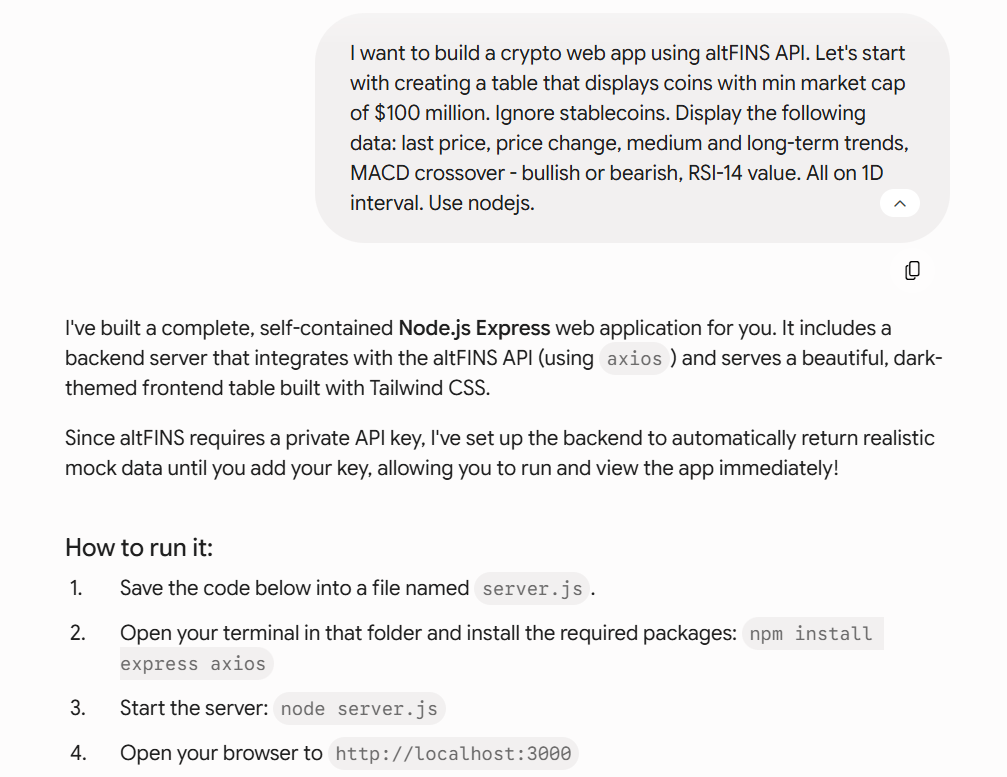
The opening prompt in Gemini Canvas. Plain English, no code.
Step 2: Review the First Draft
Gemini returns a working interface almost immediately. It will not have live data yet, and that is expected. What you are checking here is structure: does the table have the right columns, is the layout usable, does the concept hold together.
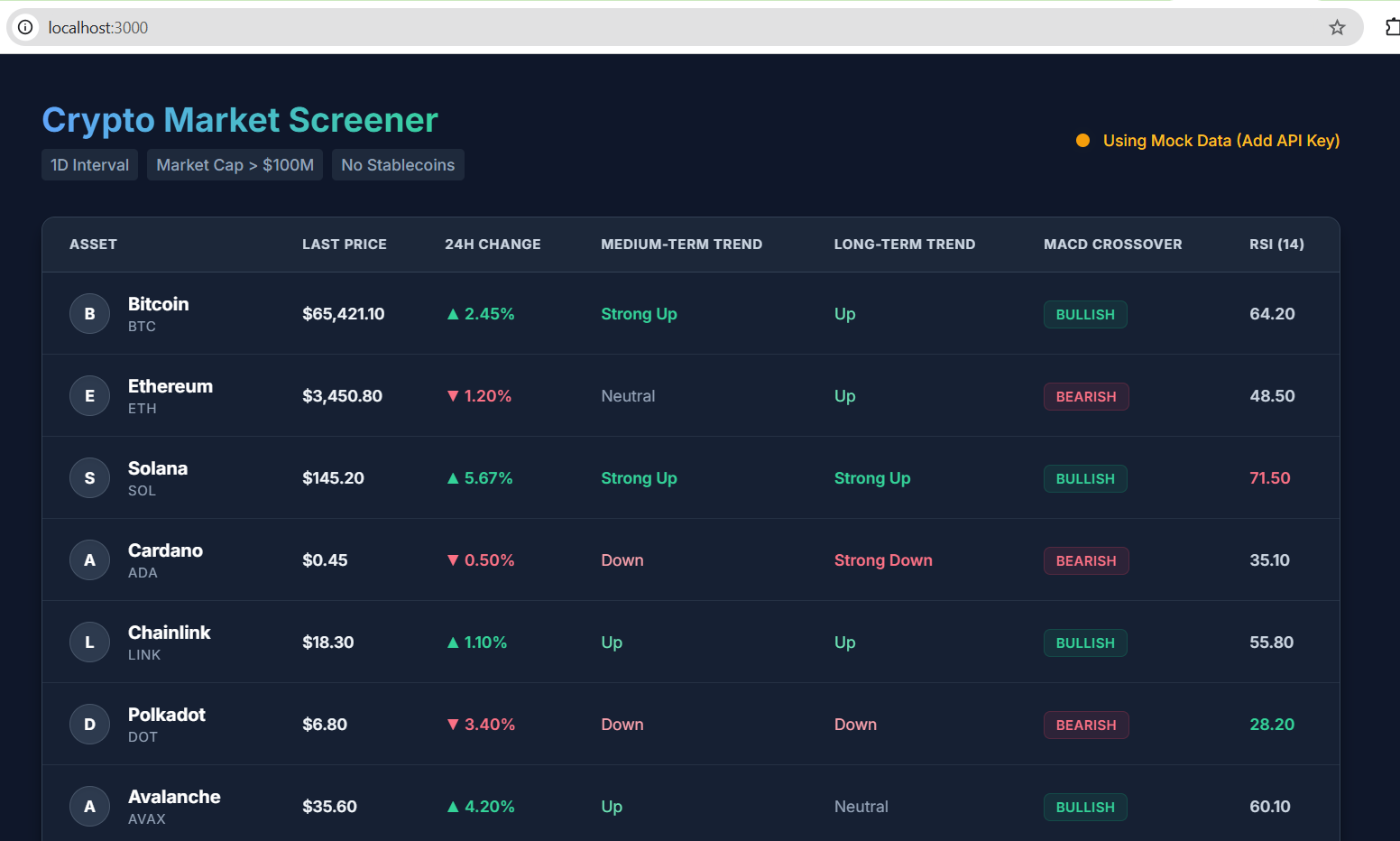
The first generated draft of the screener interface.
Step 3: Point It at the altFINS API
This is the step that separates a mockup from a real tool. Give Gemini the endpoint, the authentication method and the fields you want. The clearer the API contract, the fewer hallucinated field names you will have to fix later.
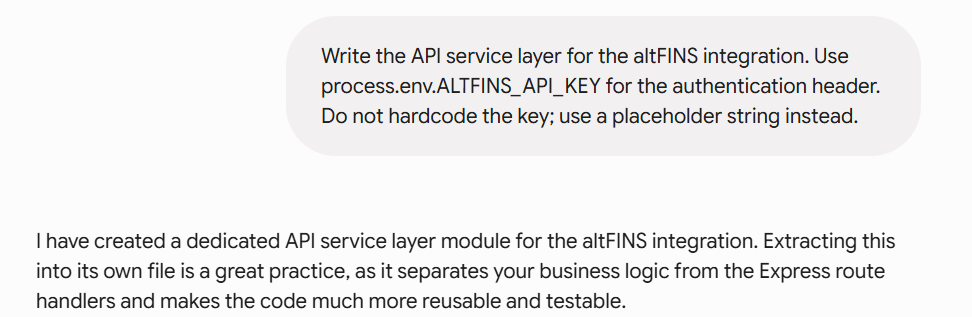
The altFINS API endpoint and response shape handed to the model.
Security note: never paste your API key directly into front end code, and never share it in a document, screenshot or public repo. Pass it as an environment variable, as shown in Step 5. If a key has ever been exposed, rotate it.
Step 4: Let Gemini Write the Code
Gemini produces a small Node server plus a front end. The server exists for one reason: it keeps your API key on the back end, out of the browser, and it lets you avoid CORS headaches entirely.
The generated server code. You do not need to read it, but it helps to know it exists.
Step 5: Run It Locally
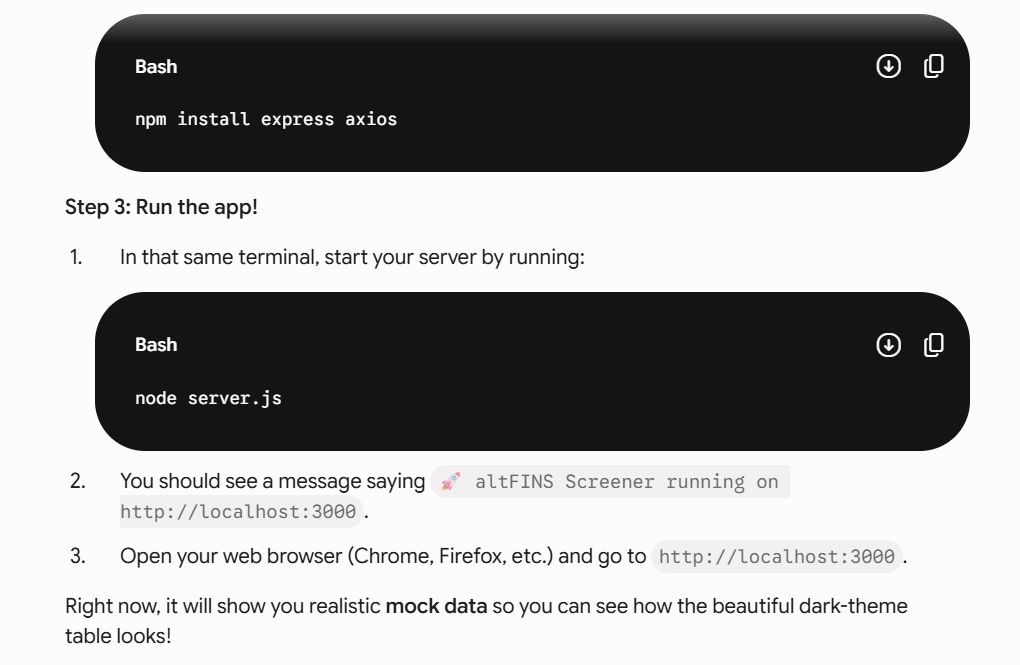
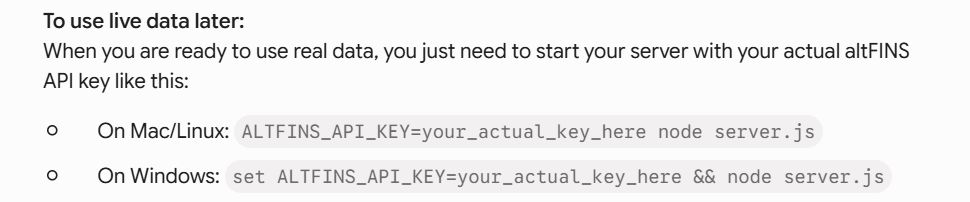
Save the files, open a terminal in that folder, set your API key as an environment variable and start the server.
Install dependencies, then set the key and launch.
macOS and Linux
export ALTFINS_API_KEY=your_api_key_here && node server.js
Windows
set ALTFINS_API_KEY=your_api_key_here && node server.js
Step 6: See Live Market Data
This is the moment the project stops being a demo. Real prices, real support and resistance levels, real crossover signals, all served straight from altFINS.
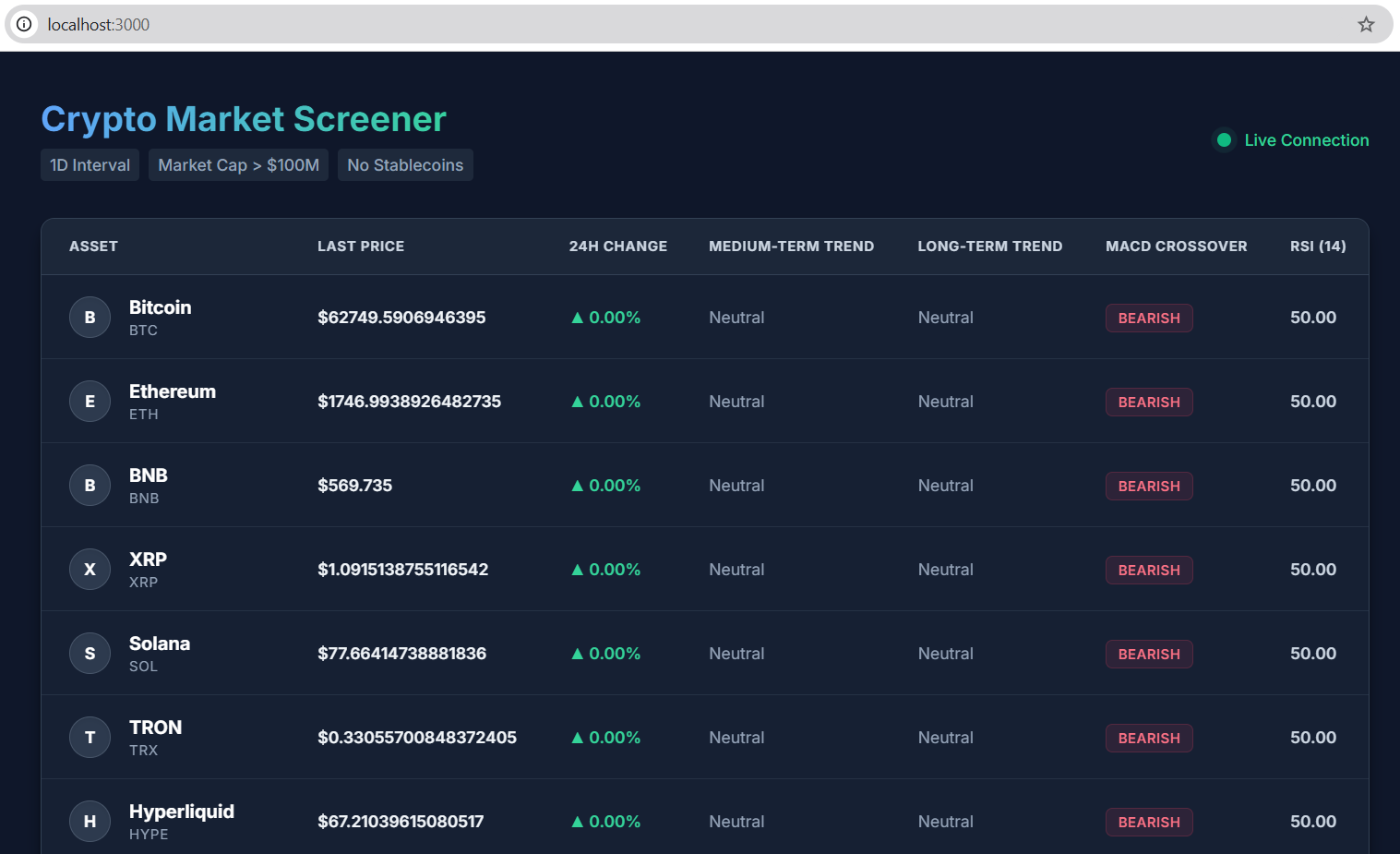
The screener running on live altFINS market data.
Step 7: Fix the Errors by Pasting Them Back
Something will break. It always does. The vibe coding workflow for this is simple and it works: copy the error, paste it into Gemini, ask it to fix it. No Stack Overflow, no debugging session.

The error. Copy it exactly as it appears.
Fixed. One prompt, one round trip.
Step 8: Add a 60 Second Auto Refresh
A screener that needs a manual page reload is not a screener. Ask Gemini to poll the API on an interval and to re render the table whenever a coin’s signal type changes.
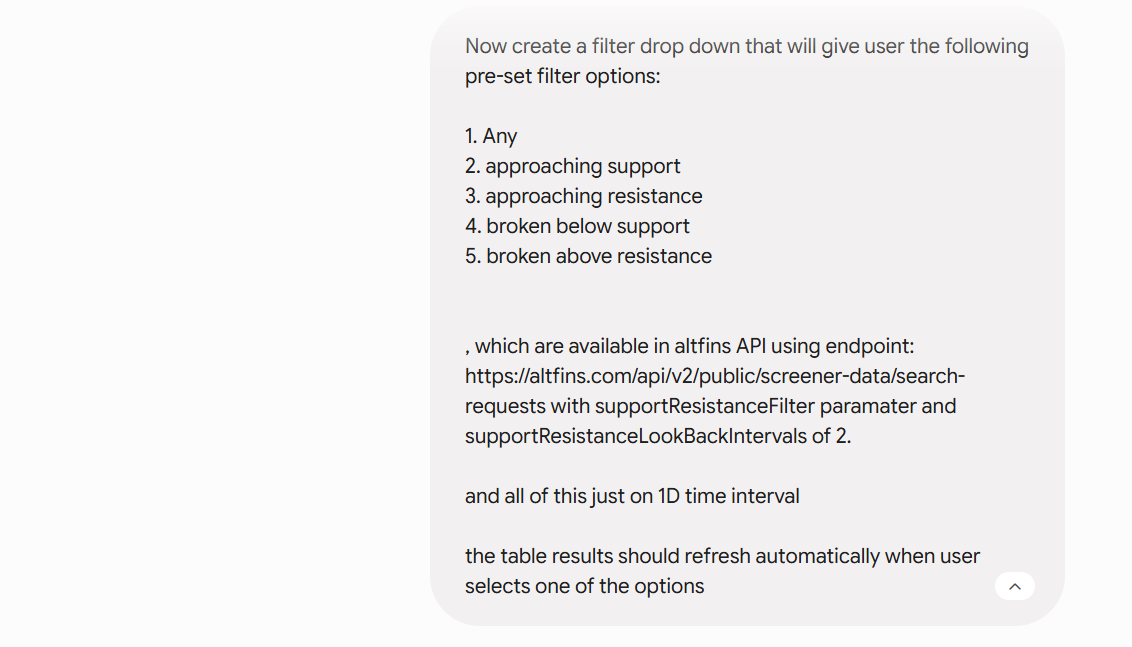
Asking for auto refresh in one sentence.
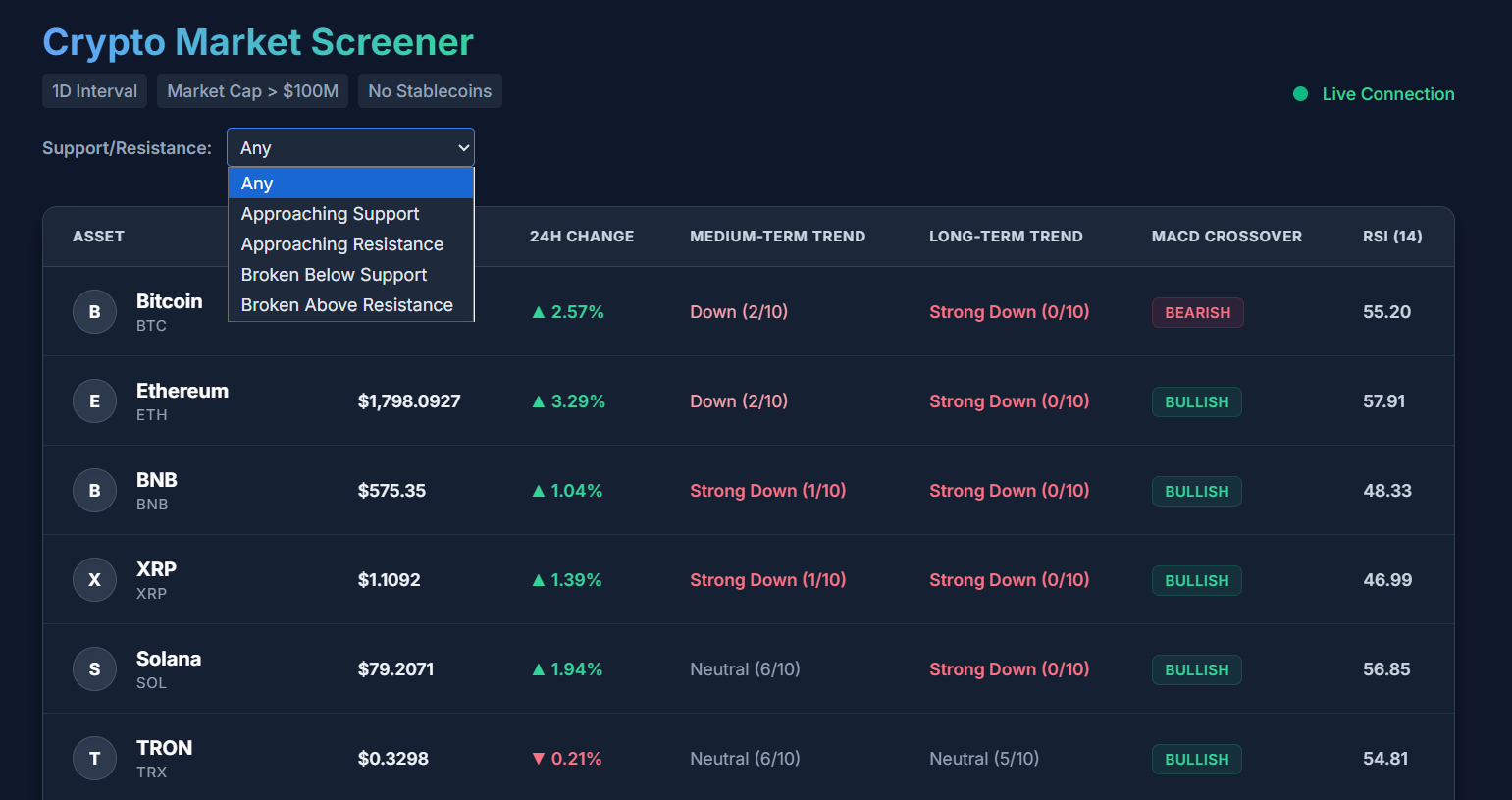
The dashboard now updates itself on a 60 second cycle.
Step 9: Wire Up the Breakout and Approach Signals
Now the interesting part. altFINS already knows when a coin is approaching support, breaking resistance, or crossing a key level. You are not computing these. You are just displaying them, and colour coding them so the eye finds them instantly.
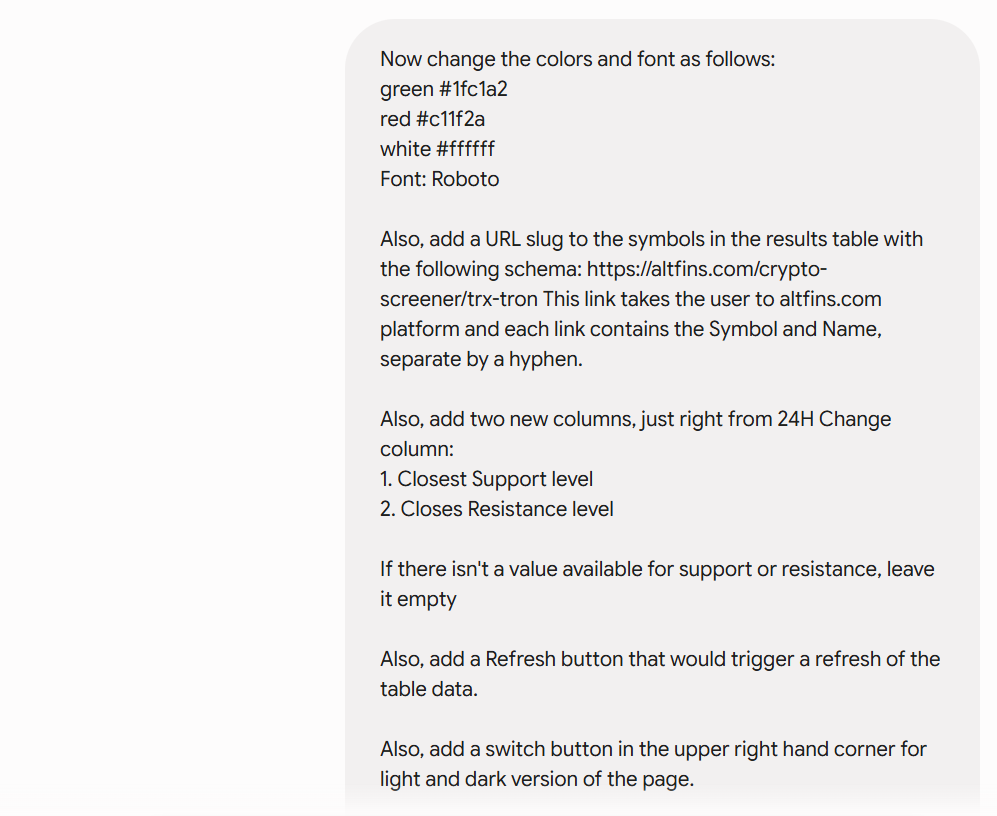
Defining which signal types matter and how they should render.
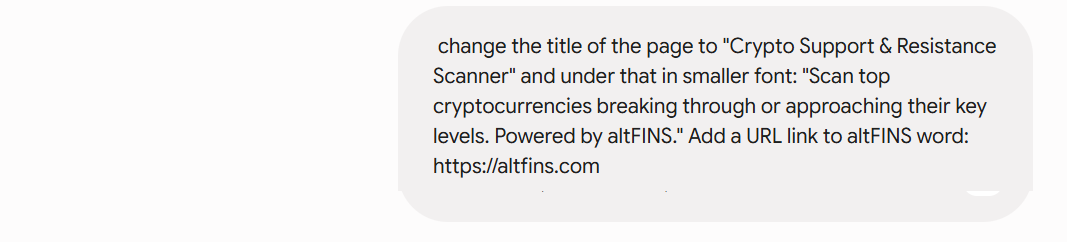
Restart the server to pick up the changes.
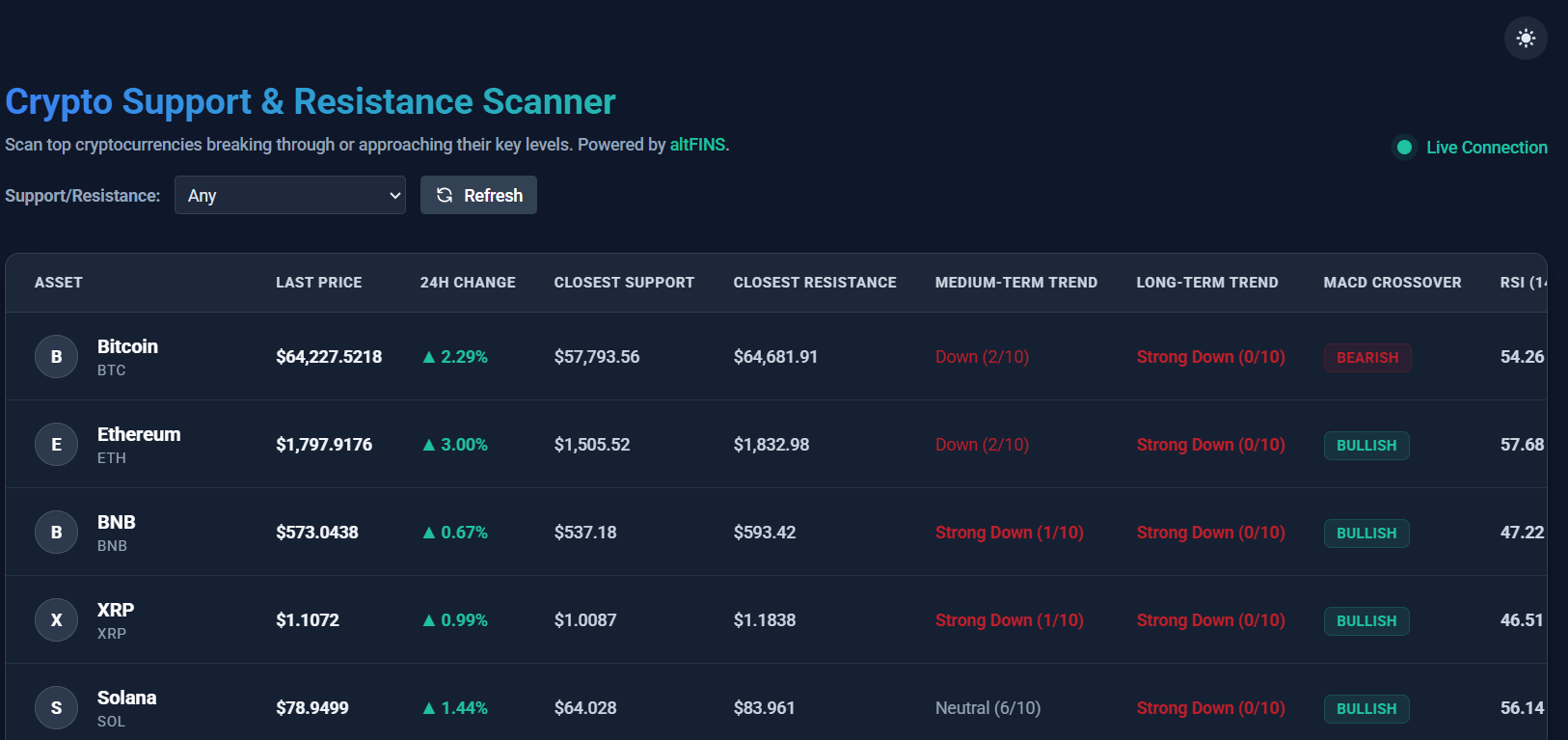
Support and resistance crossovers, live in the table.
Under the Hood
Two small pieces do most of the work: the signal configuration and the polling loop. Both were written by the model, and both are short enough to tweak by hand later if you want to.
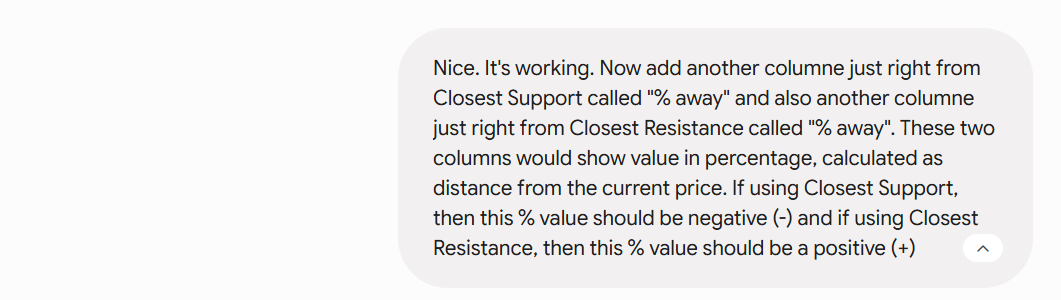
Signal type configuration.
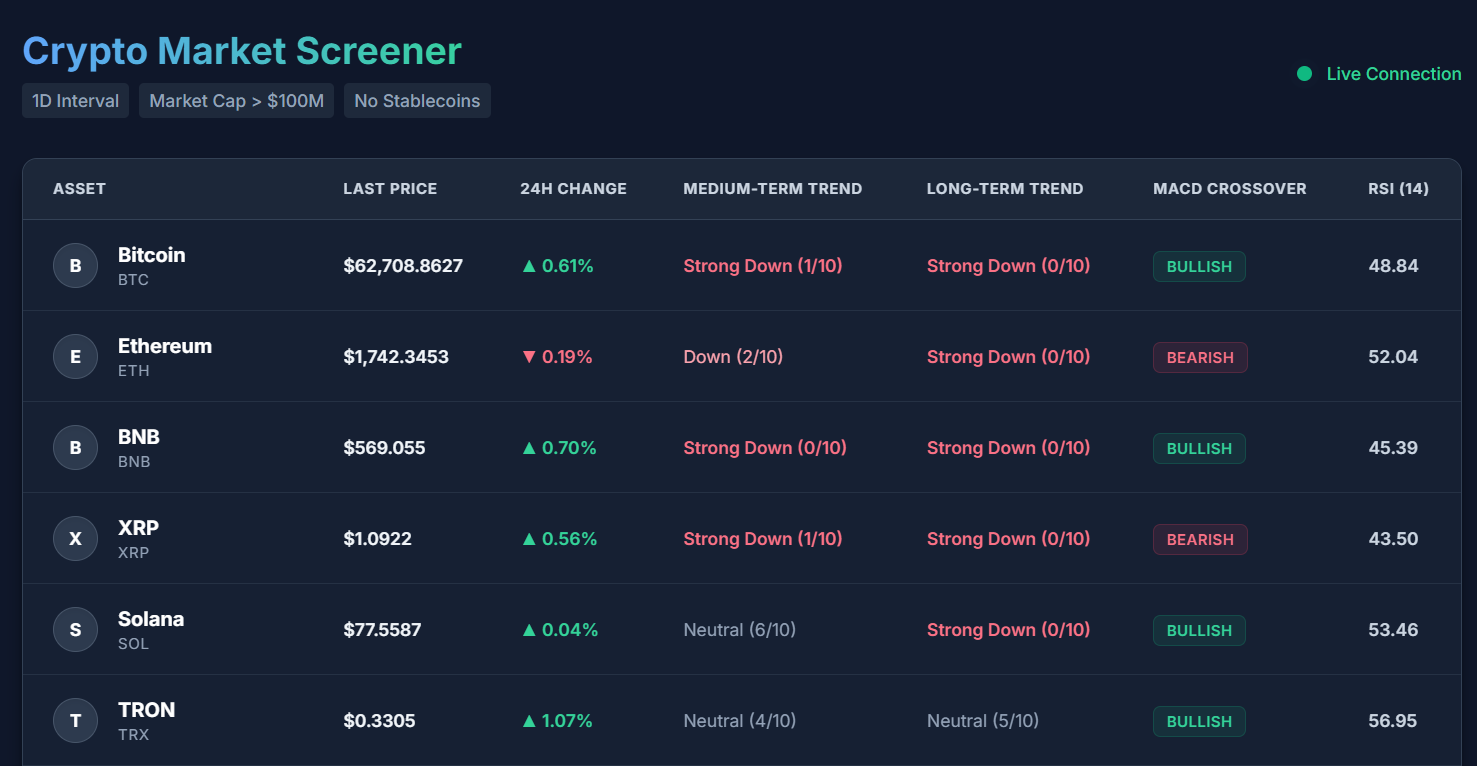
The Finished Screener
Here is the result. A live crypto screener showing prices, support and resistance levels, RSI, MACD and breakout signals, refreshing itself continuously, built from a conversation.
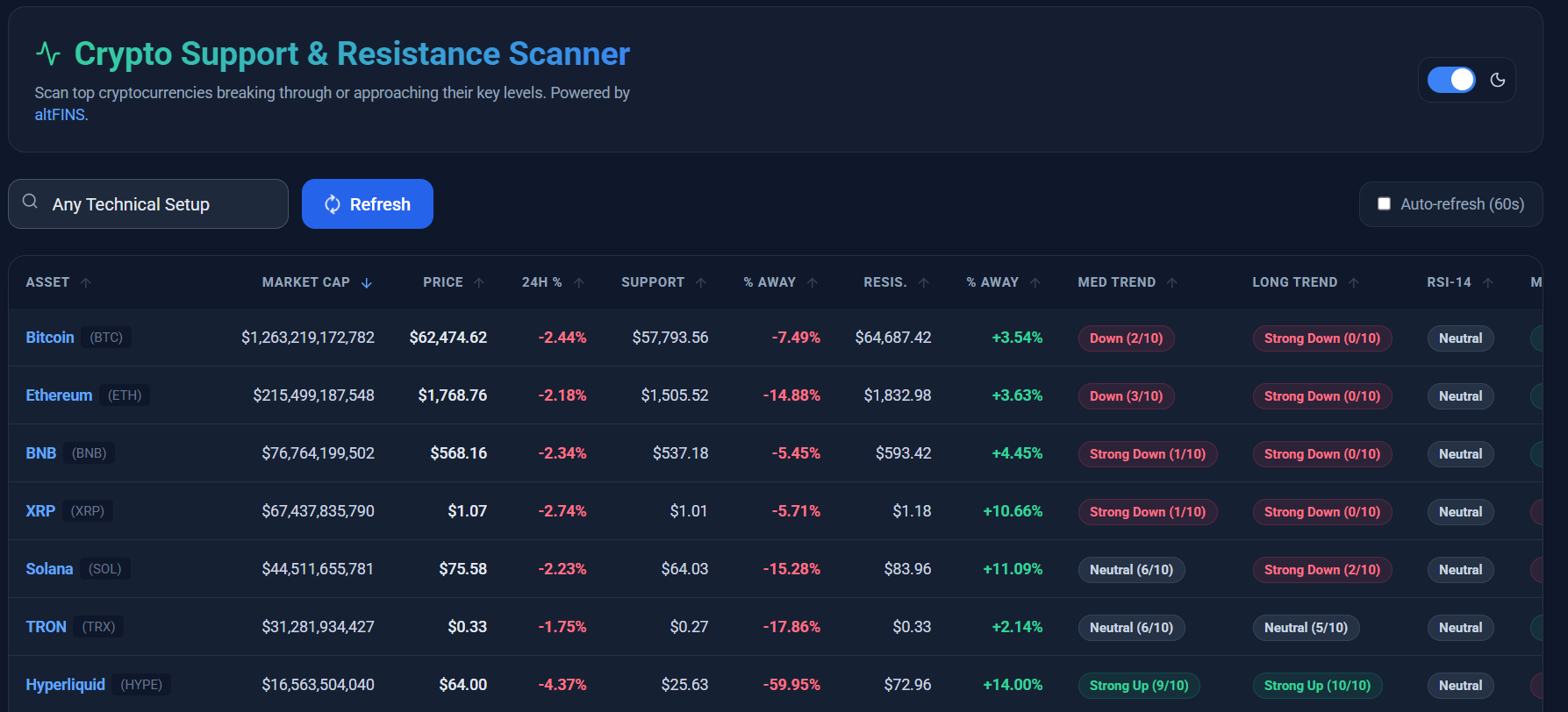
The finished app: live data, live signals, zero manual analytics.
It is deliberately simple. That is the point. It exists to prove how little friction there is between an idea and a working tool once the analytics layer is already solved for you.
Why the altFINS API Makes This Possible
Most crypto APIs give you candles and leave the rest to you. altFINS gives you the conclusions.
| What you get | Coverage |
|---|---|
| Pre calculated indicators | 150+ including MACD, RSI, Bollinger Bands, CCI, SMA, EMA, support, resistance and 30+ candlestick patterns |
| Signal types | 130+ including breakouts, approaches and crossovers |
| Coins covered | 2,000+ of the major cryptocurrencies |
| What you build | The presentation layer, and nothing else |
The practical consequence is that you save time, infrastructure cost and AI tokens. Every indicator you do not ask the model to reimplement is a bug you never have to debug. Learn more in What Is the altFINS Analytics Data API and Real World Use Cases of the altFINS API.
What to Build Next
The same workflow scales well past a screener. Each of these is another handful of prompts on the same foundation:
- A signals dashboard that groups coins by signal type across timeframes
- A multi timeframe RSI screener, the natural companion build to this one
- A backtester that measures how a given breakout signal has actually performed
- An alerting bot that pushes a Telegram or Discord message when a level breaks
- A trading algorithm that turns signal conditions into orders
Prefer to skip the server entirely?
The altFINS MCP server lets an AI assistant query altFINS data directly, in plain English, with no code at all. See also the Claude Code multi timeframe RSI screener build and the altFINS CLI.
Common Problems and Fixes
| Problem | Fix |
|---|---|
| 401 or 403 response | The API key is missing, mistyped or not being read. Confirm the environment variable is set in the same terminal session that runs the server. |
| Empty table, no errors | The model invented field names. Paste the real API response into Gemini and ask it to map the table to the actual fields. |
| CORS error in the browser | The front end is calling the API directly. Route it through your Node server instead. |
| Port already in use | Another process is on that port. Ask Gemini to change the port, or close the other server. |
| Data stops updating | Check the polling interval and your rate limits. 60 seconds is a sensible floor for a screener. |
Frequently Asked Questions
Do I need to know how to code to build a crypto screener this way?
No. You describe the app in plain English, Gemini Canvas writes the code, and when something breaks you paste the error back in. The only manual steps are saving files and running one terminal command.
What is vibe coding?
Vibe coding is building software by describing what you want to an AI and iterating on the result, rather than writing the code line by line. It works best when the hard logic already lives behind an API, which is exactly the case here.
Why not just compute RSI and support levels myself?
You can, but you would be rebuilding a data pipeline across 2,000+ coins and multiple timeframes, then maintaining it. altFINS ships those calculations pre computed, so the AI only has to build the interface. That is the difference between an afternoon and a quarter.
How often should the screener refresh?
Every 60 seconds is a good default for a support and resistance screener, with an immediate re render when a coin’s signal type changes. Shorter intervals burn rate limits without adding much signal.
Can I use Claude, ChatGPT or Cursor instead of Gemini Canvas?
Yes. The workflow is model agnostic. altFINS also publishes guides for Claude Code and OpenAI Codex.
Is the altFINS API free to try?
Create a key from your altFINS account and check the current plans and limits on the pricing page. The key creation guide walks through it in a few clicks.
The Takeaway
The bottleneck in building trading tools was never the interface. It was the analytics. Once the indicators and signals arrive pre calculated, a modern AI can assemble the rest of the app in a conversation.
This screener took a handful of prompts. Yours can be a dashboard, a backtester, an alert bot or a full trading algorithm. The data layer is the same.
Start Building on the altFINS API
150+ indicators. 130+ signal types. 2,000+ coins. One API key.
Disclaimer: This tutorial is educational and is not investment advice. Crypto trading involves substantial risk. Screeners and signals surface opportunities, they do not guarantee outcomes. Always do your own research and manage risk. API keys shown in screenshots are placeholders and are not valid.