
Search Knowledge Base by Keyword
How to Build a Live Multi-Timeframe RSI Crypto Screener with Claude Code and the altFINS API (2026 Guide)
If you can describe what you want in plain English (or any language in fact), you can now build it. No coding required. You never even see the code, just the result: an interactive web app.
In this 2026 tutorial you will see exactly how we built a live, multi-timeframe RSI crypto screener in one hour (60 minutes!), using Claude Code and the altFINS API. No React boilerplate, no reading API reference docs line by line, and no separately hand-coding a backend. Just conversation.
The finished app is a sortable table of every altFINS-tracked coin above a configurable market cap. It shows price, market cap, RSI-14 across four timeframes (1D, 4H, 1H, 15m), short, medium and long-term trend signals, and four interactive filters per timeframe (Above, Below, Crossed Above, Crossed Below). It refreshes live from altFINS every 60 seconds.
RSI Crypto Screener
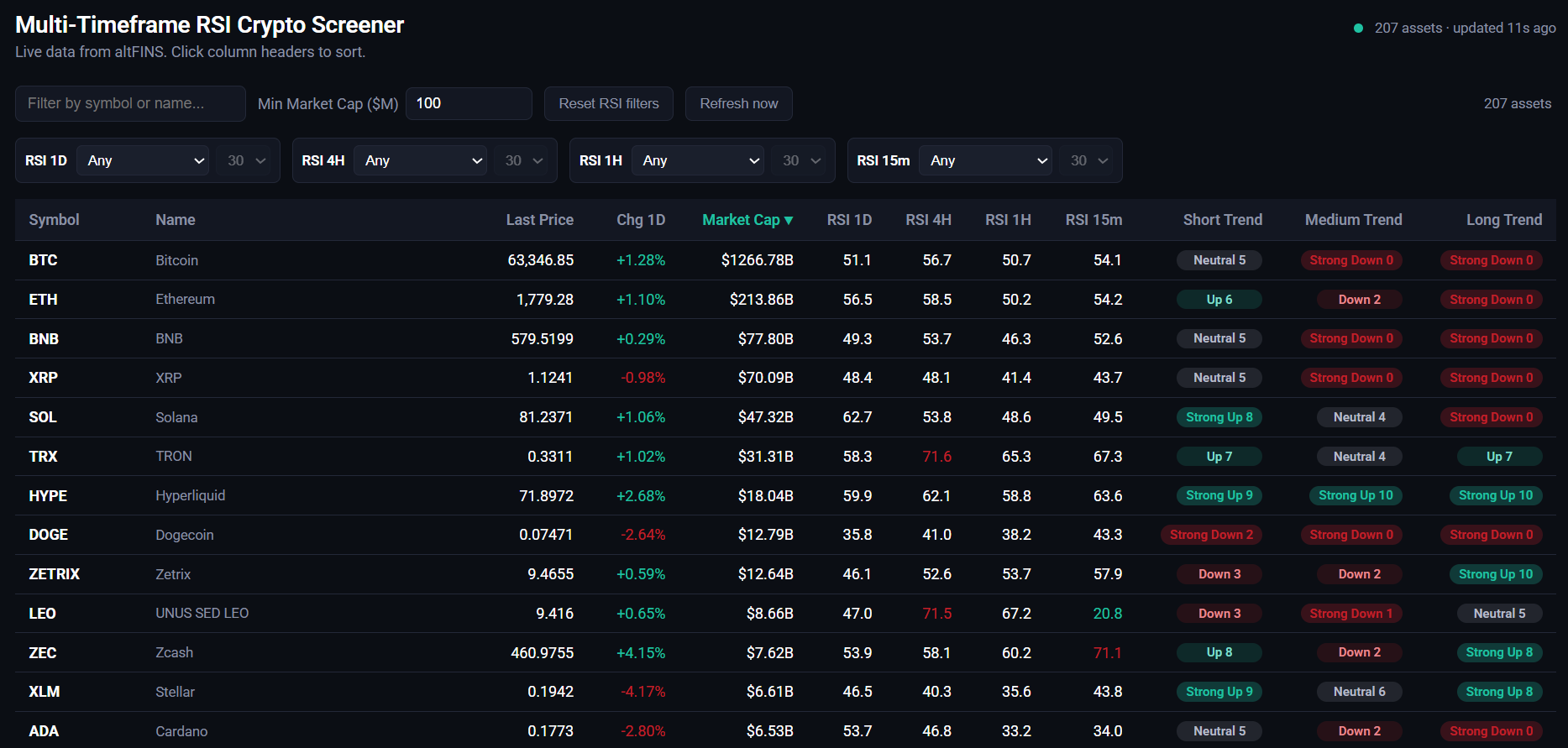
Source: altFINS RSI Crypto Screener
Quick Answer
You can build a working crypto screener without writing code by connecting Claude Code to the altFINS API through an MCP server, then describing the table and filters you want in plain English. Because Claude reads the real API through MCP, it uses correct field names and live data instead of guessing. A single-timeframe snapshot takes minutes. A live, server-backed version with crossover filters takes about an hour.
In This Guide
- What you will need
- Connect Claude Code to altFINS (MCP setup)
- Step 1: Describe the table you want
- Step 2: Add the filters a trader actually wants
- Step 3: Go from snapshot to live
- Step 4: Fit and finish, one sentence at a time
- Why this works
- FAQ
What You Will Need
- Claude Code, installed and authenticated. Get it at claude.com/claude-code.
- An altFINS account with API access. Grab a key under Account, then API Key. Follow the step-by-step API key guide.
- Node.js 18 or newer, needed for the live version backend.That is it. No frontend framework and no separate design tool.
Connect Claude Code to altFINS (MCP Setup)
The whole workflow depends on one thing: giving Claude Code live access to the altFINS API through the Model Context Protocol (MCP). MCP is what lets Claude call the real endpoints, read the real field names, and pull the real data instead of relying on training memory. Add the altFINS MCP server to your Claude configuration, paste in your API key, and restart Claude Code.
{
  "mcpServers": {
    "altfins2": {
      "command": "cmd",
      "args": [
        "/c",
        "npx",
        "mcp-remote",
        "https://mcp.altfins.com/mcp",
        "--header",
        "X-API-Key: ${API_KEY}"
      ],
      "env": {
        "API_KEY": "ADD YOUR API KEY HERE"
      }
    }
  }
}
Tip: the "command": "cmd" line above is written for Windows. On macOS or Linux, run npx mcp-remote directly. For a full walkthrough, see How to Connect altFINS MCP to Claude Desktop.
Step 1: Describe the Table You Want
The very first prompt was just a plain description of the data:
“Using the altFINS API, I want to create a simple webpage that shows a list of assets with market cap greater than $100 million. The table should show: asset symbol, asset name, last price, price change (1D), market cap, RSI-14 on four intervals (1D, 4H, 1H, 15m), and short, medium and long-term trend.”
Because Claude Code had MCP access to altFINS, it did not guess at field names or invent placeholder data. It called the real screener endpoint, discovered 225 assets above the threshold, paginated through all of them, and made four separate calls (one per timeframe) to gather RSI-14 values, joining everything back together by symbol. The output was a single sortable HTML page.
altFINS API already calculates the RSI values, along with 150+ other indicators and signals, so you don’t have to worry about creating that logic either.
One clarifying question came up here. Since a static page cannot safely hold API credentials, Claude asked whether we wanted a one-time snapshot or a fully live version with a backend. We started with the snapshot to move fast and upgraded later, in Step 3.
Step 2: Add the Filters a Trader Actually Wants
Second prompt:
“Add interactive filters for RSI 1D, RSI 4H, RSI 1H, RSI 15m so a trader can select: Above, Below, Crossed Above, or Crossed Below.”
This is where the depth of the altFINS API paid off. Rather than approximating “crossed above” in JavaScript, Claude Code found the native altFINS crossAnalyticFilter, which computes actual crossovers server-side.
No custom cross-detection logic to write or debug. The API already does it. If you want to understand the signal itself, altFINS has a full explainer on trading RSI and RSI divergence.
Step 3: Go From Snapshot to Live
A static page is fine for a demo, not for trading. The prompt:
“I would like a live-refreshing version so I can publish it on a public server.”
Claude Code did four things:
- Explained that the altFINS API needs an
X-API-KEYheader tied to a real account, which cannot safely live in client-side JavaScript. - Built a small Node and Express backend that holds the key server-side, refreshes a cached snapshot every 60 seconds, and exposes clean JSON endpoints (
/api/snapshot,/api/refresh,/api/cross,/api/health). - Rewrote the frontend to poll that backend instead of embedding static data.
- Wrote a mock altFINS server to test the entire pipeline (pagination, symbol-merging across timeframes, rate limiting) before a real key was even in place, so the first live test was not also the first time bugs could surface.
const res = await fetch(url, {
  method: 'POST',
  headers: {
    'Content-Type': 'application/json',
    'X-API-KEY': API_KEY,
  },
  body: JSON.stringify(body),
});
Once a real key was dropped into a .env file, the app was pulling live data: 218 assets on the first real run.
Step 4: Fit and Finish, One Sentence at a Time
From here, every refinement was a single plain-English request:
| Prompt | What changed |
|---|---|
| “Do not show stablecoins, use Regular Coin type only” | Added coinTypeFilter: 'REGULAR' to every altFINS request |
| “Link each symbol to its altFINS page, opening in a new tab” | Added a slugify function (leo plus UNUS SED LEO to leo-unus_sed_leo) and wrapped symbols in links |
| “Use these brand colors and Roboto font” | Swapped CSS variables and added a Google Fonts import |
| “Make Min Market Cap live, it should change the actual query, not just hide rows” | Threaded the threshold from the input, through a debounced fetch, into the backend query itself |
Each of these took one message and a couple of minutes, including verification. Claude Code does not just write code and hand it back. For UI changes it spins up the app, clicks through it in a real browser, and checks network requests and rendered output before calling it done.
Why This Works
Two things had to be true for this to be this easy:
- The altFINS API is expressive enough that what a trader wants (crossovers, trend scores, market cap floors) maps directly onto real filter parameters. Claude did not have to reimplement technical analysis from scratch.
- MCP access meant Claude was never guessing. Every field name, every filter enum, and every response shape came from live calls to the real API, not from stale training data. When something was unclear, such as the exact auth header, Claude looked it up in the published altFINS OpenAPI spec rather than assuming.
Key Takeaways
- An MCP connection lets Claude Code read the live altFINS API, so it builds against real fields and real data.
- Server-side altFINS filters like
crossAnalyticFilterandnumericFiltersdo the heavy technical-analysis lifting for you. - A tiny Node and Express backend keeps your API key safe and serves a cached snapshot that refreshes every 60 seconds.
- You refine the whole app in plain language, one sentence at a time.
Try It Yourself
If you have an altFINS API key, this same loop (describe it, watch it get built, refine in plain English) works for far more than a screener: alert bots, portfolio dashboards, custom backtests, anything the API surface supports. For inspiration, browse 8 AI-powered trade strategy prompts using altFINS MCP or the wider 2026 guide to cryptocurrency MCP servers.
- altFINS API docs: altfins.com/crypto-market-and-analytical-data-api/documentation
- Create your API key: step-by-step guide
- Claude Code: claude.com/claude-code
Ready to build your own crypto tools?
Get an altFINS API key, connect the MCP server, and start describing the trading tools you want in plain English.
Frequently Asked Questions
Can you build a crypto screener without coding?
Yes. By connecting Claude Code to the altFINS API through MCP, you describe the screener you want in plain English and Claude writes, runs, and tests the code for you. You never touch React or backend boilerplate by hand.
What is the altFINS API?
The altFINS Crypto Market and Analytical Data API gives programmatic access to prices, market caps, technical indicators like RSI, trend scores, and server-side crossover filters across thousands of coins and multiple timeframes. Learn more in What Is the altFINS Analytics Data API.
What is MCP and why does it matter here?
MCP, the Model Context Protocol, is an open standard that lets AI assistants call external tools and APIs directly. It matters because it gives Claude the real altFINS field names, enums, and live data, which removes the guesswork that causes AI-written code to break.
How does Claude Code connect to altFINS?
You add the altFINS MCP server (https://mcp.altfins.com/mcp) to your Claude configuration and pass your key in the X-API-Key header, as shown in the MCP setup block above. A detailed walkthrough is in How to Connect altFINS MCP to Claude Desktop.
How long does it take to build?
A single-timeframe snapshot takes a few minutes. The full live version in this guide, with four timeframes, server-side crossover filters, a Node and Express backend, and a polished UI, took about one afternoon.
Is the screener data live?
Yes. The backend refreshes a cached snapshot from altFINS every 60 seconds and the frontend polls that backend, so the table stays current without ever exposing your API key in the browser.
Do I need to know how RSI crossovers work?
No. The altFINS API computes crossovers server-side, so you only describe the behavior you want. If you would like the theory anyway, read the altFINS guide to trading RSI and RSI divergence.
This tutorial reflects the altFINS API and Claude Code as of 2026. Crypto trading involves risk. Nothing here is financial advice. Always test your own tools and read the altFINS terms before publishing anything that uses live market data.