
Search Knowledge Base by Keyword
10 Best AI Prompts for Crypto Trading in 2026 (altFINS MCP, Tested Live)
10 copy-paste AI prompts for crypto trading: for trend, swing, intraday and long-term crypto traders. Every prompt was tested on live altFINS data, with real results.
Last updated: October 2, 2026 | Data tested: October 2, 2026
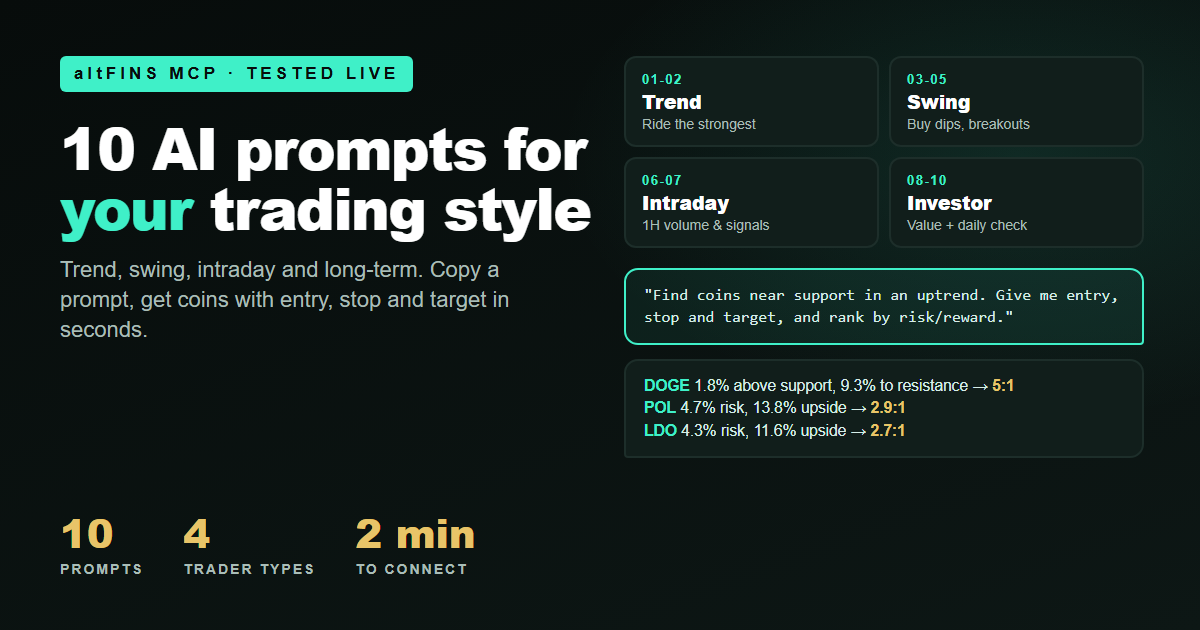
A trend trader, a swing trader and a day trader should not ask the market the same question. One wants the strongest coins. One wants a cheap entry with a tight stop. One wants what is moving this hour.
The altFINS MCP server lets an AI assistant like Claude answer each of those questions with live crypto data. We wrote 10 prompts, grouped them by trading style and ran every one on live data on October 2, 2026. Below you get the exact prompt, what it found, and how to act on the answer.
Prefer clicking to prompting? Every strategy in this guide also works as a one-click filter in the altFINS Crypto Screener.
Not financial advice. The coins below show what each prompt returned on October 2, 2026. They are examples, not recommendations. Prices change by the hour, so always check the chart before you act.
📑 In this guide
- Quick answer
- What is the altFINS MCP server?
- Why traders use it (and what it is not for)
- How to connect in 2 minutes
- 4 rules for better crypto prompts
- Trend trader prompts (01 to 02)
- Swing trader prompts (03 to 05)
- Intraday trader prompts (06 to 07)
- Investor and daily-check prompts (08 to 10)
- Bonus: the confluence prompt
- Cheat sheet: all 10 prompts
- Key takeaways
- FAQ
Quick answer: the best AI prompts for crypto trading in 2026
⚡ TL;DR
- Best prompt for trade ideas: check today’s analyst trade setups against live prices (prompt 05). Of 9 setups, only 1 was ready to enter.
- Best prompt for entries: coins near support, ranked by risk/reward (prompt 04). It found DOGE at 5:1.
- Best habit: look for confluence. On October 2, Lido (LDO) showed up in 3 separate scans.
- Setup time: about 2 minutes. The free API plan includes 1,000 credits per month.
What is the altFINS MCP server?
The altFINS MCP server is a read-only connection that gives AI assistants live access to altFINS crypto data. MCP stands for Model Context Protocol, an open standard that lets AI tools use outside data sources. Once connected, you ask questions in plain English and the AI pulls real numbers from altFINS instead of guessing.
Through the MCP, your AI can use:
- Crypto screener with technical and fundamental filters plus 150+ preset strategies (see the Screener)
- Analyst trade setups with entry, target and stop loss (see Trade Setups)
- Signal feed with breakouts, MACD crossovers and trend upgrades (see Signals Summary)
- Price history and indicator history (OHLCV, RSI, MACD, moving averages)
- Crypto news and calendar events such as listings, upgrades and unlocks
- Your portfolio across connected exchanges and wallets
It covers 2,000+ assets, including tokenized stocks. Technical details are in the altFINS MCP server documentation.
Why traders use it (and what it is not for)
| Good for | Not for |
|---|---|
| Finding trade ideas in seconds across 2,000+ coins | Placing orders. The MCP is read-only. |
| Checking a setup against live data before you enter | Replacing your own judgment or chart check |
| Morning market briefings and portfolio check-ups | “Tell me what to buy” with no plan or stop |
| Combining screener, setups, news and events in one answer | High-frequency or automated execution |
The main benefit is speed with real data. A normal routine is: open the screener, check the chart, read the news, check the calendar, and repeat for every coin. With the MCP, one question does all of it. And because the AI reads live altFINS values, it does not invent prices or levels.
How to connect the altFINS MCP in 2 minutes
Step 1: Get your altFINS API key
Log in to altFINS and create a free API key. The free Basic plan includes 1,000 credits per month. Paid API plans start at $39 per month for heavier use. Need help? Follow the step-by-step API key guide.
Step 2: Add the server to your AI assistant
Full walkthrough with screenshots: How to connect altFINS MCP to Claude Desktop.
Other AI clients: the altFINS MCP also works with VS Code (GitHub Copilot), Microsoft Copilot Studio, Perplexity Pro and Max, n8n and the Claude API. Setup for each is in the MCP docs.
Step 3: Test the connection
COPY THIS PROMPT
Using altFINS, what is the short, medium and long-term trend for BTC?
If you get trend scores back, you are connected. Now try the prompts below.
Connect your AI to live crypto data
Free plan with 1,000 credits per month. Setup takes about 2 minutes.
4 rules that make any crypto prompt better
We learned these the hard way during testing:
- Set a market-cap floor. Without one, our breakout scan was led by a coin worth just $6.7M.
- Exclude stablecoins and wrapped or staked tokens. Otherwise tokens like WBETH, which simply track ETH, take over volume scans.
- Ask for the stop and the risk/reward ratio. It forces a trading plan. In our test, it showed only 1 of 9 analyst setups was ready to enter.
- Name the timeframe. Use “daily” for trend and swing trading, and “1-hour” or “4-hour” for intraday.
📈 TREND TRADERS
Hold for weeks. Buy strength, ride it, exit when the trend breaks.
Trend trader prompts
01. Strongest trends that are not overheated
COPY THIS PROMPT
Using altFINS, find coins above $100M market cap with a Strong Up trend on the short, medium and long term, trading above the 200-day SMA, with RSI between 50 and 70. Rank by 1-month performance and show nearest support and resistance.
Result (12 coins): Quant (QNT) +267% in a month, NEAR +160%, Arweave (AR) +92%, Aerodrome (AERO) +68%, Kaspa (KAS) +56%, Uniswap (UNI) +55%, Avalanche (AVAX) +54% and Ethena (ENA) +53%. All trend up on every timeframe with RSI under 70.
How to use it
This is a watchlist of market leaders, not an entry signal. QNT fell 20% on the same day it topped the list. Use prompt 03 or 04 to time the entry.
02. Fresh breakouts with real volume
COPY THIS PROMPT
Find coins above $100M market cap that broke above resistance in the last 2 days, in a medium-term uptrend, with at least 1.5x normal volume. Show how far price is above the broken level and the RSI.
Result (5 coins):
- Algorand (ALGO): 3.4x normal volume, 2.6% above the broken $0.1269 level, RSI 66
- Monad (MON): 2.5x volume, 3.1% above $0.0323, RSI 68
- Midnight (NIGHT): 4.4x volume, but already 26% above its breakout with RSI 85
How to use it
ALGO and MON are still close to the level they broke, so a retest gives a tight stop. NIGHT shows the same signal with a much worse entry. That is chasing.
🔗 Learn: Support and Resistance
🔄 SWING TRADERS
Hold for days to weeks. Buy pullbacks and breakouts with a clear stop.
Swing trader prompts
03. Buying dips in an uptrend
COPY THIS PROMPT
Find coins in a strong medium-term uptrend that pulled back today. Show today’s drop, RSI, 1-month performance, nearest support and next resistance.
Result:
- NEAR: down 6.1% today after +160% this month. Trend 10/10, RSI 65, next resistance $5.58 (+13.7%)
- Ethena (ENA): down 6.6% today, RSI 61.5
- Falcon Finance (FF): down 6.3% today, RSI cooled to 47.7, sitting just above support at $0.116
How to use it
FF is the cleanest dip: RSI has reset below 50 and the stop sits right under support. NEAR and ENA still have RSI above 60, so their pullback may only be starting.
04. Near support, ranked by risk/reward
COPY THIS PROMPT
Find coins above $100M market cap approaching support while the long-term trend is up. Exclude stablecoins. Put the stop just below support and the target at the next resistance, then rank by risk/reward.
| Coin | Risk to support | Upside to resistance | Risk/reward |
|---|---|---|---|
| Ethereum Classic (ETC) | 0.9% | 14.3% | ~16:1 (very tight stop) |
| Dogecoin (DOGE) | 1.8% | 9.3% | 5.2:1 |
| POL | 4.7% | 13.8% | 2.9:1 |
| Lido (LDO) | 4.3% | 11.6% | 2.7:1 |
| OKB | 3.4% | 3.4% | 1:1 (skip) |
How to use it
The same “near support” signal produces very different trades. OKB has as much downside as upside. ETC looks great only because its stop is so tight it may get hit by normal noise. DOGE and POL are the most balanced.
🔗 Learn: How Support Zones Work
05. Analyst trade setups, checked against live prices
COPY THIS PROMPT
Pull today’s bullish altFINS analyst trade setups that include a stop loss and a price target. Compare each setup’s breakout level with the live price. Is the breakout still holding? Calculate risk/reward from the current price and sort into “ready now”, “wait for reclaim” and “skip”.
Result: 9 bullish setups had a clear stop and target. The live check sorted them like this:
| Setup | Status now | Risk/reward |
|---|---|---|
| ETH: flag breakout above $2,700, target $3,000, stop $2,640 | ✅ Ready (price $2,746) | 2.4:1 |
| LDO: breakout above $0.47, target $0.55, stop $0.43 | ⏳ Wait (price $0.454, back below $0.47) | 2:1 if reclaimed |
| ENA: breakout above $0.26, target $0.30, stop $0.24 | ⏳ Wait (price $0.245, back below $0.26) | 2:1 if reclaimed |
| ATOM: breakout above $1.80, target $2.00, stop $1.66 | ⏳ Wait (price $1.74) | 1.4:1 |
| XRP: pennant breakout, target $1.70, stop $1.44 | ⚠️ Weak ratio | 1.7:1 |
| LTC: channel breakout, target $80, stop $58 | ❌ Skip (price $70) | 0.8:1 |
How to use it
altFINS analysts publish trade setups every day, but prices keep moving after a setup is written. This prompt tells you which ones are still valid right now. Three breakouts had already slipped back below their trigger. For those, set a price alert at the trigger and only enter on a reclaim.
🔗 All analyst Trade Setups | How to set a price alert
Get trade setups with entry, target and stop every day
Analyst setups for 2,000+ assets, updated daily. Check them yourself or let your AI do it.
⚡ INTRADAY TRADERS
Hold for hours. Volume, momentum and fresh signals.
Intraday trader prompts
06. Volume spikes this hour
COPY THIS PROMPT
On the 1-hour chart, find coins above $200M market cap with at least 2x normal volume, RSI between 50 and 72, and short-term trend up. Exclude stablecoins and wrapped or staked tokens. Show nearest resistance.
Result:
- SPX6900: 3.1x volume, RSI 59, 2.4% below resistance
- Virtuals Protocol (VIRTUAL): 2.65x volume, pushing through $0.808 with $0.831 next
- KuCoin Token (KCS): 2.8x volume
- Pendle: 2.5x volume
- Ethereum: 2x normal hourly volume, sitting right on $2,747 resistance with $2,789 next
How to use it
Intraday moves need fuel, and volume above 2x in an uptrend means traders are paying attention now. Our first run had no exclusion and was led by METH and WBETH, two tokens that only track ETH. That is why the exclusion is in the prompt.
🔗 Signals Summary | Crypto Screener
07. What fired in the last few hours?
COPY THIS PROMPT
Show bullish altFINS signals from today: resistance breakouts, fresh MACD crossovers and short-term trend upgrades. Keep only coins above $100M market cap and exclude wrapped and staked tokens. For each, show today’s move, RSI, and whether it also matches an analyst setup.
Result: 40 bullish signals fired in the morning, and 34 were coins under $100M. After filtering, 5 were left:
- Sky (SKY): resistance breakout, +4.7% today, with 2.2x normal hourly volume. Hourly RSI is 74, so it is stretched.
- Bitget Token (BGB): short-term trend upgrade right at the $1.90 to $2.00 support zone named in its analyst setup (target $2.20, stop $1.85)
- Neo (NEO): resistance breakout, +6.4% today
- Decred (DCR) and Vision (VSN): trend upgrades
How to use it
The signal feed is the fastest way to see what changed today. Without a market-cap floor, it is almost all micro caps. With the filter, BGB stands out: a fresh signal at a support level that an analyst setup also flagged.
🔗 Signals Summary | Learn: MACD crossovers
🧭 INVESTORS AND EVERY TRADER
Hold for months, or run a quick check before any trade.
Investor and daily-check prompts
08. Undervalued DeFi with growing usage
COPY THIS PROMPT
Find DeFi protocols with market cap under 10x annual revenue, TVL up 10% or more in 30 days, a medium-term uptrend and RSI under 65. Show market cap to revenue, TVL growth and 1-month price change.
| Protocol | Market cap / revenue | TVL 30 days | Price 1 month |
|---|---|---|---|
| Lido (LDO) | 0.5x | +14% | +23% |
| Orca (ORCA) | 0.5x | +24% | +42% |
| Raydium (RAY) | 0.9x | +24% | +138% |
| Rocket Pool (RPL) | 1.1x | +12% | +23% |
| Morpho (MORPHO) | 4.5x | +16% | +0.6% |
| yearn.finance (YFI) | 8.5x | +12% | +14% |
How to use it
Fundamentals tell you what to own, and the trend tells you when. MORPHO is the outlier: usage (TVL +16%) is growing while price is flat. RAY has already run +138%. AAVE and THORChain passed the value test but were filtered out by RSI (72 and 75).
🔗 On-chain data | Learn: on-chain data explained
09. Second opinion before you enter a trade
COPY THIS PROMPT
Pull the altFINS analyst trade setup for SOL. Check it against live RSI, trend, the 50 and 200-day SMA, news from the last 7 days and events in the next 2 weeks. Does everything still agree?
Result: The setup is a resistance breakout above $120, with a target of $145 and a stop at $111. The live data agrees: price $121.75, trends Up, Strong Up and Strong Up, RSI 64.6 (not overbought), and price above both the 50-day ($103) and 200-day ($86) SMA. In the news, Fiserv’s stablecoin platform went live on Solana, and Solana led all chains in September app revenue ($144M).
The catch: SOL slipped back below $120 the day before, and there is a nearer resistance at $124.94, just 2.6% overhead.
How to use it
The setup is valid but not confirmed. A daily close above $125 is the trigger. From there it is about +19% to the target against -9% to the stop. Run this prompt before every trade, because setups age.
🔗 Solana and other Trade Setups | Set an alert at the trigger
10. Your 30-second morning briefing
COPY THIS PROMPT
Give me a morning crypto briefing: BTC and ETH trend, RSI and distance to the nearest support and resistance, plus the 3 most important news headlines from the last 24 hours.
- BTC: $86,348. Strong Up on all timeframes, RSI 67, 1.2% below resistance at $87,395. Support at $82,258 (-4.7%).
- ETH: $2,748. RSI 66, 2.1% below resistance at $2,807.
- Headline: US spot Bitcoin ETFs took in $6.34B in Q3, their strongest quarter of 2026, as BTC rose 43%.
How to use it
The market is risk-on, with both majors pressing into resistance. A clean breakout favors prompts 01 and 02. A rejection favors the dip and support prompts, 03 and 04. Save this prompt and run it every morning.
Bonus: the confluence prompt
COPY THIS PROMPT
Run prompts 04, 05 and 08. Which coins appear in more than one result? For each, list every reason it qualified.
On October 2, it found Lido (LDO) in all three:
- It is near support with 2.7:1 risk/reward.
- It has an analyst breakout setup.
- Its market cap is only 0.5x annual revenue, with TVL up 14%.
Its one missing piece is a reclaim of $0.47. A coin that passes several independent checks belongs at the top of your watchlist.
Cheat sheet: all 10 prompts at a glance
| # | Trader type | Prompt goal | Best result on Oct 2 |
|---|---|---|---|
| 01 | Trend | Strongest trends, not overbought | QNT, NEAR, AR |
| 02 | Trend | Breakouts with volume | ALGO (3.4x volume) |
| 03 | Swing | Dips in an uptrend | FF at support |
| 04 | Swing | Near support, ranked by risk/reward | DOGE 5.2:1 |
| 05 | Swing | Analyst setups, live check | ETH 2.4:1 |
| 06 | Intraday | 1-hour volume spikes | VIRTUAL, ETH |
| 07 | Intraday | Fresh signals, filtered | BGB at support |
| 08 | Investor | Undervalued DeFi | LDO, ORCA, MORPHO |
| 09 | Everyone | Second opinion on a setup | SOL: wait for $125 |
| 10 | Everyone | Morning briefing | BTC 1.2% below resistance |
Key takeaways
- Match the prompt to your timeframe. A trend list is not an entry signal.
- Check setups against live prices. 3 of 9 analyst breakouts had slipped back below their trigger.
- Filter out the noise. Use a market-cap floor and exclude stablecoins and wrapped tokens. 34 of 40 signals today were micro caps.
- Look for confluence. One coin in three scans beats ten coins in one.
- The MCP finds and checks ideas. You still decide. Always look at the chart.
Start finding trade ideas with AI today
Create your free API key, connect https://mcp.altfins.com/mcp and paste prompt 10.
Frequently asked questions
What is the altFINS MCP server?
It is a read-only connection, based on the Model Context Protocol, that lets AI assistants like Claude use live altFINS crypto data: screener, analyst trade setups, signals, price history, news, events and your portfolio.
Is the altFINS MCP free?
Yes, you can start free. The Basic API plan includes 1,000 credits per month. Paid plans start at $39 per month for more credits. See altFINS API plans.
Which AI assistants work with the altFINS MCP?
Claude Desktop, the Claude API, VS Code with GitHub Copilot, Microsoft Copilot Studio, Perplexity Pro and Max, and n8n. Any client that supports remote MCP servers with a custom header can connect.
Can the altFINS MCP place trades for me?
No. The MCP is read-only. It cannot place orders or access funds. You always make the final trading decision yourself.
What is the best AI prompt for crypto trade ideas?
In our test, the most useful prompt checked today’s analyst trade setups against live prices and sorted them by risk/reward (prompt 05). For entries, the support prompt ranked by risk/reward (prompt 04) worked best.
Do I need coding skills to use it?
No. In Claude Desktop, you paste a short config once. Copilot Studio and Perplexity connect without code. After setup, you only type questions in plain English.
Can I use these strategies without AI?
Yes. Most of the strategies in this guide are one-click filters in the altFINS Crypto Screener, and you can learn to trade them in the free altFINS Trading Course. New to the platform? Start with altFINS platform features.
Disclaimer: This article is for educational purposes only and is not financial advice. All results reflect live altFINS data on October 2, 2026, and will differ when you run the prompts. Crypto assets are volatile. Always do your own research and manage your risk.