
Search Knowledge Base by Keyword
altFINS CLI: The Complete Guide To Crypto CLI
Last Updated: March 25, 2026
📑 Table of Contents
1. What is altFINS CLI?
The altFINS CLI (af) is a terminal-native interface for the altFINS crypto analytics API. It gives traders, analysts, developers, and AI agents direct command-line access to real-time market data, trading signals, technical analysis, OHLCV candles, and curated crypto news, without writing a single line of API client code.
Installed as a single binary (no runtime, no language toolchain required), the altFINS CLI bridges the gap between raw API access and productive terminal workflows. Run one command and get a full market screener output. Run another and you’re inside a full-screen interactive dashboard with live candle charts and keyboard navigation.
The CLI is built in Go and distributed via Homebrew on macOS and Linux, and as a native Windows binary from GitHub Releases. It supports four output formats — table, json, jsonl, and csv — so you can pipe data into any downstream tool, from spreadsheets to AI agent pipelines.
🚀 Why use the CLI instead of the API directly?
- No code required — access all altFINS data endpoints with simple commands
- Interactive TUI — full-screen market dashboard without opening a browser
- Instant data exports — CSV and JSON output in one flag, no parsing needed
- AI agent ready — machine-readable output, dry-run previews, self-documenting command index
- One binary — no Node.js, Python, or Go installation required
2. Who Is It For?
The altFINS CLI is designed for anyone who prefers working in a terminal over switching to a browser mid-session. It’s particularly well suited for:
- 📉 Crypto Traders — Active traders who want live signals and market screener access inline with their workflow — no browser context-switch. Pre-filter for entry setups and monitor alerts via scripts.
- 🔬 Quant Analysts — Analysts building data pipelines who need clean CSV or JSON exports of OHLCV and analytics data for backtesting, Excel models, or Python scripts.
- ⚙️ Backend Developers — Engineers integrating altFINS data into apps, bots, or CI/CD pipelines who want to validate API calls with
--dry-runand pipe JSON output into existing tooling. - 🤖 AI / LLM Engineers — Engineers building agentic tools who need a self-documenting binary to hand to an LLM as a tool — with structured JSON output and agent-discovery endpoints built in.
- 📰 Market Researchers — Newsletter writers and researchers who need quick access to signals, technical analysis, and news summaries — without writing any code.
- 🏗 Platform Builders — Teams building crypto dashboards or trading bots who use the CLI for rapid prototyping before committing to full API integration.
3. Key Features
Here’s a full breakdown of what the altFINS CLI includes out of the box:
🖥 Interactive TUI Dashboard
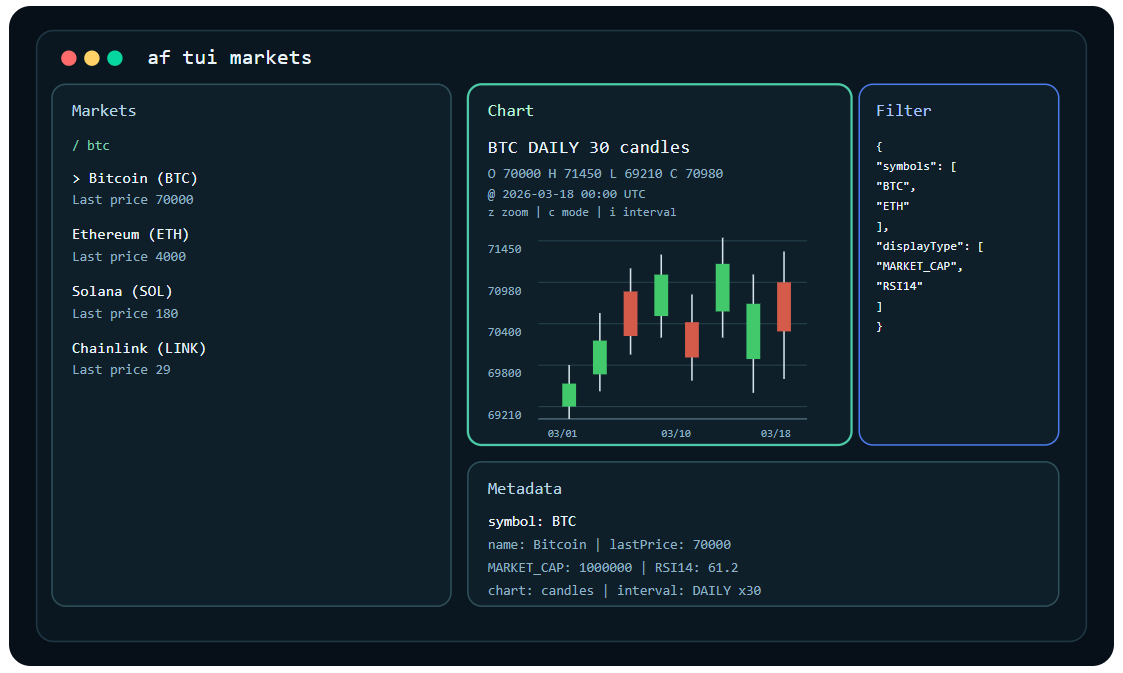
Launch full-screen terminal dashboards for markets, signals, technical analysis, and news with af tui markets, af tui signals, af tui ta, and af tui news. The TUI features real-time OHLC candle charts with green/red bodies, braille fallback for narrow terminal panes, keyboard-driven navigation, and live API pagination.
📡 Trading Signals
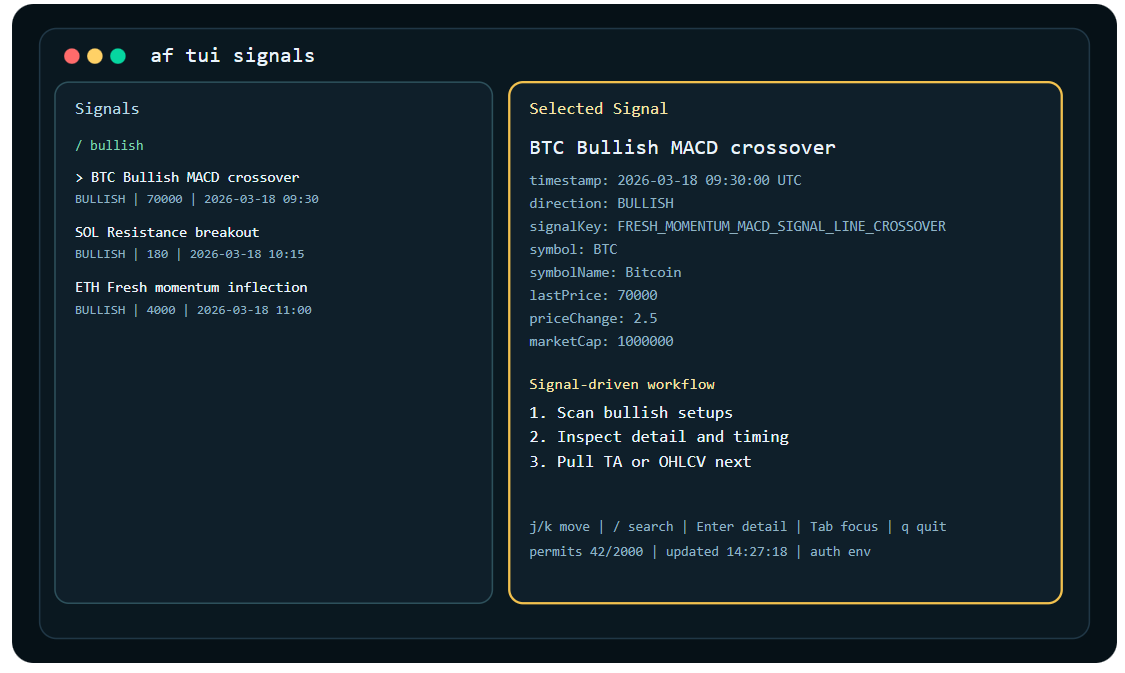
Query bullish and bearish trading signals filtered by symbol, date range, direction, and signal type. Supported signal types include MACD crossovers, RSI divergence, support/resistance breakouts, rising/falling wedge patterns, MACD histogram crossovers, and more. Use af signals keys to enumerate all available signal types.
📊 Market Screener
Screen thousands of coins using advanced filter parameters including RSI, MACD, volume, market cap, coin category, exchange, support/resistance status, ATH distance, and 52-week high proximity. Filters can be passed as CLI flags or as raw JSON bodies using --filter or --stdin-json for complex multi-parameter screens.
📈 OHLCV & Analytics History
Pull historical OHLCV candle data and analytics metrics (RSI, MACD, momentum, and more) for any coin across hourly (HOURS1), 4-hour (HOURS4), and daily (DAILY) intervals. Export directly to CSV with -o csv for immediate use in Excel or Python DataFrames.
🤖 AI Agent–Friendly Design
--dry-run previews the exact API request shape before execution. -o json returns machine-readable output on stdout. af commands -o json provides a full self-documenting command index that agents can use for tool discovery.
📰 Crypto News Feed
Query and filter curated crypto news by date range and source with af news list and retrieve individual articles with af news get. Pipe directly to scripts or view inline in the TUI’s news dashboard.
📦 Single Binary Distribution
No Node.js, Python, Go, or any other runtime required. The CLI ships as a single compiled binary, installable via Homebrew on macOS and Linux in one command, or as a .zip download on Windows. Zero configuration beyond setting your API key.
4. How to Install
View the source on GitHub or get the standalone binary from the GitHub Releases page.
Pick the setup that matches your machine. Homebrew is the recommended path on macOS and Linux. On Windows, the native .zip release is the simplest option.
macOS
Recommended — Homebrew:
# Recommended install
brew install altfins-com/tap/af

# Or with explicit tap
brew tap altfins-com/tap
brew install af

# Verify install
af auth set
af auth status
Linux
Recommended — Homebrew:
brew install altfins-com/tap/afStandalone binary (alternative):
# Choose your architecture:
#   af_*_linux_amd64.tar.gz  — Intel/AMD (most machines)
#   af_*_linux_arm64.tar.gz  — ARM64 (e.g. Raspberry Pi, ARM servers)

tar -xzf af_<version>_linux_amd64.tar.gz
mkdir -p ~/.local/bin
mv af ~/.local/bin/
chmod +x ~/.local/bin/af
💡 PATH note: If ~/.local/bin is not in your PATH, add it to your shell config or move af to /usr/local/bin instead.
Windows
Download af_*_windows_amd64.zip (or af_*_windows_arm64.zip for ARM) from GitHub Releases.
- Download and extract the
.zipfile - Move
af.exeto a folder such asC:\Tools\af\ - Open PowerShell or Windows Terminal in that folder and run:
.\af.exe auth set
.\af.exe auth status
Optionally add C:\Tools\af\ to your system PATH so you can run af from any folder without the .\af.exe prefix.
⚠️ Windows PowerShell tip: When passing inline JSON filter arguments in PowerShell, escape inner double quotes as \". For example: af tui markets --filter '{\"macdFilter\":\"BUY\"}'
5. 60-Second Quickstart
After installing, you’re three commands away from live market data:
# Step 1: Save your altFINS API key
af auth set

# Step 2: Verify auth and check your quota
af auth status
af quota all

# Step 3: Start using the CLI immediately
af markets search --symbols BTC,ETH --display-type MARKET_CAP,RSI14
af signals list --direction BULLISH --from 2026-03-01
af tui markets
If your API key is valid, af quota all gives you an immediate sanity check on your current and monthly permit counts.
📋 Real example output
$ af markets search --symbols BTC,ETH --display-type MARKET_CAP,RSI14

symbol  name       lastPrice  MARKET_CAP   RSI14
──────  ─────────  ─────────  ───────────  ─────
BTC     Bitcoin    70,210     1,385,000M   61.2
ETH     Ethereum   3,980        478,000M   54.7
6. Use Cases
📉 For Traders
Screen for entry setups:
af tui markets --filter '{"macdFilter":"BUY","minimumMarketCapValue":100000000,"displayType":["MARKET_CAP","RSI14","MACD"]}'Hunt fresh bullish signals:
af signals list --direction BULLISH --from 2026-03-01 -o tableTrack coins near 52-week highs:
af tui markets --filter '{"weekAnalytics52Filter":"HIGH_52W_IN_THE_LAST_2DAYS","displayType":["HIGH_52W","PRICE_CHANGE_1W","RSI14"]}'Automate signal alerts with a cron job:
# Run every hour, alert if new MACD crossovers appear
af signals list --direction BULLISH --signals FRESH_MOMENTUM_MACD_SIGNAL_LINE_CROSSOVER -o json | jq '.[] | .symbol'
🔬 For Analysts
Export RSI history to CSV for backtesting:
af analytics history --symbol BTC --type RSI14 --interval DAILY --from 2026-01-01 --to 2026-03-25 -o csv > btc_rsi_daily.csvBenchmark a category:
af tui markets --filter '{"coinCategoryFilter":["AI_BIG_DATA"],"minimumMarketCapValue":50000000,"displayType":["MARKET_CAP","PRICE_CHANGE_1W","RSI14"]}'Load complex research presets from files:
# Save your filter as a JSON file
# filters/rwa-breakout.json
{
  "coinCategoryFilter": ["REAL_WORLD_ASSETS_PROTOCOLS"],
  "supportResistanceFilter": "BROKEN_ABOVE_RESISTANCE",
  "minimumMarketCapValue": 50000000,
  "displayType": ["MARKET_CAP", "RESISTANCE", "PRICE_CHANGE_1M"]
}

af tui markets --filter @filters/rwa-breakout.json
💡 Pro tip: On the Analyst plan (paid), historical data goes back 10+ years. Combined with -o csv export, this makes the CLI a powerful standalone data sourcing tool.
⚙️ For Developers
Preview the exact API request before executing:
ALTFINS_API_KEY=demo-key af markets search --symbols BTC,ETH --display-type MARKET_CAP,RSI14 --dry-run -o jsonEmbed in GitHub Actions:
af signals list --direction BULLISH --from $(date -d "1 hour ago" +%Y-%m-%dT%H:%M:%SZ) -o json | jq 'length > 0'Generate a command index:
af commands -o json | jq '.[].command'🤖 For AI Agents
Agent self-discovery:
af commands -o jsonContext injection — fresh market data at prompt time:
af markets search --symbols BTC,ETH --display-type MARKET_CAP,RSI14,MACD -o json💡 Agent best practice: Always run af commands -o json once during agent initialization. Use --dry-run to inspect calls before executing — prevents wasting API credits on malformed requests.
7. Interactive TUI
The TUI (Terminal User Interface) provides full-screen, keyboard-driven dashboards for four data views:
af tui markets   # Full market screener with candle charts
af tui signals   # Trading signals with detail view
af tui ta        # Technical analysis summaries
af tui news      # Curated crypto news feed
Keyboard Controls
| Key | Action |
|---|---|
j / k or arrow keys |
Move selection up / down |
/ |
Filter loaded rows (local search only) |
n |
Load next API page |
p |
Jump to previous page |
Enter |
Open detail view (candle chart + data) |
Esc |
Return to list view |
f |
Toggle filter drawer (shows active API filter JSON) |
z |
Toggle chart zoom mode |
c |
Toggle between OHLC candles and braille chart |
i |
Cycle chart interval (1h → 4h → 1d) |
r |
Refresh data with same filter |
q |
Quit |
Pre-seeding the TUI with Filters
Simple symbol filter:
af tui markets --symbol BTC
af tui ta --symbol SOL
Inline JSON filter:
af tui markets --filter '{"symbols":["BTC","ETH"],"signalDirection":"BULLISH"}'
af tui signals --filter '{"symbols":["BTC"],"signalDirection":"BULLISH"}'
Load from a JSON file:
af tui markets --filter @filters/breakout.jsonPipe from stdin:
printf '%s' '{"symbols":["BTC"],"signalDirection":"BULLISH"}' | af tui signals --stdin-jsonUseful Filter Examples
# AI & Big Data sector — bullish MACD, min $50M market cap
'{"coinCategoryFilter":["AI_BIG_DATA"],"macdFilter":"BUY","minimumMarketCapValue":50000000,"displayType":["MARKET_CAP","RSI14","MACD"]}'

# Support/resistance breakout — last 3 candles
'{"supportResistanceFilter":"BROKEN_ABOVE_RESISTANCE","supportResistanceLookBackIntervals":"3","displayType":["RESISTANCE","SUPPORT","RSI14"]}'

# 4h chart — MACD histogram rising
'{"timeInterval":"HOURS4","macdHistogramFilter":"H1_UP","displayType":["MACD","MACD_SIGNAL_LINE","MACD_HISTOGRAM"]}'

# RSI divergence + new high in last 10 periods
'{"rsiDivergenceFilter":"BULLISH","newHighInLastPeriodFilter":"PERIODS_10","displayType":["RSI14","RSI_DIVERGENCE","PRICE_CHANGE_1W"]}'

# Coins within 15% of all-time high
'{"percentDownFromAthFilter":"PRICE_AT_LEAST_15_PERCENT_MORE_ATH","displayType":["ATH","PRICE_CHANGE_1M","RSI14"]}'

# Real World Assets — near 52-week high
'{"coinCategoryFilter":["REAL_WORLD_ASSETS_PROTOCOLS"],"weekAnalytics52Filter":"HIGH_52W_IN_THE_LAST_2DAYS","minimumMarketCapValue":50000000}'
💡 Press f to see the active API filter JSON. Press / to search over already-loaded rows — this is local only and does not make a new API call.
8. Common Workflows
Screen the market
# List available display columns
af markets fields

# Search with specific metrics
af markets search --symbols BTC,ETH,SOL --display-type MARKET_CAP,RSI14,MACD
Pull historical analytics
# List available analytics types
af analytics types

# Fetch RSI14 daily history for BTC
af analytics history --symbol BTC --type RSI14 --interval DAILY --from 2026-03-01 --to 2026-03-25
Retrieve OHLCV data
# Current snapshot
af ohlcv snapshot --symbols BTC,ETH --interval DAILY

# Historical candles with date range
af ohlcv history --symbol BTC --interval DAILY --from 2026-03-01 --to 2026-03-25
Explore reference data
af refs symbols       # All supported coin symbols
af refs intervals     # Valid time interval constants
af signals keys       # All available signal types
af analytics types    # All analytics metric types
Export to CSV for Python
af analytics history --symbol BTC --type RSI14 --interval DAILY --from 2026-01-01 -o csv > btc_rsi.csv

# Then in Python:
# import pandas as pd
# df = pd.read_csv('btc_rsi.csv')
9. Command Reference
All commands follow one of two patterns: reference catalogs (e.g. af refs symbols) or paged search endpoints (e.g. af markets search).
Full Command Index
| Command | Description |
|---|---|
af auth set |
Save your altFINS API key securely |
af auth status |
Verify the API key is configured and valid |
af quota all |
Check current API permit usage against monthly limit |
af markets search |
Screen coins with filters (RSI, MACD, volume, category…) |
af markets fields |
List all available --display-type column names |
af signals list |
Query trading signals by direction, date range, type |
af signals keys |
Enumerate all supported signal type keys |
af ta list |
Get technical analysis summary for a coin |
af analytics history |
Historical RSI, MACD, momentum, and more by date range |
af analytics types |
List all available analytics metric types |
af ohlcv snapshot |
Current OHLCV candle for one or more symbols |
af ohlcv history |
Historical OHLCV candles with date range filter |
af news list |
Curated crypto news feed filtered by date range |
af news get |
Get a single news item by message ID and source ID |
af refs symbols |
Reference catalog of all supported coin symbols |
af refs intervals |
Valid time interval constants (HOURS1, HOURS4, DAILY) |
af tui markets |
Launch interactive full-screen market dashboard |
af tui signals |
Launch interactive signals view with chart detail |
af tui ta |
Launch interactive technical analysis dashboard |
af tui news |
Launch interactive news feed view |
af commands -o json |
Full command index as JSON — for AI agent tool discovery |
Global Output & Pagination Flags
| Flag | Values | Description |
|---|---|---|
-o |
table json jsonl csv |
Output format. Default is table. |
--page |
integer | Zero-based API page index |
--size |
integer | Results per page |
--sort |
field,ASC / field,DESC |
Sort expression (e.g. timestamp,DESC) |
--fields |
comma-separated | Keep only selected output columns |
--dry-run |
flag | Preview API request without executing it |
--filter |
JSON string or @file.json |
Inline JSON filter body or path to JSON file |
--stdin-json |
flag | Read filter JSON body from stdin |
10. API Plans & Limits
All core CLI features — TUI, signals, screener, OHLCV, news, and analytics — are available on the free Demo key. Paid plans unlock higher rate limits, more historical data, and advanced features like WebSocket streaming and top gainers/losers.
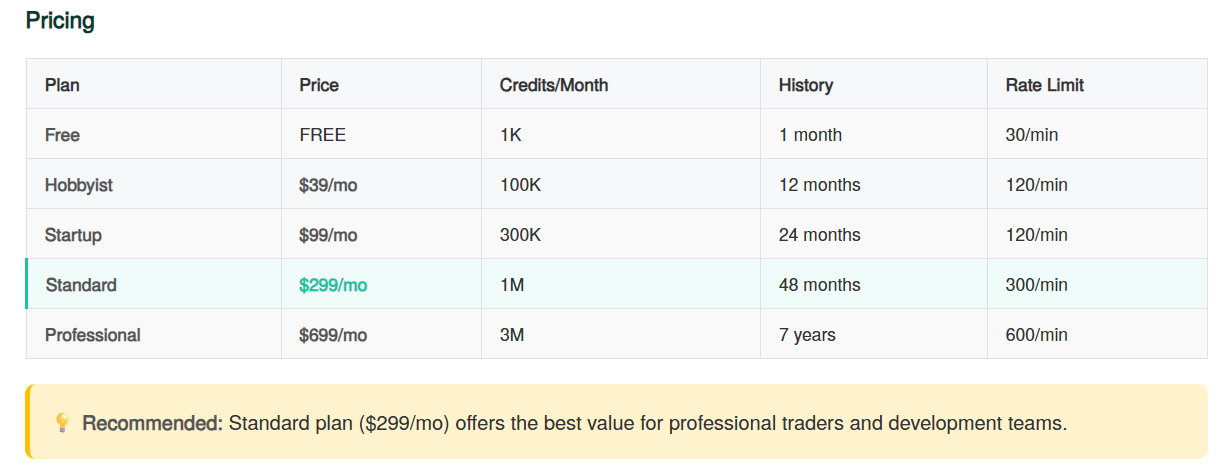
See the altFINS API pricing page for full plan details.
11. Frequently Asked Questions
Do I need to install Node.js, Python, or Go to use the CLI?
No. The altFINS CLI is a single compiled Go binary. There is no runtime, interpreter, or language toolchain required. Download it, make it executable, and it runs immediately.
Where do I get an API key?
Sign up on altFINS.com and create API Key here. A free Demo key is available with no credit card required. It supports 1,000 monthly credits and 30 calls per minute — enough to explore all CLI features.
How do I update the CLI?
On macOS and Linux with Homebrew, run:
brew upgrade altfins-com/tap/afOn Windows, download the latest release from GitHub Releases and replace your existing af.exe.
Can I use the CLI without a paid plan?
Yes. The free Basic Plan supports almost the full CLI feature set — TUI, signals, market screener, OHLCV, and news — with 1,000 monthly credits and 30 calls per minute. Paid plans unlock higher rate limits, longer historical data depth, and advanced endpoints like technical analysis.
Does the CLI work on Windows Subsystem for Linux (WSL)?
Yes. If you already use WSL with Ubuntu or another Linux distribution, you can install af via Homebrew inside the WSL environment. Note that this installs the Linux binary inside WSL — it will not be available as a native Windows command in PowerShell or Command Prompt.
What output formats does the CLI support?
All paged data commands support four output formats via the -o flag:
table(default) — Human-readable aligned columns, ideal for terminal reviewjson— JSON array, one object per result set — ideal for scripting and APIsjsonl— Newline-delimited JSON, one object per line — ideal for streaming pipelinescsv— Comma-separated values — ideal for Excel, pandas, or R
Is the CLI open source?
The source code and GitHub Releases are available at github.com/altfins-com.
How does the --filter flag work with the TUI?
When you pass --filter to a TUI command, the JSON body is sent as the initial API request that populates the view. Once the TUI is open, press f to see the active filter JSON at any time. Note that / inside the TUI is a local search over already-loaded rows — it does not make a new API call. CLI flags (like --symbol) take precedence over the JSON filter body if both set the same field.
The crypto market never sleeps. Neither should your analysis.
Get a free API key and start using the altFINS CLI in under 60 seconds.