altFINS CLI
1. What is altFINS CLI
Terminal-native crypto market intelligence for traders, analysts, and AI agents.
af gives you fast access to altFINS market data, analytics, signals, news, and a full-screen TUI without asking you to install a language toolchain or wire up your own API client.
2. Features
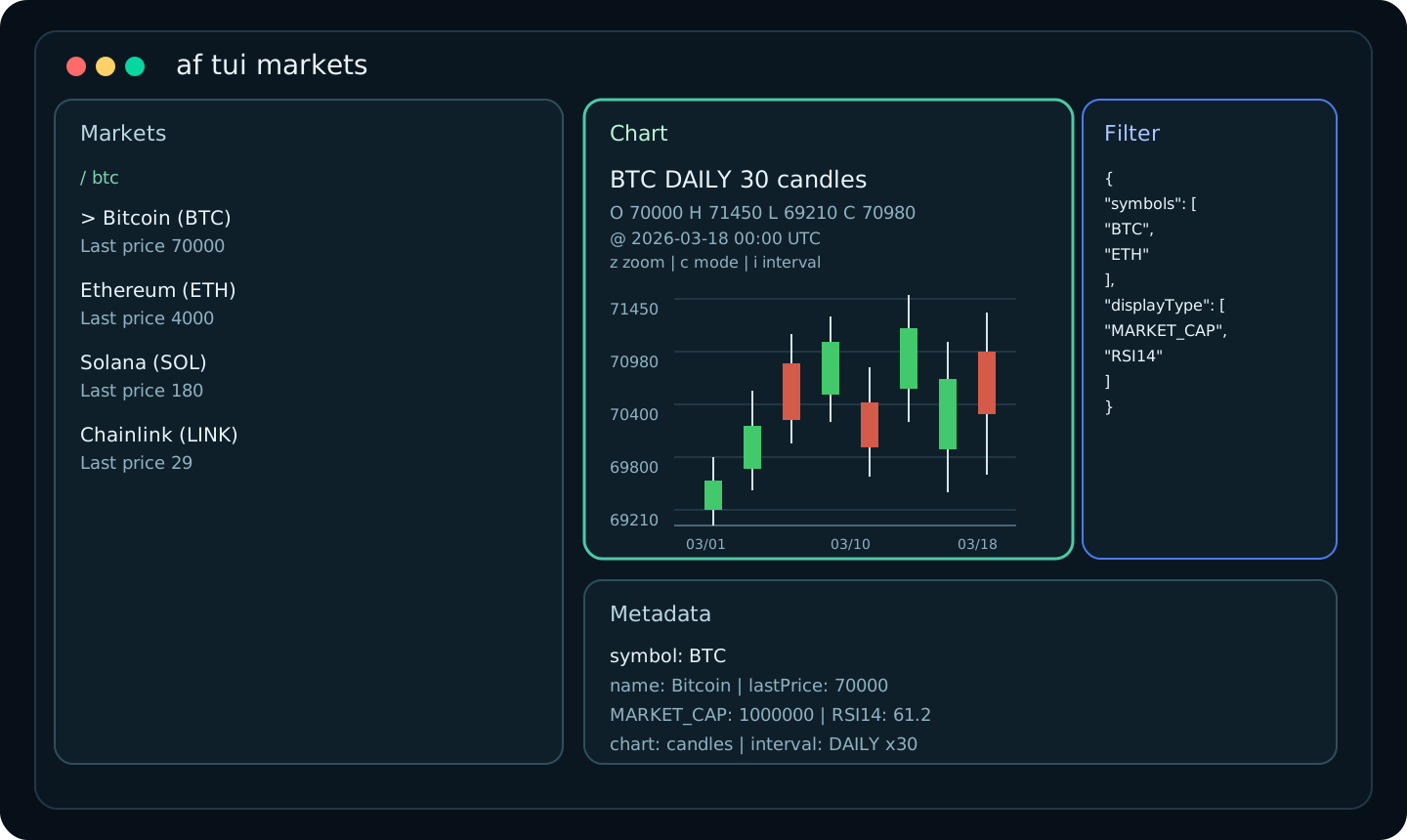
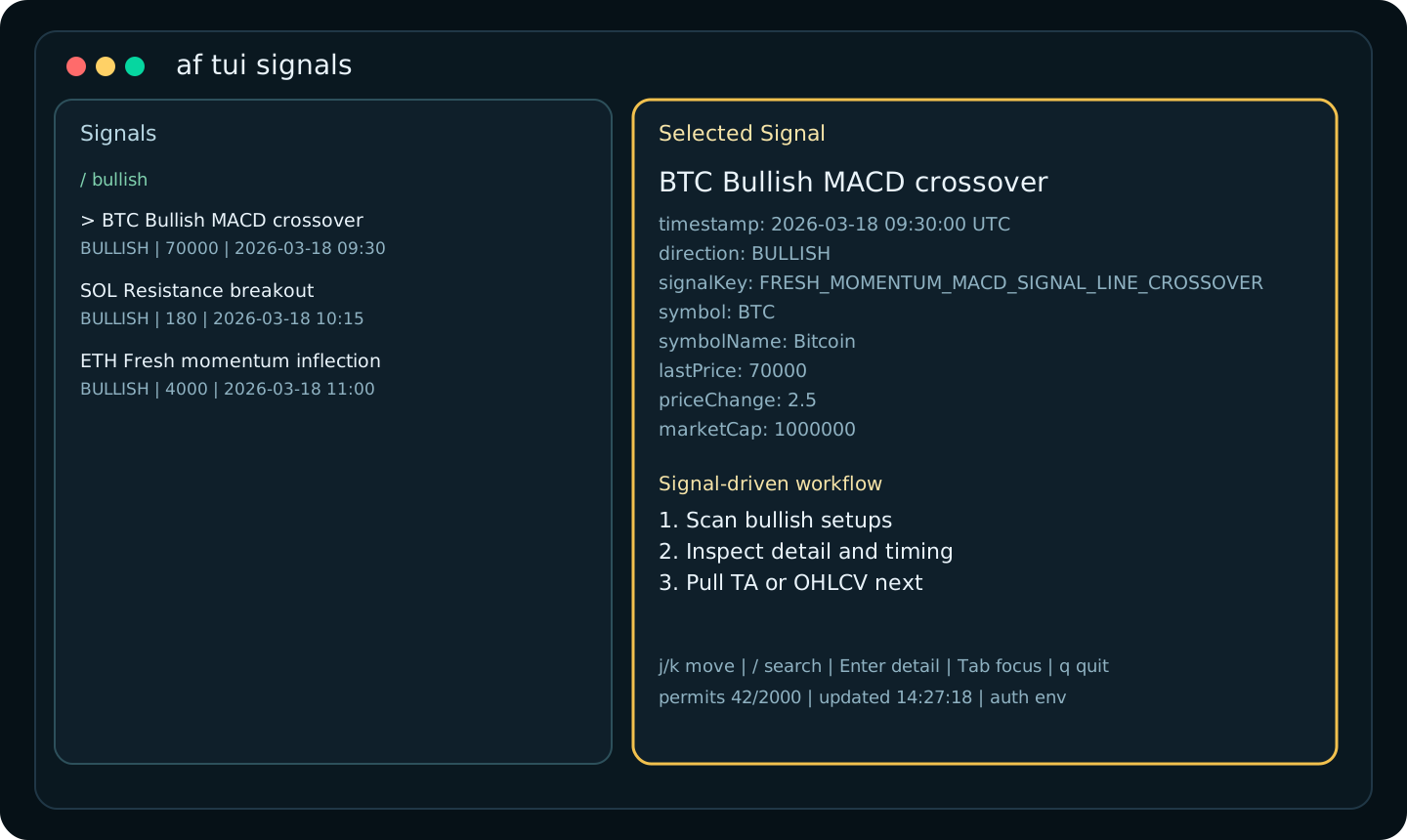
- Interactive TUI for markets, signals, technical analysis, and news
- Candle-first OHLC charts with green/red bodies and braille fallback for tight panes
- Machine-readable
json,jsonl, andcsvoutput for scripts and pipelines --dry-runrequest previews with redacted auth headersaf commands -o jsonfor agent and LLM self-discovery- Reference data for symbols, intervals, field types, and signal keys
- Historical analytics and OHLCV endpoints exposed as clean CLI workflows
- Single binary distribution with Homebrew-first installation
3. Download
View the source on GitHub or get the standalone binary from the GitHub Releases page.
4. Install
Pick the setup that matches your machine. Homebrew is the recommended path on macOS and Linux. On Windows, the simplest path is the native .zip release, with WSL + Homebrew as an optional setup for users who already work inside Linux terminals.
4.1 macOS
Recommended install:
brew install altfins-com/tap/af
If you prefer the explicit tap flow:
brew tap altfins-com/tap
brew install af
Then verify the install:
af auth set
af auth status
4.2 Linux
Recommended install:
brew install altfins-com/tap/af
Then verify the install:
af auth set
af auth status
If you prefer a standalone binary, download the latest release from GitHub Releases.
Choose:
af_*_linux_amd64.tar.gzfor most Intel/AMD Linux machinesaf_*_linux_arm64.tar.gzfor ARM64 Linux machines
Example install into ~/.local/bin:
tar -xzf af_<version>_linux_amd64.tar.gz
mkdir -p ~/.local/bin
mv af ~/.local/bin/
chmod +x ~/.local/bin/af
If ~/.local/bin is not in your PATH, add it or move af into a directory that already is, such as /usr/local/bin.
4.3 Windows
For most Windows users, the easiest path is the native .zip release from GitHub Releases.
Choose:
af_*_windows_amd64.zipfor most Windows laptops and desktopsaf_*_windows_arm64.zipfor Windows on ARM devices
If you are not sure, start with af_*_windows_amd64.zip.
Simple setup:
- Download the
.zipfile for your system. - Extract it.
- Move
af.exeinto a folder such asC:\Tools\af\. - Open PowerShell or Windows Terminal in that folder.
- Run:
.\af.exe auth set
.\af.exe auth status
Optional: add C:\Tools\af\ to your PATH so you can run af from any folder without typing .\af.exe.
No extra runtime or language install is required.
Optional: WSL + Homebrew
If you already use Windows Subsystem for Linux and prefer working inside Ubuntu or another Linux shell, you can install af there with Homebrew:
brew install altfins-com/tap/af
af auth set
af auth status
This installs af inside your WSL environment, not as a native Windows af.exe command for PowerShell or Command Prompt.
5. 60-Second Quickstart
- Save your altFINS API key:
af auth set
- Verify that auth is configured:
af auth status
af quota all
- Start using the CLI immediately:
af markets search --symbols BTC,ETH --display-type MARKET_CAP,RSI14
af signals list --direction BULLISH --from 2026-03-01
af tui markets
6. Real CLI Snippets
6.1 Auth and First Check
af auth set
af auth status
af quota all
If your API key is valid, af quota all gives you an immediate sanity check against your current and monthly permit counts.
6.2 Agent-Friendly Dry Run
Preview the exact request shape before you execute a live query:
ALTFINS_API_KEY=demo-key af markets search \
  --symbols BTC,ETH \
  --display-type MARKET_CAP,RSI14 \
  --dry-run -o json
{
  "method": "POST",
  "url": "https://altfins.com/api/v2/public/screener-data/search-requests",
  "body": {
    "displayType": ["MARKET_CAP", "RSI14"],
    "symbols": ["BTC", "ETH"]
  },
  "headers": {
    "Accept": "application/json",
    "Content-Type": "application/json",
    "X-Api-Key": "redacted"
  },
  "authSource": "env"
}
6.3 Typical Table Workflow
Use the screener like a terminal-native market scanner:
af markets search --symbols BTC,ETH --display-type MARKET_CAP,RSI14
symbol  name      lastPrice  MARKET_CAP  RSI14
BTC     Bitcoin   70000      1000000     61.2
ETH     Ethereum  4000       500000      57.8
6.4 Signal Hunting
af signals list --direction BULLISH --from 2026-03-01
af signals keys
timestamp              symbol  symbolName  direction  signalKey                      signalName
2026-03-18T09:30:00Z   BTC     Bitcoin     BULLISH    FRESH_MOMENTUM_MACD_SIGNAL...  Bullish MACD crossover
2026-03-18T10:15:00Z   SOL     Solana      BULLISH    SUPPORT_RESISTANCE_BREAKOUT     Resistance breakout
6.5 Technical Analysis and News
af ta list --symbol SOL
af news list --from 2026-03-01
af news get --message-id 12345 --source-id 12
7. TUI Experience
Launch any of the full-screen terminal views:
af tui markets
af tui signals
af tui ta
af tui news
Keyboard controls:
j / k or arrows  Move selection
/                Filter the current list
n                Load the next API page
p                Jump to the previous loaded API page
Enter            Open detail mode
Esc              Return to the list
Tab              Switch focus
f                Toggle filter drawer
z                Toggle chart zoom
c                Toggle candles/braille
i                Cycle chart interval
r                Refresh data
q                Quit
The f drawer shows the active API filter that was used to start the TUI. It is not an in-place form editor. Use / for local search over already loaded rows, and use --symbol, --filter, or --stdin-json when launching the TUI to seed API-side filters.
7.1 Start TUI With Filters
Seed the TUI with a simple symbol filter:
af tui markets --symbol BTC
af tui ta --symbol SOL
Pass inline JSON as the initial API filter:
af tui markets --filter '{"symbols":["BTC","ETH"],"displayType":["MARKET_CAP","RSI14"]}'
af tui signals --filter '{"symbols":["BTC"],"signalDirection":"BULLISH"}'
Use the raw API field names in these JSON bodies, such as timeInterval, signalDirection, fromDate, and toDate.
Windows note: if you paste these JSON examples into a Windows shell that expects double-quoted arguments, escape inner double quotes as \".
More inline filter ideas:
af tui markets --filter '{"symbols":["BTC","ETH","SOL"],"timeInterval":"DAILY","displayType":["MARKET_CAP","RSI14","MACD"]}'
af tui markets --filter '{"timeInterval":"HOURS4","macdFilter":"BUY","minimumMarketCapValue":100000000,"displayType":["MARKET_CAP","MACD","MACD_SIGNAL_LINE"]}'
af tui markets --filter '{"supportResistanceFilter":"BROKEN_ABOVE_RESISTANCE","supportResistanceLookBackIntervals":"3","displayType":["RESISTANCE","SUPPORT","RSI14"]}'
af tui markets --filter '{"coinTypeFilter":"REGULAR","coinCategoryFilter":["AI_BIG_DATA"],"displayType":["MARKET_CAP","PRICE_CHANGE_1W","RSI14"]}'
af tui markets --filter '{"coinCategoryFilter":["REAL_WORLD_ASSETS_PROTOCOLS"],"minimumMarketCapValue":50000000,"displayType":["MARKET_CAP","PRICE_CHANGE_1M","VOLUME_RELATIVE"]}'
af tui markets --filter '{"tradingTypeFilter":["SPOT"],"exchangeFilter":["BINANCE","COINBASE"],"displayType":["MARKET_CAP","VOLUME","VOLUME_RELATIVE"]}'
af tui markets --filter '{"percentDownFromAthFilter":"PRICE_AT_LEAST_15_PERCENT_MORE_ATH","displayType":["ATH","PRICE_CHANGE_1M","RSI14"]}'
af tui markets --filter '{"weekAnalytics52Filter":"HIGH_52W_IN_THE_LAST_2DAYS","displayType":["HIGH_52W","PRICE_CHANGE_1W","MOM"]}'
af tui markets --filter '{"rsiDivergenceFilter":"BULLISH","newHighInLastPeriodFilter":"PERIODS_10","displayType":["RSI14","RSI_DIVERGENCE","PRICE_CHANGE_1W"]}'
af tui markets --filter '{"macdHistogramFilter":"H1_UP","displayType":["MACD","MACD_SIGNAL_LINE","MACD_HISTOGRAM"]}'
af tui signals --filter '{"symbols":["BTC","ETH"],"signalDirection":"BULLISH","fromDate":"2026-03-01T00:00:00Z"}'
af tui signals --filter '{"signals":["SIGNALS_SUMMARY_RISING_WEDGE"],"signalDirection":"BEARISH","fromDate":"2026-03-01T00:00:00Z","toDate":"2026-03-19T00:00:00Z"}'
af tui news --filter '{"fromDate":"2026-03-01T00:00:00Z","toDate":"2026-03-19T00:00:00Z"}'
Load the initial filter from a JSON file:
af tui markets --filter @filters/breakout.json
Or pipe the filter JSON in through stdin:
printf '%s' '{"symbols":["BTC"],"signalDirection":"BULLISH"}' | af tui signals --stdin-json
Once the TUI is open:
fshows the active filter JSON used for API requests/searches only the rows that are already loaded into the listrrefreshes using the same starting filter
The current TUI layout includes:
- A left-side browser for lists and search
- Real API pagination with lazy loading as you approach the end of loaded rows
- Explicit next/previous API page actions for faster navigation through large result sets
- Local
/search over loaded rows only, with loaded/total counters in the footer - A chart-first detail pane for markets, signals, and technical analysis
- Green/red OHLC candles with a braille fallback when the pane is narrow
- A dedicated chart zoom mode for the selected asset
- Interval cycling between hourly, 4-hour, and daily presets inside the TUI
- Active filter visibility
- Permit counts in the footer
Example candle-style detail:
BTC  DAILY  30 candles
O 70000  H 71450  L 69210  C 70980  @ 2026-03-18 00:00 UTC

71450 ┤          │ █
70980 ┤      █   │██
70500 ┤    ████  ███
70000 ┤  ███████ ███
69600 ┤ ██ │ ████ │
69210 ┤ │  │  ██  │
      └────────────────
        03/01   03/10   03/18
Example pagination status:
loaded 150/1248 | api page 3/25 | searching loaded rows only
8. Common Workflows
8.1 Screen the market
af markets fields
af markets search --symbols BTC,ETH,SOL --display-type MARKET_CAP,RSI14,MACD
8.2 Pull historical analytics
af analytics types
af analytics history --symbol BTC --type RSI14 --interval DAILY --from 2026-03-01 --to 2026-03-18
8.3 Retrieve OHLCV data
af ohlcv snapshot --symbols BTC,ETH --interval DAILY
af ohlcv history --symbol BTC --interval DAILY --from 2026-03-01 --to 2026-03-18
8.4 Explore reference data
af refs symbols
af refs intervals
af signals keys
af analytics types
9. AI and LLM Friendly by Design
Use af as a terminal tool for agents, evals, workflows, and prompt-time retrieval:
af commands -o json
af markets search --symbols BTC,ETH --display-type MARKET_CAP,RSI14 -o json
af signals list --direction BULLISH --from 2026-03-01 -o json
Example command metadata:
af commands -o json | sed -n '1,20p'
{
  "command": "af",
  "use": "af",
  "short": "altFINS CLI for market data, signals, analytics, and TUI workflows",
  "flags": [
    {
      "name": "dry-run",
      "type": "bool",
      "usage": "Show the API request without executing it"
    }
  ]
}
Why this matters:
- JSON output stays machine-readable on stdout
- dry runs expose endpoint and request body shape before execution
af commandsgives agents a self-documenting command index- one binary is easier to drop into local tools, shells, and CI jobs
10. Search Guide
Most af data commands follow one of two patterns:
- Reference catalogs:
af refs symbols,af refs intervals,af analytics types,af markets fields,af signals keys - Paged search and history endpoints:
af markets search,af signals list,af news list,af analytics history,af ohlcv history,af ta list
All paged endpoints support the same core pagination and output controls:
--pagefor the zero-based API page index--sizefor the page size--sortfor repeatable sort expressions such astimestamp,DESC-o table|json|jsonl|csvfor output format--fieldsto keep only selected output columns
Simple flag-first search examples:
af markets search --symbols BTC,ETH,SOL --interval DAILY --display-type MARKET_CAP,RSI14,MACD
af signals list --direction BULLISH --signals FRESH_MOMENTUM_MACD_SIGNAL_LINE_CROSSOVER --from 2026-03-01
af analytics history --symbol BTC --type RSI14 --interval DAILY --from 2026-03-01 --to 2026-03-18
af news list --from 2026-03-01 --page 0 --size 50
For advanced screener searches, send the raw JSON request body with --filter or --stdin-json:
af markets search --filter @filters/breakout.json
cat filters/breakout.json | af markets search --stdin-json
The same pattern also works for TUI entrypoints when you want the screen to open with a preloaded API filter:
af tui markets --filter @filters/breakout.json
printf '%s' '{"symbols":["BTC"],"signalDirection":"BULLISH"}' | af tui signals --stdin-json
Example screener body:
{
  "coinTypeFilter": "REGULAR",
  "tradingTypeFilter": ["SPOT"],
  "supportResistanceFilter": "BROKEN_ABOVE_RESISTANCE",
  "supportResistanceLookBackIntervals": "3",
  "macdFilter": "BUY",
  "minimumMarketCapValue": 10000000
}
How merging works:
--filteraccepts inline JSON or@path/to/file.json--stdin-jsonreads the JSON body from stdin- explicit CLI flags are applied after the JSON body is loaded, so flags win if both set the same field
- in TUI commands,
fshows that starting filter and/remains a local search over loaded rows
The screener request body supports these advanced filter arrays:
numericFilterssignalFilterscrossAnalyticFilterscandlestickPatternFiltersanalyticsComparisonsFilters
Each of those arrays uses AND logic across multiple filter objects according to the vendored OpenAPI schema.
In the TUI, / is a local search over the currently loaded rows. It is not a remote API search.
For more informations go to project GitHub